Overview
What is WAV-MP3-Converter?
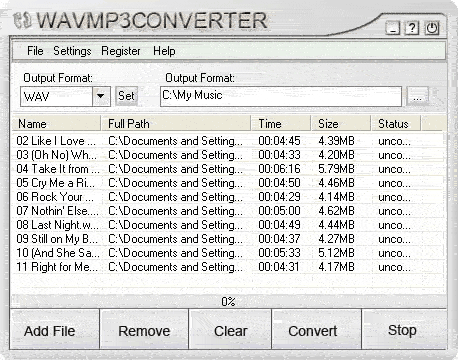
WAV MP3 Converter supports batch conversion between MP3, WAV, WMA and OGG. WAV MP3 Converter converts the audio files digitally-not through the soundcard-which enables you to make perfect copies of the originals, without temporary files produced.
In depth
A closer look at WAV-MP3-Converter
To reduce the size of your WAV files? To convert your MP3, WMA and OGG files to CD quality WAV files for burning your own CD? Just use our WAV MP3 Converter. WAV MP3 Converter supports batch conversion between MP3, WAV, WMA and OGG. You can convert your MP3, WMA and OGG files to CD quality WAV files for burning your audio CD(Assuming you have a CD-R). You can convert your WAV, WMA and OGG files to MP3 files for listening the songs with your MP3 Player. WAV MP3 Converter converts the audio files digitally-not through the soundcard-which enables you to make perfect copies of the originals. Convert from one to another directly and on-the-fly (without temporary files produced). WAV MP3 Converter has user-friendly-interface and converting your files is just a button click away. You'll be an experter in no time! Run stably on Windows 98/NT/Me/2K/XP/2003.
Requirements
System requirements
Pentium 166,32 MB of RAM
Verdict
Should you download WAV-MP3-Converter?
WAV-MP3-Converter runs on
Windows 10/11
and is available under the
Shareware
license
— the installer is 2938 KB.
We’ve catalogued it under
Utilities and Tools.
✓
Verified clean. Every WAV-MP3-Converter build on SoftLookup is scanned for viruses, spyware, adware, trojans and backdoors. We re-test on every update.
Sponsored
At a glance
WAV-MP3-Converter specifications
- Last updated
- Mar 1, 2025
- Requirements
- Pentium 166,32 MB of RAM
- License
- Shareware
- Operating system
- Windows 10/11
- File size
- 2938 KB
- Price
- $19.95
- Page views
- 475
Help fellow users decide. Share your experience with WAV-MP3-Converter.