Web based School
Programming with the Microsoft ActiveX Conferencing APIs |
 |
 |
Chapter 14Programming with the Microsoft ActiveX Conferencing APIs
OverviewThe Internet has made way for new kinds of
communications. The goal is to always make communication as simple as possible, but
flexible and full of features. The Microsoft ActiveX Conferencing API is a great new tool
because it allows people to participate in conference calls and meetings over their
computers. The GoalThe goal of Microsoft ActiveX Conferencing APIs is
to allow real-time voice and data communications, application sharing, file-transferring,
whiteboard usage (a computer equivalent of using a whiteboard or chalk board in a
meeting), and text-based chats. This functionality is nothing new. Each piece or several
pieces of Microsoft's ActiveX Conferencing APIs are currently bundled in software by
vendors (Microsoft being one of them). You might be wondering why software vendors don't
create a single application instead of using one component of Microsoft's ActiveX
Conferencing APIs to accomplish one goal; why not create a single application?
Unfortunately, applications require a great deal of vendor money and resources, and are
often out-dated six months after their release. Many problems related to what I call shrink-wrap
software are solved with component software. To make this component software
"Internet aware," it must be an Active X product. The StandardThe Microsoft ActiveX Conferencing API and control
are based on communications standards governed by an international committee. Many
companies are trying to conform to this standard when creating their applications, which
means that any other product that conforms to the same standard should be compatible with
their product. The Microsoft ActiveX Conferencing API and control are based on standards
passed by the International Telecommunications Union (formerly CCITT). The TechnologyUnderlying conferencing technology are the party
host and the party members. The party host manages the party members joining or
leaving the conference, and manages how information is transferred to each party member.
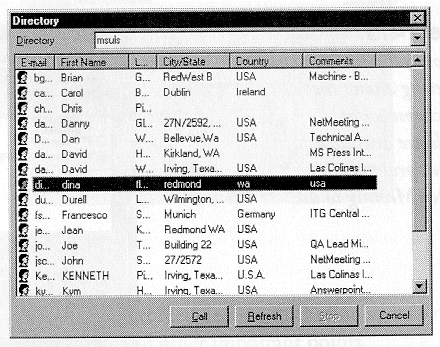
The party host can be a locator service that lists all people that you can connect with
(see Figure 14.6 for an example), or a party host can be you calling your business
associate in another town (you would be the party host). An example of this technology is
a chat service. Most chat servers operate either as an open room, where anyone can join
the discussion, or a private room, where one member specifically invites a newcomer.
Everything is centrally managed by the chat server, but made available to anyone that
joins. Microsoft NetMeetingThe NetConference APIs and Active X control assume
that central host management is handled by another party, namely Microsoft NetMeeting (see
Figure 14.1 for user interface of NetMeeting). NetMeeting is the central host and keeps
track of who is available to be called or conferenced (see Figure 14.6 for NetMeeting's
directory list). NetConference will not install without NetMeeting. Both products are in
beta stage as of this writing. NetMeeting has a locator service that sits on a server
(probably not your machine). When you install NetMeeting, tell it who and where you are
(see Figure 14.5). If you leave your NetMeeting software running in the background, your
software lets you know when someone calls you (see Figure 14.2). NetMeeting keeps a list
of all NetMeeting users, and acts as an address guide that contains NetMeeting contacts.
Also, you need NetMeeting because NetConferencing has no way to make a direct connection
to necessary protocols. NetConferencing passes requests to NetMeeting, and NetMeeting, in
turn, passes the information to the protocols (see Figure 14.3). NetMeeting also allows
you to configure audio and compression (see Figure 14.4). It appears that the next release
of NetConferening will not require the use of NetMeeting. Figure 14.1. NetMeeting
main user interface. Figure 14.4. The Audio and
Compression properties of NetMeeting. Figure 14.6. This is the
directory service listing in NetMeeting. So if you don't need NetConferencing to manage the
host activities, what do you need it for? Simply put, NetConferencing gives you the
functionality of one of the members of a conference. And what can a member do? A member
can:
Let's Get StartedThere's a lot to cover about NetConferencing and
NetMeeting, including system requirements, the functions in the API, coding issues and
other important points. System RequirementsNetConferencing and NetMeeting should work on
Windows 95 and Windows NT. At the time of this writing, both products were in beta and
only supported on Windows 95. You can get Microsoft NetMeeting and Microsoft NetConference
at http://www.microsoft.com/intdev/,which
is the Internet Developer page on the Microsoft site. Install the NetMeeting software
before installing the NetConference SDK. The Functions in the APIThe functions of the API are few at this time, but
you can expect more functionality as this product grows. The entire list of APIs follows:
Before You Get StartedYou might have noticed that some of the functions
have management qualities, such as being able to terminate a conference. How is that
possible without a central host? There are three scenarios
Assume the last person to join the conference
terminates the call. Because he was the last person to join the conference, no other
callers or nodes depend on him for their connection. That means there are no side effects
from terminating the call. The middle person, on the other hand, has callers
dependent on him. If he terminates, callers that joined after him are terminated by
default. If the first caller terminates, the entire
conference is shut down. This seems like a steep condition for a conference call, but it
does follow the standard. The standard does allow for the "splitting" of
conferences into two, but that is beyond the scope of this chapter. So now you see why a permanent host is necessary: so
the conference never dies. People can join and leave without terminating the conference or
being dependent on each other to join. There are also the concepts of broadcasting and
personal connections to other members of the conference. I might want to send my status to
my boss only, or I might want to send the network traffic report to everyone in the
conference. When sending data or a file, you must specify whether you want the entire
conference to receive it, or whether you want an individual member of the conference to
receive it. Let's Get To CodingTo use this Conferencing API, include the windows.h
and msconf.h header files. You must include the windows.h header file so you can share
your applications window; you'll need to be able to pass the window handle.Make sure that
msconf.lib is in the path (for library files) for your compiler. The msconf.h and
msconf.lib are included in the NetConference SDK (software development kit). The windows.h
file should be in your c:\msdev\include directory if you are using Microsoft Visual C++
4.2. If you don't include the header file or library, NetConferencing will dynamically
link to any NetMeeting functionality it needs. Your header files should look something
like Listing 14.1. Listing 14.2 is the implementation code for a simple application that
connects to a computer, and then disconnects.
Listing 14.1. Use netconf.h to create header
file. Listing 14.2. Use netconf.cpp to create codefile
to connect. The function ConferenceConnect has the parameters
shown in Table 14.1.
Table 14.1. DWORD WINAPI
ConferenceConnect
Notice that I left the fourth parameter (CONFNOTIFY
* lpConfNotify) as NULL, instead of passing a CONFNOTIFY pointer because callback
information isn't necessary at this time. So what do you put in these new data types? The
HCONF is a handle to a conference. There can be more than one conference, each identified
by its handle, which makes it easy to get to each conference. What is actually inside this
variable is not very interesting; it is only important that the other conferencing
functions recognize this handle. The conference address (CONFADDR * lpConfAddr) for
the machine is a structure that has a DWORD for the total size of the structure, and a
union. The union contains one of two members: the IP address or a character string of the
computer name. Which member of the union is used depends on where the union member is
assigned (see Table 14.2): Table 14.2. Assignments and
resulting union members.
For a local network, the CONF_ADDR_MACHINENAME
computer name(dinaf, for instance) is probably sufficient.
The status code CONFERR_SUCCESS means the function
successfully completed its task. Check for this return code on each NetConferencing
function. The rest of the return codes appear in Table 14.3. In this table, the word object
refers to a file, application or other item. It does not refer to an Active X object. Table 14.3. NetConferencing
function return codes.
Now that you can connect, let's get information
about the conference. Listing 14.3 adds to the code that allows you to connect to a
conference. Listing 14.3. Use netconf.cpp to create codefile
to connect to and get information about a conference.
#include "include netconf.h"
void main()
{
 HCONF hconf;
 CONFADDR confAddr;
 CONFINFO confInfo;
if(CONFERR_SUCCESS == ConferenceConnect(&hconf,
&confAddr, &confInfo, NULL))
{
 if(CONFERR_SUCCESS == ConferenceDisconnect(hconf))
 {
 cout << _T("Connection disconnected successfully") << endl;
 DWORD dwCode;
 VOID vRequestedInfo;
 if(CONFERR_SUCCESS == ConferenceGetInfo(hconf,
 dwCode,&vRequestedInfo))
 {
 cout << _T("Connection Information retrieved") << endl;
 }
 else
 cout << _T("Connection Information NOT retrieved") << endl;
 }
 else
 cout << _T("Connection could not be disconnected") << endl;
}
else
 cout << _T("Connection could not be established") << endl;
}
The ConferenceGetInfo function has three parameters,
which are listed in Table 14.4. The function definition (without parameters) looks like
DWORD WINAPI ConferenceGetInfo. Table 14.4. Parameter information
for ConferenceGetInfo.
The last two parameters work in unison. The dwCode
indicates a type of information. Each kind of information is kept in its own structure.
You will need to cast the pvoid to the correct structure to retrieve the information you
requested. The first row in Table 14.5 can be understood to mean that if you want to get
information about the user, you need to cast the pvoid to a CONFUSERINFO structure, then
read the specific members of that structure. For more detail on these structures, refer to
the NetConference SDK product specification. The dwCode and void * parameters can be one
of the following structures: Table 14.5. dwCode and pvoid.
You might have to fill in part of the structure
before casting to a void *, and many of the functions take an all-or-nothing approach.
Say, for instance, that you want information on either one user or on all users; placing a
zero in the appropriate field of the structure indicates that you are requesting
information on all users. See the end of this chapter of a listing of each structure.
The NetConferencing ActiveX ControlThe NetConferencing ActiveX control is another way
to access a conference. The ActiveX control dynamic link library is IMSCONF.DLL. The
NetConferencing ActiveX control can be used like any other, meaning it can be used in an
HTML document or a script (such as VBScript or JavaScript). The control sits on top of the
MSCONF.DLL (SCRAPI, using the xxxAPI naming convention, such as MAPI or
TAPI).SCRAPI is the codename for the API technology.
The objects in the Active X control are the
conference manager, user, conference, member, and channel. A conference manager is
the host that I referred to in the beginning of this chapter. The user is any
potential member of a conference; this could be someone who has the NetMeeting software
running in the background listening for a call. A conference is exactly what it
sounds like. A member is an active participant in the conference. The channel
is media-specific pipe for communicating, such as an audio channel or a video channel. If
you have put stereo equipment together, the channel should be a familiar concept. For the
first beta release of NetMeeting, four channels are supported: data transfer, file
transfer, application sharing, and application control. The audio and video channels will
be supplied in future releases. The channel control doesn't always support the
user-to-user concept in each method, and the default behavior is a broadcast message to
everyone in the conference. Check each method call in the SDK for broadcast versus
peer-to-peer connection information. Let's write a Web page that uses this NetConference
ActiveX control . You need a Window_OnLoad subprocedure to get things started, and a
Window_OnUnload subprocedure to get things cleaned up. You also need a text box to show
user names in the conference, and two buttons, one to join the conference and one to leave
the conference, and procedures for these buttons. Listing 14.4. shows the HTML for the
text box, buttons, and procedures. Figure 14.5. illustrates how the Web page looks in the
Microsoft Internet Explorer 3.0 browser. Listing 14.4. Use conf.asp to configure VBScript
to use the NetConference ActiveX control . Now that you have the basic code, add code to create
and delete the conference, and to join or leave the conference. Notice in Listing 14.4
that you created your conference manager object (variable: ConfMgr) and conference object
(variable: Conference). Because they are not declared in a subprocedure, they are global
to the script and can be accessed by any subprocedure in the script. To initialize the Active X control , add Listing
14.5 to the Window_OnLoad subprocedure. In Listing 14.5, you create a conference
collection object (variable: Conferences) because there can be many conferences running
simultaneously. After you declare your variables, initialize your conference manager
object. Pass the GUID of the calling application, then go through the conference
collection and grab the first one you find. If there are members already in the
conference, add them to the text box. The ConfMgr.Advise and Conference.Advise variables
let the ActiveX control listen for notifications. Listing 14.5. Add the Window_OnLoad code to
conf.asp . Listing 14.6. adds the cleanup code you need.
Because you have opened a conference and a conference manager, it makes sense that you
would have to close them down. There is no need to clean up the text box, but it is a nice
thing to do for users of the Web page. Listing 14.6. Add the Window_OnUnload code to
conf.asp . Listing 14.7. adds the code you need to join the
conference. Notice that if a conference was not previously created, you create one here.
Then you create a user and invite the user to join in the conference. The user in this
case is a computer name. You would want to enter the correct name in place of MyMachineNameOrIPAddress.
After a user joins a conference, he changes from a user to a member. At this point, you
want to reassemble all the members of the conference and put all their in the text box.
The code to do this is presented in Listing 14.7. Listing 14.7. Add the Join code to conf.asp .
To do the necessary cleanup, we need some code to
handle when we close the browser or leave this page to load another. So the Leave code is
fairly straight-forward, as Listing 14.8 illustrates. Listing 14.8. Add the Leave code to conf.asp .
To use a conference in this ActiveX control , you
must create a conference object, but you only need one per application instance. You can
create the other objects by having a method return that object as instantiated (User,
Conference, Communication Channel and File Transfer) or by having an enumeration create
that object (Member, Client Application, Shareable Application). For a list of objects,
please refer to the end of this chapter. When you attempt to open this page in your Internet
Explorer 3.0, you will notice a message box (see Figure 14.7) asking you whether you want
to activate the control. This is a nice way for the user to be aware that something is
going on with his computer, and to have a degree of control over it. Figure 14.7. NetConference
asks you how you would like to use it. NetConference will be very useful in scripts.
Imagine that you go to a conference HTML page. You find a list of people involved in the
conference, a text box for you to enter a message to send, and a text box for you to read
messages as they are entered by other members of the conference. Joining a conference is
as simple as clicking a button on an HTML page! For complete information on this control,
refer to the specification you will get when you download and install the SDK. NetConference API StructuresAll dwSize variables are the size of the structure
in bytes. When you look at the API parameters in more detail, remember that you might have
to pass the size or count of an object.
Table 14.6 contains the structure members for the CONFUSERINFO structure. Table 14.6. Specification: the
structure CONFUSERINFO members .
Table 14.7 contains the members of
the CONFINFO structure. Table 14.7. Specification: the
structure of CONFINFO members .
CONF_MAX_CONFERENCENAME refers to a constant number
defined for the maximum characters in a conference name. Table 14.8 contains the members of the CONFDEST
structure. Table 14.8. Specification: the
structure of CONFDEST members .
Table 14.9 contains the members of the CONFRECFIR
structure. Table 14.9. Specification: the
structure of CONFRECDIR members .
MAX_PATH refers to the constant number defined for
the maximum number of characters for this string. Table 14.10 contains the members of the CONFFILEINFO
structure. Table 14.10. Specification: the
structure of CONFFILEINFO members .
MAX_PATH refers to the maximum number of characters
that can be in the string szFileNameSrc. NetConference ActiveX Objects, Properties, Methods, and Events
NetConference ActiveX Objects are: Conference
Manager, User, Conference, Member, and Communication Channel. Remember that properties are
information about the object such as what the text is in a text box. A method acts on the
object such as capitalizing all characters in a text box. An event is a piece of code that
does something when a specific event happens such as when I click the text box to change
it, all characters in the text box are automatically highlighted. Table 14.11 is a list of
properties, methods, and events for the IConferenceManagerX object . Table 14.11. IConferenceManagerX
properties , methods, and events.
Table 14.12 is the list of properties for the
IConfUserX object. This object has no events or methods. Table 14.12. IConfUserX properties
(no events or methods).
Table 14.13 is the list of IConferenceX properties
and methods. This object has no events. Table 14.13. IConferenceX
properties and methods (no events).
Table 14.14 is a list of IConfMemberX object's
properties and methods. This object has no events. Table 14.14. IConfMemberX
properties and methods (no events).
Table 14.15 is a list of IConfChannelX's properties
and methods. This object has no events. Table 14.15. IConfChannelX
properties and methods (no events).
Table 14.16 is a list of IconfDataExchangeX methods.
This object has no properties or events. Table 14.16. IConfDataExchangeX
methods (no properties or events).
Table 14.17 is a list of IConfFileExchangeX
properties and methods. This object has no events. Table 14.17. IConfFileExchangeX
properties and methods (no events).
Table 14.18 is a list of IConfAppSharingX properties
and methods. This object has no events. Table 14.18. IConfAppSharingX
properties and methods (no events).
Table 14.19 is a list of IConfAppControlX methods.
This object has no properties or events. Table 14.19. IConfAppControlX
methods (no properties or events).
Table 14.20 is a list of IConfApplicationX
properties. This object has no events or methods. Table 14.20. IConfApplicationX
properties (no events or methods).
Table 14.21 is a list of IConfShareAppX properties
and methods. This object has no events. Table 14.21. IConfShareAppX
properties and methods (no events).
Table 14.22 is a list of IConferenceX properties.
This object has no events or methods. Table 14.22. IConferenceX
properties (no events or methods).
Table 14.23 is a list of IConfFileTransferX
properties and methods. This object has no events. Table 14.23. IConfFileTransferX
properties and methods (no events).
SummaryThe NetConferencing APIs and the NetConferencing
ActiveX control extract the know-how from the programmer while leaving a great deal of
functionality for the user. This functionality is not for the timid. The product is in its
earliest stages, and a great deal remains to be fleshed out. This software allows an application (Web page or
windows GUI interface) to let people join a conference, transfer data or files, and
disconnect from the conference. Conference management functionality is also included, but
you must depend on NetMeeting to make this software work. Q&A
WorkshopDevelop a cool application or Web page that uses
NetConference to transfer data and files between your computer and someone else's
computer. Quiz
|
|
|
Popular Tutorials
-
 MS Access
1109
MS Access
1109
-
 C++
1222
C++
1222
-
 HTML
584
HTML
584
-
 JavaScript
616
JavaScript
616
-
 Vbscript
873
Vbscript
873
-
 Oracle
473
Oracle
473
-
 VC++
875
VC++
875
-
 SQL
2959
SQL
2959
-
 XML
514
XML
514
-
 Java
814
Java
814
-
 Perl
455
Perl
455
-
 Linux
451
Linux
451