Web based School
What Is an ActiveX Control? |
 |
 |
Chapter 15What Is an ActiveX Control?ActiveX controls have evolved from object linking
and embedding technologies. They allow user access and interaction with shared documents
over the Internet or an enterprise's intranet. ActiveX, in general, consists of a number
of processes that allow many, varied technologies to operate over a distributed
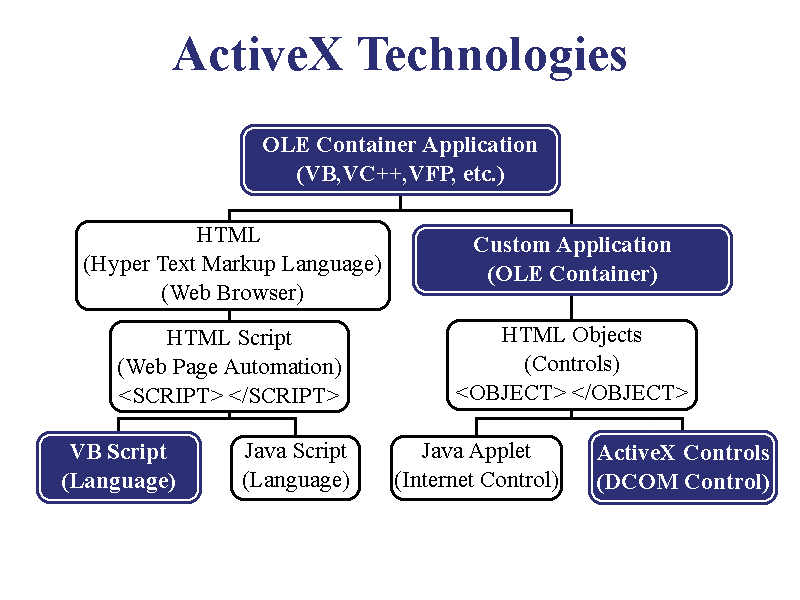
environment such as the Internet (see Figure 15.1). With object linking and embedding a spreadsheet from
an application such as Excel and a database from an application such as Access can be made
a part of the content of a document in Word. Without object linking and embedding, those
object would be kept separate and you would need to run all three applications to access
the data. Figure 15.1. ActiveX is a
method for implementing various technologies over the Internet. Before you can learn how to program with ActiveX
controls, there is a some background information with which you should be familiar. In
today's lesson, you will learn
Evolution of ActiveX ControlsActiveX controls come from half a century of
software development, beginning with the early research at companies such as Xerox/PARC
and Bell Labs. ActiveX controls are a marriage of an innovative method of allowing
applications to interact with each other (OLE) and Microsoft’s response to the demand
for a simple way to implement that interaction. OLEOLE
(Object Linking and Embedding) is what set the advanced programmer apart from the merely
experienced. To understand just what it means (no, it's not what the crowd says at a
bullfight!), let's dissect the phrase: Object—Every "thing" on a
computer system is called an object. This includes everything such as the console,
applications, libraries (like many of the .DLL files in your \Windows\System directory),
and so on. Linking —Sometimes a link is
created between two separate objects on a system that allows them to share each other's
information and resources. For instance, if you have a mailing list and a form letter, you
will create a link between the two so that the form letter can go out to everyone on the
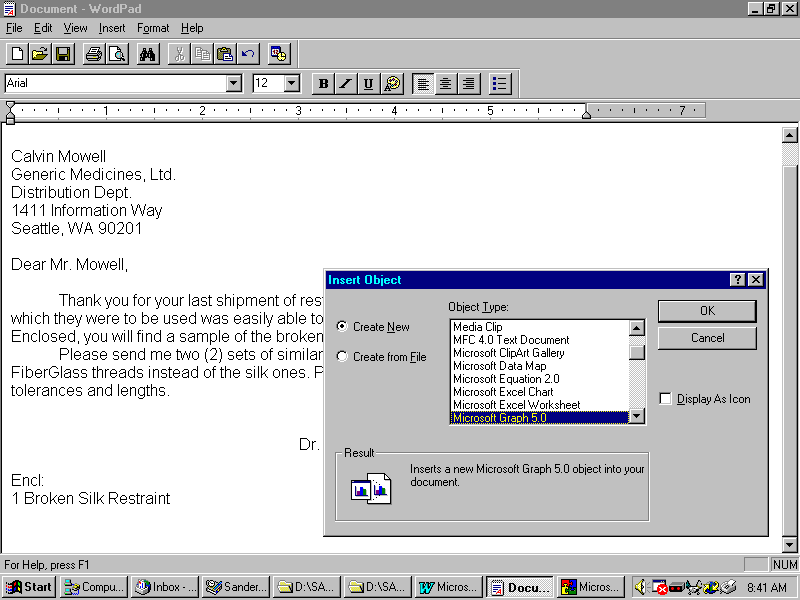
list. If the list is modified in some way, the changes will be reflected in the mailings. In Figure 15.2 you see a document from a doctor in a
remote location ordering new Yeti Restraints from his medical supplies company. Because he
wants to include a graph in his document, and because he is using the WordPad utility that
has no graphing support, he can create a link to a previously created Excel chart. This is
done through the menu option Insert | Object and then by selecting the Create from File
option. Embedding —When you create a document in
one application, sometimes you will find that the application does not allow you to work
with or edit a particular kind of document. Referring again to Figure 15.2, if Dr. Kirbymeister
had not previously created an external graph, the doctor would choose the menu option
Insert | Object—but this time, he would select the Create New option instead of
Create from File. Then he could create and edit the chart from within WordPad much the
same as if he were using the Excel program itself. The History of OLEOOP (Object Oriented Programming) was developed
around the middle of the century. At that time, most of its use was limited to the
military, research labs, universities, and large corporations. OLE , as a generally accepted technology, was not
introduced to the public until Apple Corporation developed and marketed the later versions
of the Macintosh. The Mac used the first widely accepted GUI (Graphical User Interface),
and its natural programming environment was object oriented. It was a few more years before it found global
acceptance, when Microsoft incorporated OLE and OOP into millions of NT Servers and
Windows 95 Workstations. Now OLE is the state of the art in Programming—almost 50
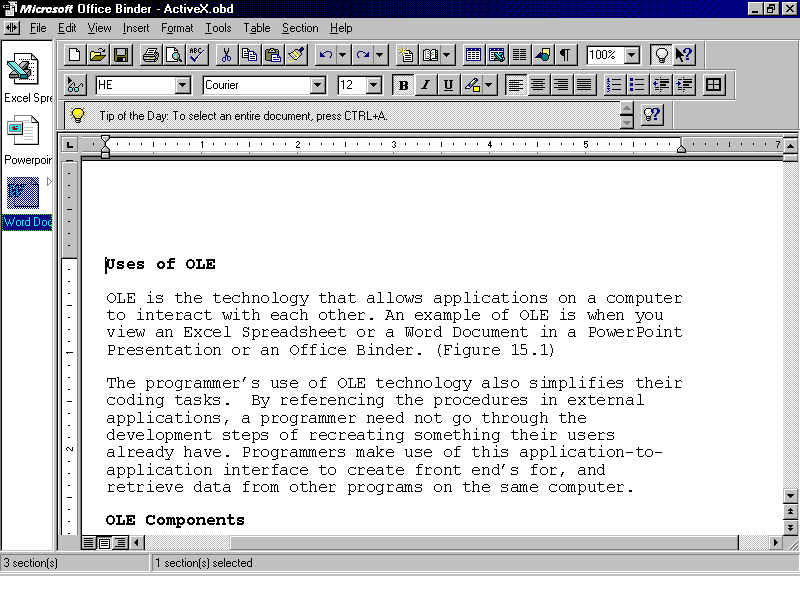
years after it was first introduced. Uses of OLEOLE is the technology that allows applications on a
computer to interact with each other. An example of OLE is when you view an Excel
spreadsheet or a Word document in a PowerPoint presentation or an Office Binder. (See
Figure 15.3.) The Office binder is utility that comes with MS
Office for Windows 95. It allows a user to place several, documents in one shell. This
shell then provides a method for linking the various object so that they can all reference
a common set of data. This is one of the first implementations of DCOM-type technologies
into a Windows95 product, since the different documents can reside on remote servers. Figure 15.3. OLE between
Office95 applications. Using OLE technology also simplifies programmers'
coding tasks. By referencing the procedures in external applications, a programmer need
not go through the development steps of re-creating something his users already have.
Programmers make use of this application-to-application interface to create front ends
for, and retrieve data from, other programs on the same computer. You can see another instance of OLE by following
these steps:
OLE ComponentsThe application whose features one wants to access
would need to support a certain set of functions. The presence or absence of these
features is what makes an application OLE-enabled or not. The host application is an OLE
Server and the system accessing it is the OLE client. Although the OLE Server
is usually a full-blown application, it could be as simple as DLL or two. As long as it
supports the interconnectivity features of OLE, other OLE-Enabled applications can use it.
The widest uses of OLE are based on COM (Component
Object Model). COM defines a basic structure and set of rules for developing
object-oriented programs. When a Windows OOP programmer develops their application, it is
the structure of the COM model upon which their program acts.
When creating an ActiveX control there are two
features that it must implement. These are the "IUnknown" interface, and that it
be self registering. The controls are then instantiated and uninstantiated through the
AddRef() and Release() methods in whatever programming language you use. OLE also proved of great benefit to software
manufacturers who wanted to increase the value of their product by allowing other
applications to access the features of their software. A manufacturer would publish an API
(Application Programmers Interface) for its product, and developers would reference that
document to see how to make their programs interact with that product. Using this complex
API, the programmers would develop their own front ends for others' software, tailoring it
to the specific needs of their customers.
The only real drawback to this is that the API can
be very difficult to understand for a programmer who is not familiar with the program.
Although OLE coding is complex, it is still not as complex as it would be without the
standardization of OLE features. VBX—16-bit Custom ControlThe VBX was the first "custom
control." It incorporated the features of an API into a single item that could be
added to a program. This item would enable the programmer to access the features of a
given item without needing to know the more complex features of OLE. Each control enabled
users to interact with a specific OLE component or set of components. Visual programming systems (like Visual Basic and
Access), which are OLE container applications, could now access complex features of an
external object with just a few lines of code. Although the processes the VBX uses are not
true OLE, in the strictest sense, this "mock OLE" is still quite powerful. The development of custom controls brought an
additional benefit to programmers, many of whom were working with programming languages
that were not true OOP. Although the VBX was not a true OLE component, it broke ground in
enabling programmers to access functionality within external software components. OCX—16/32-bit Object ControlsOCX controls were developed in response to the need
for simpler, yet more powerful, access to control and OLE functionality. Lower-level VBXs
just did not do it. Although most of these controls are still not, by definition, true OLE
controls, many of them incorporate the more complex (and frequently needed) OLE functions.
The enhanced "mock OLE" of the first OCX’s filled most of this demand. Custom controls like VBXs and OCXs provided an
excellent way of incorporating complex features into a simple package. As with any
technology that proves valuable, programmers began demanding more from these
tools—demanding that developers incorporate actual OLE features into them. Indeed,
OCXs met this demand so well that there is still some confusion and debate among
programmers about whether OCXs are true OLE controls. They were not yet, however, true OLE
controls. ActiveX Controls
ActiveX controls were introduced to combine two
distinct areas in the evolution of computer technologies: custom controls and a rethinking
of the basic ideas behind OLE and OOP. These new controls are the first DCOM (Distributed
Component Object Model)-based OLE controls. As I've mentioned, prior OLE interfaces were
based on COM. Therefore, ActiveX is the first true OLE control. In DCOM, the programmer no longer programs for an
individual computer, but rather for the environment, or network, within which computers
operate. In the older COM model, a programmer need only follow a set of rules on how the
computer and the user would interact. With DCOM, the programmer is provided with a set of
rules by which computers, in general, interact with each other over the Internet or an
intranet. How ActiveX Controls Are UsedTwo similar methods are used to interact with
ActiveX controls—programmatic and through script. When using VBScript, the line
between the two is blurred because it so closely follows the structure of the Visual Basic
programming language. Programmatic
One
of the neatest things about ActiveX controls is the way they blur the line between
Internet controls and regular programming controls such as command buttons and drop-down
list boxes. ActiveX controls can be used within hypertext documents as well as within
full-blown programs. The major difference between the two uses is that scripting uses a
degree of restricted functionality for many controls when used in a network document. When
these same controls are used in an OLE container application (such as Visual Basic or
Visual C++), they can be programmed with all the power of the programming language used. Using ActiveX with Visual Basic/VBAAlthough the programming of ActiveX controls is
possible today through Visual Basic 4.0, the integration of ActiveX into a programming
language is mature only in versions of Visual BASIC after version 4. Visual Basic and VBA
(Visual Basic for Applications) will be the first programming languages to incorporate
ActiveX into their environments. Programmers who make use of Visual Basic to program
with ActiveX will find it simple to port their applications to the Web by replacing their
VB code with VBScript. Most of the syntax and other conventions will remain the same, and
most of the code will need very minor revisions to work the same as it did in the compiled
version. In fact, VBScript is actually just a subset of VBA. This code will send 100 alerts to the user in Visual
Basic: This code will do the same thing in VBScript: Using ActiveX in Other LanguagesVisual Basic and VBA are the programming
environments in which most of the ActiveX controls are designed to be used. They can be
used, however, in any programming environment that supports DCOM-based OLE. These
programming environments are called OLE Container applications. A few of these are
Visual Basic, Access, Visual FoxPro, Turbo C++, and Visual C++. ActiveX ScriptingActiveX
scripting adds a level of control to Internet documents and allows the programmer to
automate and activate Web pages. It does this through the use of server-side and
client-side scripts (which was covered earlier in this guide). The HTML page itself can
have bits of script (client-side) such as VBScript and JScript, which provide a level of
automation for use on the client machine. The server then can have its own scripts, such
as ISAPI and CGI, which provide a level of automation for use on the server machine. Server ScriptsWithout client scripting, the only way to program a
Web document is through a server script such as ActiveX ISAPI, HTTP CGI, or UNIX Perl.
These scripts are very powerful, but they require a Web page manager to have access to a
server's executable files.
For many ISPs, this level of user access to their
servers is unacceptable and they disallow it (or charge a premium for it). Server
scripting gives the scriptwriter access to a large portion of the ISP's server
configuration. The malicious or uninformed writer could cause problems—not only on
the ISP's servers, but to its customers' machines as well. HTML ScriptThe IETF (Internet Engineering Task Force) has
established a standardized method for coding script within an HTML (hypertext markup
language) document. This standard defines how all scripts are supposed to work within a
Web Document.
JavaScriptJavaScript is the first widely used language based
on the HTML scripting standard. It was developed by Sun Microsystems to support Java
applets. The similar naming of the scripts and the objects often causes confusion when
talking about either in conversation—but they are two completely different beasts.
ActiveX honors the JavaScript standard and allows
interaction between JavaScript, VBScript, Java Controls, and ActiveX Controls. VBScriptVBScript , which you learned about earlier, is
Microsoft's answer to JavaScript. It also allows a programmer to place his code and
objects in an HTML document. Because VBScript is part of the ActiveX line of technologies,
it supports programmatic control of both Java applets and ActiveX controls. Anyone with an
MSIE (Microsoft Internet Explorer) Web browser can run VBScript.
SecurityParents,
guardians, employers, and others provide those in their charge with Internet access in
order to increase their productivity and overall value. However, with this added power
comes a need to be protected from inappropriate, dangerous, or downright malicious
activity. ActiveX provides a framework over which a very effective security system can be
laid. ThreatsBecause scripting is such a powerful tool, it is of
great value in distributing information according to a multitude of client system
requests. This punches a wide hole in most enterprises' security. Security can be breached by allowing foreign
programs access to internal information systems. Dangerous or malicious activity by
scripts can be brought on through programmatic events such as file I/O. The threat is not
less for an individual system than it is for a larger network. ProtectionIn order to protect yourself from malicious
programs, there are a couple of security policies you will want to implement on your
system. These should protect you against
StandardBecause most security boils down to three basic
levels (UserID, Password and/or physical location), the wise administrator will keep the
most sensitive information unavailable to the Net. Each user and system
administrator should determine the level of protection (and the resultant impact upon
interoperability) within which their particular system should operate. AntiVirusAny system that has a disk drive or network
connection or other way of accessing files (and being accessed for files) is exposed to
threats from viral infection. An AntiVirus program should be running on any system with
such interconnectivity. Microsoft AntiVirus, Norton AV, McAfee AntiVirus, and many other
utilities provide a basic level of security that should catch most threats from viral
infection.
ActiveXIn response to the threat that scripting exposes, a
wide variety of methods have been developed with and without the ActiveX technologies to
protect systems against threats such as malignant code and corrupt controls. Some of these
methods include Internet ratings, code signing, trust verification, and user locator
services . Where to Find ActiveX ControlsActiveX controls are available from many sources.
Controls that software manufacturers, corporate marketers, and even hobbyists post on
their Web pages can automagically find their way to systems all over the world. The nature
of ActiveX controls makes it almost too simple for users to load them onto, and install
them into, their machines. World Wide Web
The
easiest way to obtain new software of any kind, especially ActiveX controls, is by way of
the World Wide Web (a.k.a. "WWW" or "The Web"). As ActiveX is being
implemented all over the world, the Web is turning out to be the most effective
distribution channel as well as a way to communicate. (Why order something through the
mail, with all of its overhead, cost, and inefficiencies, when it can be downloaded as
needed and with immediacy?) Automatic Installation from Web PagesWhen a user points his browser to a standard Web
page (or HTML document), the page of text is displayed in the browser window. This is the
quickest, cheapest, easiest way to acquire a new ActiveX control. When a user views a page
containing ActiveX controls, and using an ActiveX-enabled browser, activities to load and
use those controls are launched. Part of this process is to prompt the users for whether
they want to load and install the controls (and, of course, expose themselves to the
threat those controls may pose).
During the installation, the control is loaded onto
the user's system. If the Web page creator referenced an .INF file, that file will tell
the user's system what files to get, where to get them, and how to add them to the system
registry as necessary. At this point, a number of different security
activities are performed to assure the integrity of the control. Software DistributorsAt the time of this writing, Microsoft has ActiveX
in the beta test phase of its development. Still, many software developers have already
released their ActiveX applications. It's probably safe to say that ActiveX (or DCOM),
however it matures or who takes it the farthest, is a standard that will be developed upon
heavily—even if Microsoft never releases it in a final form! ActiveX Web BrowsersThere
are a wide variety of Web browsers on the market—each capable of viewing hypertext
documents. In the earliest days of the Web, text-only browsers
such as Lynx were the standard. These browsers allow users to read the content of a Web
page over a slow (less than 9600 baud) connection. Any graphic content (which can swell
the size of a document significantly) is not retrieved unless the user specifically asks
for it. In the early 1990’s, the National Center for
Supercomputing at the University of Illinois at Urbana-Champaign developed a graphical Web
browser called Mosaic that proved very popular on the net. Soon afterward, Netscape jumped
on the WWW bandwagon, developing and releasing its Navigator Web browser. By this time,
use of the Web by previous nonusers was increasing by leaps and bounds, and a wide variety
of (sometimes incompatible) Internet utilities was being released to the general market. To maintain dominance in the computing industry,
Microsoft followed suit in a big way with the development of ActiveX browsers that not
only allow text and graphics, but a plethora of other types of content, such as music,
video, and a special Internet flavor of SQL (Structured Query Language). Internet ExplorerBeginning with version 5.0 of MSIE, Microsoft has
chosen its free Web browser as the developmental and presentation platform for the
introduction of ActiveX technologies. Needing no plug-ins or additional software, it is
the most effective tool for applying the features of activated HTML pages.
Netscape NavigatorThere is a wide variety of Web browsers used to
access the World Wide Web, and Netscape Communicastor is currently the Web browser of
choice for most users. In spite of this wide use, however, it does not internally support
ActiveX.
NCompass LabsNCompass Labs makes a plug-in for Netscape that adds
some ActiveX functionality to it. Because Netscape does not yet have ActiveX
functionality, a plug-in such as this is necessary to browse ActiveX documents with that
browser.
ActiveX ControlsMicrosoft has released a number of ActiveX controls
into the public domain. Any developer may use most of these tools, royalty free, to
develop and distribute his applications. Some of these include the HTML Layout Control,
the Active Marquee Control, and (possibly the most important of all) the ICP (Internet
Control Pack). The ICP is a set of ActiveX controls , incorporating
the standard Internet protocols. These controls include
Microsoft licensed the controls in the ICP from
NetManage, who has also has placed them in the public domain. You will learn more about
the ICP later . ActiveX System RequirementsThe DCOM model behind ActiveX is designed to be
usable across a variety of systems. Cross-platform compatibility has always been the holy
grail of systems development. The variety of systems and the exponentially higher number
of possible configurations and software packages installed on those systems makes this
task all but impossible. Operating SystemsActiveX controls are usable on any system that
supports DCOM. The first to incorporate this technology is Windows 95, with Windows NT
version 4.0 following close behind. Microsoft is working with software vendors to enable
ActiveX on UNIX and Macintosh in the near future. Required FilesIn the following lessons, you will be introduced to
some specific ActiveX controls; any files required to run them will be noted. A few are
basic to the use of ActiveX. For a Windows 95 installation, the files that may
need to be made available to the user are discussed in the sidebar titled "ActiveX
File Dependencies." If you use any other controls, you may want to keep a similar
chart as a reference for what other files those controls may require. There is no one file or one group of files that you
can use to make your system a complete ActiveX or DCOM system. Each feature has its own
requirements. Windows NT 4.0 is based on DCOM, and others will certainly follow, but other
operating systems must use an add-in (such as the Internet Explorer version 3.x for
Windows 95) to use ActiveX features.
SummaryIn this chapter, you have been introduced to ActiveX
controls and the concept of COM (Component Object Modeling) and the emerging DCOM
(Distributed Component Object Model). ActiveX controls are the first wide implementation
of DCOM, and provide the programmer with a simplified interface to the highly complex
features of OLE in an internetworked environment. These controls are the product of the
evolution of custom controls and OLE and the market demand for a system that combines the
two. ActiveX controls can be embedded within an HTML
document or in an application developed in an OLE Container IDE (Integrated Development
Environment) such as Visual Basic. The programmer can then develop a user interface to
those controls using VBScript or another scripting language. The programmer can also use
those same ActiveX controls, programmatically, to develop standalone client or server
applications. ActiveX controls can be acquired quite easily, and
almost by accident. An individual who is browsing the Web and accesses a page with ActiveX
controls embedded within it may receive a prompt asking if he wants to install the custom
control. Also, when a user installs an application that uses ActiveX controls, those
controls are installed on and made available to their system. Although the ActiveX controls themselves will not
necessarily work on every machine, a user's Windows 95 system can be easily upgraded and
modified to support them. This is done by installing a few freely redistributable files on
the user's system. Q&A
WorkshopRetrieve copies of, or create shortcuts to, the following ActiveX-related
specifications (Note: The URLs mentioned only show the specification's sponsor's home
page.): HTML 3.2—http://www.w3.org Win32 Internet API—http://www.microsoft.com MSIE Object Model for Scripting—http://www.microsoft.com Internet Ratings API—http://www.microsoft.com COM Specification—http://www.microsoft.com WinSock API—http://www.microsoft.com
Quiz
|
|
|
Popular Tutorials
-
 MS Access
1109
MS Access
1109
-
 C++
1222
C++
1222
-
 HTML
584
HTML
584
-
 JavaScript
616
JavaScript
616
-
 Vbscript
873
Vbscript
873
-
 Oracle
473
Oracle
473
-
 VC++
875
VC++
875
-
 SQL
2959
SQL
2959
-
 XML
514
XML
514
-
 Java
814
Java
814
-
 Perl
455
Perl
455
-
 Linux
451
Linux
451