Web based School
Chapter 1
Becoming a Programmer
Computer programming is insanely difficult. It requires a four-year degree in computer science, thousands of dollars in computer hardware and software, a keen analytical intellect, the patience of Job, and a strong liking for caffeinated drinks. If you're a programming novice, this is probably what you've heard about computer programming. Aside from the part about caffeine, all of the rumors are greatly exaggerated.
Programming is a lot easier than most people think. There are several reasons why you might believe otherwise:
- Computer programmers have been telling people for years that programming is hard.
This belief makes it easier for us to find high-paying jobs (or so I've heard) and
gives us more leeway to goof off during business hours.
- Computer programming manuals are often written in a language that only a Scrabble
player could appreciate. Strange acronyms like OOP, RAD, COM, and MUMPS are used
frequently along with newly invented jargon like instantiation, bytecode, and makefile.
- Many computer programming languages have been available only with software packages costing $200 or more, which is a lot of cabbage.
Because of the growth of the Internet and other factors, this is a great time to learn programming. Useful programming tools are being made available at low cost (or no cost), often as downloads from World Wide Web sites. The goal of this guide is to teach programming to the person who has never tried to program before or the person who tried programming but hated it with an intense passion. The English language will be used as much as possible instead of jargon and obscure acronyms, and all new programming terms will be thoroughly explained as they are introduced.
If I've succeeded, you will finish Learn Java 1.1 Programming in 24 Chapters with enough programming skill to be a danger to yourself and others. You'll be able to write programs, dive into other programming guides with more confidence, and learn programming languages more easily. You also will have developed skills with Java, the most exciting programming language to be introduced in a decade.
The first hour of this guide provides some introductory material about programming and gives you instructions on how to set up your computer so you can write Java programs. The following topics will be covered:
- Choosing which programming language to learn first
- What Java is
- Using programs to boss your computer around
- How programs work
- How program errors called bugs are fixed
- Acquiring the free Java Developer's Kit
- Installing the Kit
- Getting ready to write programs
Choosing a Language
As you might have surmised at this point, computer programming is not as hard as it's cracked up to be. If you're comfortable enough with a computer to create a nice-looking resume, balance a checkguide with software such as Intuit Quicken, or create your own home page on the Web, you can write programs.
The key to learning how to program is to start with the right language. The programming language that you choose to use often depends on the tasks you want the computer to accomplish. Each language has things that it is well-suited for and things that are difficult, or perhaps impossible, to do with the language. For example, many people use some form of the BASIC language when they are learning how to program because BASIC is good for learning how to write programs.
The BASIC language was invented in the '60s to be easy for students and beginners to learn (the B in BASIC stands for Beginner's). The downside to using some form of BASIC is that it's easy to fall into some sloppy programming habits with the language. Those habits can make it much more difficult to write complex programs and improve them later on.
Microsoft Visual Basic combines the ease of BASIC with some powerful features to aid in the design of Windows software. (VBScript, which is short for Visual Basic Script, offers the simplicity of BASIC for small programs that run in conjunction with World Wide Web pages.) Visual Basic has been used to write thousands of sophisticated programs for commercial, business, and personal use. However, Visual Basic programs can be slower than Windows programs written in other languages such as Borland C++. This difference is especially noticeable in programs that use a lot of graphics--games, screen savers, and the like. Because of that, game programmers and other multimedia developers don't use Visual Basic to create graphical programs such as Doom.
This guide uses the Java programming language. Though Java is more difficult to learn than a language such as Visual Basic, it is a good starting place for several reasons. One of the biggest advantages of learning Java is that you can use it on the World Wide Web. If you're an experienced Web surfer, you have seen numerous Java programs in action. They can be used to create animated graphics, present text in new ways, play games, and help in other interactive efforts.
Another important advantage is that Java requires an organized approach in order for programs to work. The language is very particular about the way that programs must be written, and it balks if programmers do not follow all of its rules. When you start writing Java programs, you might not see the language's choosy behavior as an advantage. You'll write a program and will have several errors to fix before the program will be finished. Some of your fixes might not be correct, and they will have to be redone. If you don't structure a program correctly as you are writing it, other errors will result. In the coming hours, you'll learn about these rules and the pitfalls to avoid. The positive side of this extra effort is that your programs will be more reliable, useful, and error-free.
Java was invented by Sun Microsystems developer James Gosling as a better way to create computer programs. Gosling was unhappy with the way that the C++ programming language was working on a project he was doing, so he created a new language that did the job better. It's a matter of contentious debate whether Java is superior to other programming languages, of course, but the amount of attention paid to the language today shows that it has a large number of adherents. guide publishers obviously dig it--more than 89 guides have been published about the language since its introduction. (This is my second guide about Java. Learn SunSoft Java WorkShop in 21 Days was the first, and I will write more of them until prohibited from doing so by municipal, state, or federal law.) Regardless of whether Java is the best language, it definitely is a great language to learn today. There are numerous resources for Java programmers on the Web, Java job openings are increasing, and the language has become a major part of the Internet's future. You'll get a chance to try out Java during Chapter 2, "Writing Your First Program."
Learning Java or any other programming language makes it much easier to learn other languages. Many languages are similar to each other, so you won't be starting from scratch when you dive into a new one. For instance, many C++ programmers find it fairly easy to learn Java because Java borrows a lot of its structure and ideas from C++. Many programmers are comfortable using several different languages and learn new ones as needed.
C++ has been mentioned several times in this hour, and you might be tripping over the term wondering what it means and, more importantly, how it's pronounced. C++ is pronounced C-plus-plus, and it's a programming language that was developed by Bjarne Stroustrop and others at Bell Laboratories. C++ is an enhancement of the C programming language, hence the plus-plus part of the name. Why not just C+, then? The plus-plus part is a computer programming joke you'll understand later on.
Telling the Computer What to Do
A computer program, also called software, is a way to tell a computer what to do. Everything that the computer does, from booting up to shutting down, is done by a program. Windows 95 is a program. Ms. Pac-Man is a program. The dir command used in MS-DOS to display file names also is a program. Even the Michaelangelo virus is a program.
If you're a science fiction fan, you're probably familiar with the concept of household robots. If not, you might be familiar with the concept of henpecked spouses. In either case, someone gives very specific instructions telling the robot or spouse what to do, something like the following: Dear Theobald,
Please take care of these errands for me while I'm out lobbying members of Congress:
Item 1: Vacuum the living room.
Item 2: Go to the store.
Item 3: Pick up butter, lozenges, and as many SnackWells Devil's Food Cakes as you can carry.
Item 4: Return home.
Love,
Snookie Lumps
If you tell a loved one or artificially intelligent robot what to do, there's a certain
amount of leeway in how your requests are fulfilled. If lozenges aren't available,
cough medicine might be brought to you instead. Also, the trip to the store can be
accomplished through a variety of routes. Computers don't do leeway. They follow
instructions literally. The programs that you write will be followed precisely, one
statement at a time.
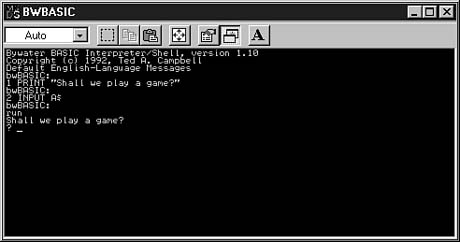
The following is one of the simplest examples of a computer program, written in BASIC. Take a look at it, but don't worry yet about what each line is supposed to mean:
1 PRINT "Shall we play a game?"
2 INPUT A$
Translated into English, this program is equivalent to giving a computer the following to-do list: Dear personal computer,
Item 1: Display the question, "Shall we play a game?"
Item 2: Give the user a chance to answer the question.
Love,
Snookie Lumps
Each of the lines in the computer program is a statement. A computer handles each
statement in a program in a specific order, in the same way that a cook follows a
recipe or Theobald the robot followed the orders of Snookie Lumps when he vacuumed
and shopped at the market. In BASIC, the line numbers are used to put the statements
in the correct order. Other languages, such as Java, do not use line numbers, favoring
different ways to tell the computer how to run a program.
Figure 1.1 shows the sample BASIC program running on the Bywater BASIC interpreter, which is available for free in several shareware file repositories on the World Wide Web and can run on any DOS or UNIX platform. Bywater BASIC is among many free BASIC interpreters that can be found on the Internet for Microsoft Windows, Apple Macintosh, UNIX, and Linux systems.
Figure 1.1. An example of a BASIC program running on the Bywater BASIC shell and interpreter developed by Ted A. Campbell.
The quote "Shall we play a game?" is from the 1983 movie WarGames, in which a young computer programmer (Matthew Broderick) saves mankind after nearly causing global thermonuclear war. You'll learn how to do that in the next guide of this series, Learn to Create International Incidents with Java in 24 Chapters.
Because of the way programs operate, it's hard to blame the computer when something goes wrong while your program runs. After all, the computer was just doing exactly what you told it to do. Unless your hardware is on the fritz or a pesky virus is attacking your system, both rare occurrences, the blame for program errors lies with the programmer. That's the bad news. The good news is that you can't do any permanent harm to your computer with the programming errors you make. No one was harmed during the making of this guide, and no computers will be injured as you learn how to program with Java.
How Programs Work
Most computer programs are written in the same way that you write a letter--by typing each statement into a word processor. Some programming tools come with their own word processor, and others can be used with any text-editing software. You can use the Java Developer's Kit, which you will learn about later in this hour, with any of your favorite editors.
When you have finished writing a computer program, you save the file just as you would save any other document to disk. Computer programs often have their own file extension to indicate what type of file they are. Java programs have the extension .java; an example of a Java program file name is Calculator.java.
If you use a fancy word processing program that has features such as boldfaced text, different font sizes, and other stylistic touches, do not use those features while writing a computer program. Programs should be prepared as text files with no special formatting. For example, when using Microsoft Word to write a program, save the file in Text Only mode instead of saving it as a Word document. Notepad, a word processor that comes with Windows, saves all files as unformatted text.
To run a program, you need some help. The kind of help that's needed depends on the programming language you're using. Some languages require an interpreter to run their programs. The interpreter is a program that interprets each line of a computer program and tells the computer what to do. Most versions of BASIC are interpreted languages. The advantage of interpreted languages is that they are faster to test. When you are writing a BASIC program, you can try it out immediately, spot any errors, fix them, and try again. The primary disadvantage is that interpreted languages run more slowly than other programs.
Other programming languages require a compiler. The compiler takes a computer program and translates it into a form that the computer can understand. It also does what it can to make the program run as efficiently as possible. The compiled program can be run directly, without the need for an interpreter. Compiled programs run more quickly than interpreted programs, but they take more time to test. You have to write your program and compile it before trying it out. If you find an error and fix it, you must compile the program again to verify that the error is gone.
Java is unusual because it requires a compiler and an interpreter. You'll learn more about this later as you write Java programs.
How Programs Dont Work
Many new programmers become discouraged when they start to test their programs. Errors appear everywhere. Some of these are syntax errors, which are identified by the computer as it looks at the program and becomes confused by what you wrote. Other errors are logic errors, which are only noticed by the programmer as the program is being tested, if they are noticed at all. Logic errors sneak by the computer unnoticed, but they will cause it to do something unintended.
As you start to write your own programs, expect to encounter errors. They're a natural part of the process. Programming errors are called bugs, a term that dates back a century or more to describe errors in technical devices. The process of fixing errors has its own term also-- debugging. Whether you want to or not, you'll get a lot of debugging experience as you learn how to write computer programs.
Next Stop: Java
Before you can start writing Java programs, you need to acquire and set up some kind of Java programming software. Although several different products are available for the development of Java programs, including many terrific ones that make programming much easier, the starting place for most new Java programmers is the Java Developer's Kit. All of the examples in this guide use the Kit, and you are encouraged to forsake all other Java programming tools as you go through the remaining 23 hours of tutelage. The material will make more sense to programmers using the Kit, and using the Kit builds experience that will be beneficial no matter which development software you use later on.
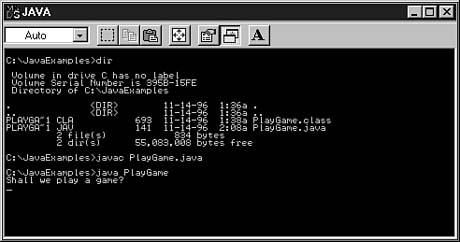
The Java Developer's Kit (also referred to as the JDK) is in version 1.1 as of this writing. It is a set of tools that enable you to write and test Java programs. Users of Microsoft Windows systems may be dismayed to learn that the Kit is not graphical. You run programs from a command line (the familiar C:\> prompt on Windows systems) instead of using a mouse and a point-and-click environment. Figure 1.2 shows the Kit in use in an MS-DOS window on a Windows 95 system. The Java program PlayGame.java is compiled, and then it is run.
Caution: The examples of this guide were prepared on a Microsoft Windows system, and some references in the text are specific to Windows users. However, all of the material is intended for users of the Java Developer's Kit on any of the platforms it is currently available for, and all of the tutorials will work regardless of the system you're using.
At the time of this writing, the Java Developer's Kit is available directly from JavaSoft for the following systems:
- Microsoft Windows NT or Windows 95 systems
- SPARC Solaris systems with version 2.3 or later
- Intel x86 Solaris systems
According to JavaSoft, the Apple Macintosh version of the Kit also should be available by the time this guide is published.
Figure 1.2. A program being compiled and run with the Java Developer's Kit version 1.1.
The Windows 95/NT version of the Kit is provided in two versions. One version is listed as an EXE file, which means that you can install it by clicking on the file's icon when you download it. This version is the easiest to set up.
The World Wide Web page to download versions of the Kit is the following:
http://www.javasoft.com/products/JDK/1.1/
Although JavaSoft has not announced plans to make version 1.1 of the Kit available for other systems, other companies can create their own implementations of Java development tools. Details about these tools will be listed in the Frequently Asked Questions section of the JavaSoft site. Visit the following Web page:
http://www.javasoft.com/nav/read/faqindex.aspl
If your system can handle the Java Developer's Kit, download it from the Web and save it on your system in a newly created directory called jdk11 or something similar. The file is several megabytes in size, so you'll have time during the download to make coffee, knit an afghan, or gnaw your foot off to escape any bear traps it might be caught in.
Although the JavaSoft Web site always will have the most current edition of Java Developer's Kit 1.1, you can find the a version of the Kit on the CD-ROM that accompanies this guide. Go to the Java subdirectory of the CD and choose the folder for your system: Win95NT, SparcSol, or IntelSol. This version of the Kit will work with all sample programs in the guide. Copy this installation file from the CD to your hard drive.
Workshop: Installing the JDK
After the Java Developer's Kit has been downloaded or copied to your hard drive, you can install the software. The Windows 95 or Windows NT version provides the easiest means of setting up the Kit because you can start the installation process by double-clicking on the downloaded file's name or icon. This action will install the Kit in a subdirectory of the current directory, so make sure the file is in the place you want before beginning the installation. If you put the downloaded file into the jdk11 directory, a subdirectory called java will be created with the Java Developer's Kit and related files.
Other versions of the Kit are packed as an archive file that has been compressed to reduce its size. These versions will have a file extension such as .zip, .z, or .tar in the name. To use these, you must use decompressing software such as WinZip, untar, gzip, or PKZip.
If you don't own any software that can handle archive files, you can find programs for all common archive types on the Web. Windows, DOS, and OS/2 users can find some of these programs at the Coast to Coast Web site (http://www.coast.net/SimTel/). The CNET Web site at http://www.shareware.com offers access to file collections for all popular operating systems. Both of these sites are searchable, so you can type text such as unzip or untar and find several programs that handle these archive formats.
The Kit comes with any special installation instructions that are needed and also includes a Web page that links directly to help pages on Sun's Java site. If you need more help on the installation of the Java Developer's Kit, visit the following page:
http://www.javasoft.com/products/JDK/1.1/
Several different programs come with the Kit; the main ones you will use are the following:
- The compiler, javac, takes a Java program's file and translates it into
a form that the computer knows how to run.
- The interpreter, java, runs programs that are created by the compiler.
- The Java Web browsing tool, appletviewer, enables you to run Java programs that are designed to run on the Web.
Two of these programs are being used in Figure 1.2. Look at the C:\JavaExamples> command prompts to see javac and java commands being typed in to compile and run the PlayGame program.
Windows systems require two additions to the AUTOEXEC.BAT file in order to use the Java Developer's Kit. You have to tell your system where to find the Kit's programs and where to find a file called classes.zip. If you installed the kit in the C:\jdk11\java directory, add the following to your PATH statement in the AUTOEXEC.BAT file:
c:\jdk11\java\bin
Also, add a line to AUTOEXEC.BAT after the PATH line:
SET CLASSPATH=.;c:\jdk11\java\lib\classes.zip
When you're done, your AUTOEXEC.BAT file should include something like the following:
PATH=c:\windows;c:\windows\command;c:\jdk11\java\bin
SET CLASSPATH=.;c:\jdk11\java\lib\classes.zip
Official Documentation
In addition to the Developer's Kit, JavaSoft offers documentation for the Java language in Web page format. You don't need this information to use this guide because each topic is discussed fully as it is introduced, but these pages will come in handy when you write your own programs.
You can download the entire documentation, but it might be more convenient to browse it as needed from JavaSoft's Web site. The most up-to-date Java documentation is available from the following address:
http://www.javasoft.com/products/JDK/1.1/docs/index.aspl
Summary
During this hour, you were introduced to the concept of programming a computer--giving it a set of instructions that tell it what to do. You also downloaded and installed the Java Developer's Kit that will be used as you write sample programs throughout the guide.
If you are still confused about programs, programming languages, or Java in general, that's understandable at this point. Everything will make more sense to you in the next hour, "Writing Your First Program," which takes a slow trip through the process of creating a Java program.
Q&A
- Q What does the Internet have to do with making it easier to learn programming?
A Because of the dramatic growth of the World Wide Web, companies such as Microsoft, Netscape, and Sun Microsystems are trying to attract as many programmers as possible to their languages and related technology. To do this, they are offering many programming tools for free over the Web, such as the Java Developer's Kit and the beta release of the Microsoft Visual Basic 5 Control Creation Edition. They are offering others, such as SunSoft Java WorkShop for free 30- or 90-day trial periods. There also are numerous free products distributed over the Internet for programmers. To find out where these products are, visit Yahoo! at http://www.yahoo.com and search for a language you're interested in. It's much cheaper today to learn programming than it was five years ago.
Q What is it about BASIC that makes it easier to fall into bad habits while writing programs in it?
A One thing you'll learn as you start writing Java programs is that you have to be organized. If you don't structure your program in the correct way, it won't work. BASIC doesn't have this kind of requirement. You can write in a disorganized manner and still get the program to work successfully. Later on, however, you'll have a much harder time figuring out the program if you try to fix a bug or add an improvement.
Q BASIC? C++? Java? What are the names of these languages supposed to mean?
A Like many programming languages, BASIC is an acronym that describes what it is: Beginner's All Symbolic Instruction Code. C++ is a programming language that was created to be an improvement on the C language, which itself was an improvement of the B programming language. Java goes against the tradition of naming a language with an acronym or other meaningful term. It's just the name that Java's developers liked the best when brainstorming for possible monikers--beating out WebRunner, Silk, Ruby, and others.
Q There are 89 guides about Java programming?
A Actually, as of this writing, there are 89 Java-related guides now available in English, and another 171 are being prepared for publication. These figures come from a World Wide Web site by Steve Pietrowicz that lists all of the known guides and upcoming ones. Visit the following page for details:
http://lightyear.ncsa.uiuc.edu/~srp/java/javaguides.asp
- Q Why are interpreted languages slower than compiled ones?
A For the same reason that a person interpreting a live speech is a lot slower than a translator interpreting the printed speech later on. The live interpreter has to think about each statement that's being made as it happens, while the other interpreter can work on the speech as a whole and take some shortcuts to speed up the process. Compiled languages can be much faster than interpreted languages because they can do things to make the program more efficient.
Q Is C++ harder to learn than Java?
A It's a matter of personal opinion, but Java does seem more approachable for beginners than C++. C++ and its predecessor, C, are widely regarded as "programmer's languages," meaning that they were designed for the needs of experienced programmers. There are a lot of features in C and C++ that make them faster--and more powerful--during program creation, but these features often come at the expense of understandability. Java takes a more simplified approach to programming than C++ and is probably a better place to start.
Quiz
Test your knowledge of the material covered in this chapter by answering the following questions.
Questions
- 1. Which of the following is not a reason that people think computer programming
is painfully difficult?
(a) Programmers spread that rumor to improve their employment prospects.
(b) Jargon and acronyms are all over the place.
Mind-control waves are sent out by the CIA promoting this belief.
2. What kind of tool runs a computer program by figuring out one line at a time?
(a) A slow tool
(b) An interpreter
A compiler
3. Why did James Gosling hole up in his office and create Java?
(a) He was unhappy with the language he was using on a project.
(b) His rock band wasn't getting any gigs.
When you can't download any image files at work, the World Wide Web is pretty dull.
Answers
- 1. c. Of course, the CIA could have forced me to say this.
2. b. Compilers figure out the instructions beforehand so the program can run faster.
3. a. The Web was still a little-known idea when Gosling wrote Java.
Activities
If you'd like to better acquaint yourself with Java before you create your first program, do the following activity:
- Visit the JavaSoft site at http://java.sun.com
and read some of the introductory articles that are presented in the What is
Java? section


Popular Tutorials
-
 MS Access
1109
MS Access
1109
-
 C++
1222
C++
1222
-
 HTML
584
HTML
584
-
 JavaScript
616
JavaScript
616
-
 Vbscript
873
Vbscript
873
-
 Oracle
473
Oracle
473
-
 VC++
875
VC++
875
-
 SQL
2959
SQL
2959
-
 XML
514
XML
514
-
 Java
814
Java
814
-
 Perl
455
Perl
455
-
 Linux
451
Linux
451