Web based School
- Chapter 3
- Vacationing in Java
Chapter 3
Vacationing in Java
"Java is a huge opportunity for all of us."
--Marc Andreesen of Netscape at the JavaOne Conference, May 31, 1996
Before you venture further into Java programming, it's worthwhile to learn more about the language and see what Java programmers are doing today. One of the reasons that Java has become popular quickly is that it can be used to offer programs on the World Wide Web. Because of this capability, the best examples of how to use Java are also on the Web. During this hour, we'll take a look at some sites that feature Java programs and talk about the history and development of the language.
To go on this vacation, you need a Web browser that can handle Java programs. Most current versions of Netscape Navigator and Microsoft Internet Explorer can run Java programs that are found on Web pages.
If you're using a current version of Netscape Navigator or Microsoft Internet Explorer and it isn't working with Java programs, check your setup configuration from one of the program's pull-down menus (select View | Options in Internet Explorer or Options | Network Preferences | Languages in Navigator). Make sure your browser software is configured to run Java programs.
Load your browser software of choice, put on your best Hawaiian shirt, and get ready to vacate. Because you won't be leaving your house, you won't get a chance to experience the simpler pleasures of tourism: odd driving rituals, exotic food, exotic members of the opposite sex, exotic members of the opposite sex with food, and so on. But look on the bright side: no antibacterial shots, traveler's checks, or passports are required either.
The following topics will be covered during this hour:
- A definition of the Java language
- The benefits of using Java
- Some examples of Java at work
- An explanation of object-oriented programming
- Sites of note for Java programmers
The Web site-seeing examples that you visit during this hour's vacation are just a small sampling of the Java programs in use on the Web. A search of the AltaVista Web search database finds more than 4,900 pages that have included a Java program as of this writing.
First Stop: JavaSoft
The Java vacation begins at a place you'll be visiting regularly now that you're a Java programmer: the Web site of JavaSoft, the group that developed the Java language. To get there, go to the following address:
http://java.sun.com
JavaSoft is the division of Sun Microsystems that is responsible for the advancement of the Java language and the development of related software. To see a simple example of Java in action, choose the hyperlink on the JavaSoft main page that offers a "Java version" of the site. If you can't find one, you can reach the Java front page by visiting the following Web address:
http://java.sun.com:81/index.aspl?
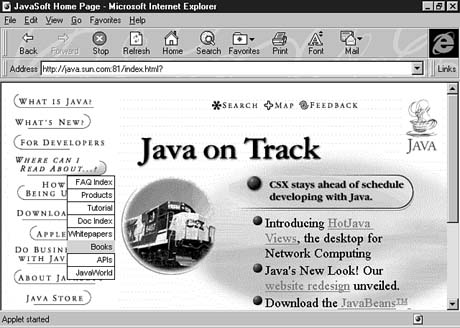
A Java program is used on this page to add pull-down menus on top of the page. Drag your mouse across the different section titles on the page to see the pull-down menus that appear. Figure 3.1 shows a pull-down menu that appears when the mouse is over the Where Can I Read About...? text.
Figure 3.1. The JavaSoft Web site uses a Java program to add pull-down menus on top of a Web page.
This Web site is the place to find the latest released versions of the Java Developer's Kit, as well as other programmer's resources. This site also has press releases about Java-related products, full documentation for Java, and sample Java programs that run on the Web. Sun Microsystems made Java available for free via this Web site in late 1995.
A Brief History of Java
Company cofounder Bill Joy called Java the end result of 15 years of work to produce a better, more reliable way to write computer programs. Java's creation was a little more complicated than that.
Java was invented five years ago by Sun engineer James Gosling as a language to use as the brains for smart appliances (interactive TVs, omniscient ovens, and the like). Gosling was unhappy with the results he was getting by writing programs with C++, another programming language, so he holed up in his office and wrote a new language to better suit his needs.
Most people who are holed up in their office aren't producing new programming languages or other achievements. They're playing Quake. How many lasting contributions to mankind have been lost because of Id Software?
At the time, Gosling named his language Oak after a tree he could see from his office window. The language was part of Sun's strategy to make millions when interactive TV became a multimillion-dollar industry. That still hasn't happened today (five years down the road), but something completely different took place. Just as Sun was ready to scrap Oak development and scatter its workers to other parts of the company, the World Wide Web became popular.
In a fortuitous circumstance, many of the qualities that made Gosling's language good on its appliance project made it suitable for adaptation to the World Wide Web. Sun developers devised a way for programs to be run safely from Web pages and chose a catchy new name to accompany the language's new focus: Java.
You might have heard that Java is an acronym that stands for Just Another Vague Acronym. You also might have heard that it was named for the developers' love of coffee, especially the percolating product of a shop near Sun's offices. Actually, the story behind Java's naming contains no secret messages or declarations of liquid love. Instead, Java was chosen for the same reason that comedian Jerry Seinfeld likes to say the word salsa. It sounds cool.
Although Java can be used for many other things, the Web provided the showcase that it needed to capture international attention. A programmer who puts a Java program on a Web page makes it instantly accessible to the entire Web-surfing planet. Because Java was the first tool that could offer this capability, it became the first computer language to receive as much press as Dennis Rodman, Madonna's baby, and the alien autopsy. In 1996, you had to be in solitary confinement or a long-term orbital mission to avoid hearing about Java.
Going to School with Java
As a medium that offers a potential audience of millions, the World Wide Web includes numerous resources for educators and schoolchildren. Because Java programs can offer a more interactive experience than standard Web pages, some programmers have used the language to write learning programs for the Internet.
For one of the strongest examples of this use of Java, visit the following address:
http://www.npac.syr.edu/projects/vishuman/VisibleHuman.asp
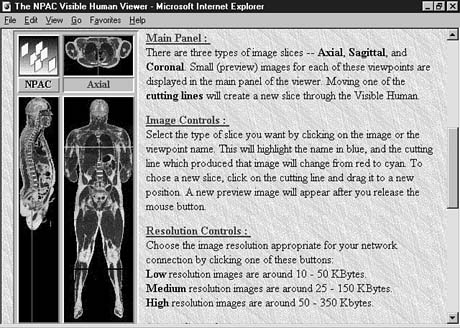
This Web site uses data from the National Library of Medicine's Visible Human Project. The project is a database of thousands of cross-sectional images of human anatomy. A Java program is being used to enable users to search the collection and view images. Instead of making requests by text commands, users make the requests to see different parts of the body graphically, and the results are shown immediately in graphic detail. The Java program is shown in Figure 3.2.
Figure 3.2. Images from the National Library of Medicine's Visible Human Project can be viewed interactively on the Web using a Java program.
Numerous educational programs are available for many different computer systems, but what makes this program remarkable is its versatility. The Visible Human Project tool is similar in function and performance to CD-ROM software that users might run on their computer systems. However, it is run directly from a Web page. No special installation is needed, and unlike most CD-ROM software, it isn't limited to PC-compatible and Macintosh systems. Just like Web pages, Java programs can be run on any computer system that can handle them.
In order to handle Java programs, a Web browser must have a Java interpreter. The interpreter included with a browser serves a similar function as the interpreter that you used to run the BigDebt program during Chapter 2, "Writing Your First Program." The difference is that a browser's interpreter can only run Java programs that are set up to run on Web pages and cannot handle programs set up to run from the command line. Currently, Java-enabled browsers are available for most common systems, including PCs running a version of Microsoft Windows, Apple Macintosh systems, SPARC workstations, and computers running the Linux operating system.
A Java program such as the Visible Human Project database does not have to be written for a specific computer system. This advantage is called platform independence. Java was created to work on multiple systems. Originally, Java's developers believed it needed to be multiplatform because it would be used on a variety of appliances and other electronic devices.
The programs that you write using Java can be run on a variety of computer systems without requiring any extra work from you. This advantage is one of the primary reasons that so many people are learning to write Java programs and are using them on software projects. Many professional software companies are using Java for the same reason. Under the right circumstances, Java can remove the need to create specific versions of a program for different computer systems. The potential audience for software grows with a multiplatform solution such as Java.
Lunch in JavaWorld
If you didn't lose your appetite after searching through the innards of a visible human, take a lunch break with JavaWorld, an online magazine for Java programmers and other Internet developers. The JavaWorld Web site is available at the following address:
http://www.javaworld.com
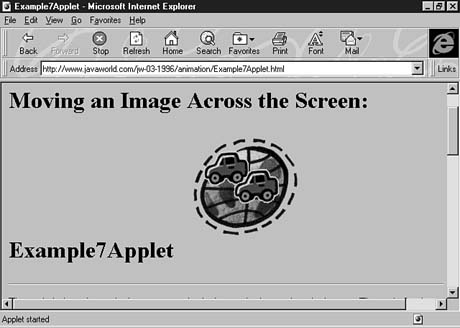
JavaWorld offers how-to articles, news stories related to Java development, and other features in each monthly edition. One of the advantages of the publication's Web format is that it can display functional Java programs in conjunction with articles. Figure 3.3 shows a working example from a tutorial on Java animation programming.
Figure 3.3. A JavaWorld how-to article on Java animation programming includes a working example of a program.
In addition to offering information of benefit to Java programmers, JavaWorld publishes articles and commentary about the language and its development. One issue that has been hotly debated since Java's release is whether the language is secure. Security is important because of the way Java programs work when they are placed on a Web page. The Java programs that you have tried during this hour were downloaded to your computer first. When the program was finished downloading, it ran on your computer. It was as though someone sat down at your computer, popped in a disk, and ran his own program.
Unless you know a whole lot of people, most of the Web pages you visit will be published by strangers. In terms of security, running their programs isn't a lot different than letting the general public use your computer on weekends. If the Java language did not have safeguards to prevent abuse, its programs could introduce viruses onto your system, delete files, and do other malicious things. Java includes several different types of security to make sure that its programs are safe when run from Web pages.
The main security is provided by the following restrictions on Java programs running over the Web:
- No program can open, read, write, or delete files on the user's system.
- No program can run other programs on the user's system.
- All windows created by the program will be identified clearly as Java windows.
This identification prevents someone from creating a fake window asking for the user's
name and password.
- Programs cannot make connections to Web sites other than the one they came from.
- All programs will be verified to make sure that nothing was modified after they were compiled.
At this time, the general consensus among Java developers is that the language has enough safeguards in place to be usable over the Web. Several security holes have been found, often by programming security experts, and these holes have been dealt with quickly by Sun or the Web browser programmers. Because JavaWorld covers the latest news of note in the Java development community, it is a good way to keep track of any security issues that arise.
Caution: None of the safeguards in place are a complete block against malicious programs. Just as loopholes were found in the past year, more will undoubtedly be found in the future. If you are concerned about running Java programs through your Web browser, you might want to run programs only from a source such as Gamelan because it tests the programs before including them in the directory. You also should back up anything you can't afford to lose on your computer, which is good practice for anyone who runs programs received from the Internet.
Taking in a Ball Game at Instant Ballpark
The first afternoon stop on the Java tour will be a trip to the old ball game. Instant Sports, a Texas company that provides sports reporting information, is using Java to present baseball games as they happen in a visual, pitch-by-pitch fashion. To see how baseball is played in cyberspace, visit the following address:
http://www.instantsports.com/
The Java program called Instant Ballpark presents each pitch in a major league game. The ball travels from the pitcher's icon to the batter and goes out to the fielders when it's hit. Sound effects, such as the umpire's strike call and the ball hitting the bat, also are presented.
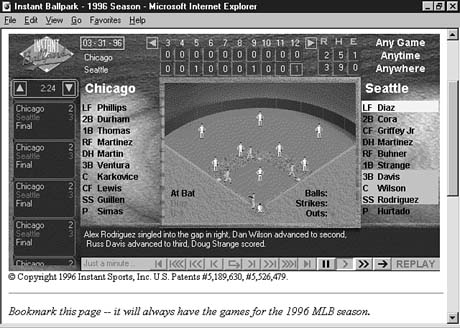
The program is a unique way to follow live games and past games that are available from the Instant Ballpark archive. Figure 3.4 shows the last play in a game between the Chicago White Sox and the Seattle Mariners from the 1996 season.
Figure 3.4. Mariners shortstop Alex Rodriguez drives home the winning run in Instant Ballpark, a presentation of a live baseball game using a Java program.
One of the things that you might notice about Instant Ballpark is that it updates the day's scores in other games as you are using the program to follow a game. This update is relatively easy to do because the Java language is multithreaded. Multithreading is a way for the computer to do more than one thing at the same time. One part of a program takes care of one task, another part takes care of a different task, and the two parts can pay no attention to each other. Each part of a program in this example is called a thread.
In a program such as Instant Ballpark, the league scoreboard along one side of the window could run in its own thread. The rest of the program could be another thread. If you use an operating system such as Microsoft Windows 95, you're using a type of this behavior when you run more than one program at the same time. If you're at work and you surf the Web for European aerobics videos in one window while running a company sales report in another window, congratulate yourself--you're multithreading!
Getting Down to Business
At this point in your travels, you might be getting the impression that Java is primarily of use to baseball fans and those who have body parts to show the world. Although those two subject areas are enough to keep most of us entertained for hours, the next stop on our trip shows an example of Java getting down to business.
Direct your Web browser to the following address:
http://www.engine.com/java/engbrowse/Employee.asp
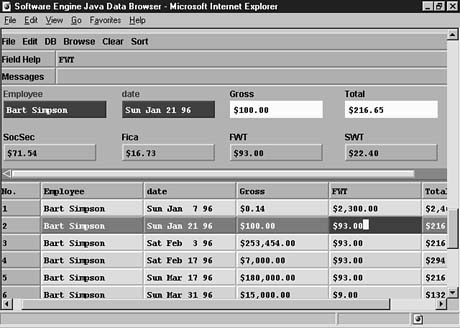
This example is an employee payroll database managed as a pair of Java programs. Employee information is viewed in one program, and the other program is used to edit items from the payroll record of a specific employee. Figure 3.5 shows Bart Simpson's record as it is being edited.
Unlike other payroll tracking systems that require the installation of software on the computers of each employee who needs access, the use of Java enables Software Engine to make the program available to any employee with a Web browser. With some kind of password security system in place, the program could even be used by employees who are away from the office on business trips. All the employees would have to do is access the company's Web site.
Figure 3.5. A Java program from Software Engine that is used to maintain employee payroll records.
A database program such as Software Engine's can be thought of in several different ways. One way is to think of a program as an object--something that exists in the world, takes up space, and has certain things it can do. Java, like the C++ language, uses object-oriented programming, as you will see during Chapter 10, "Creating Your First Object." Object-oriented programming (OOP) is a way of thinking about computer programs. A program is thought of as a group of objects. Each object handles a specific task and knows how to speak to other objects. For example, a word-processing program could be set up as the following group of objects:
- A document object, which is the area where you type in text
- A spell-checking object, which can look over the document object to find any
possible spelling errors
- A printer object, which handles the printing of the document
- A menu object, a mouse object, and many others
Each of these objects is an independent computer program that doesn't need the others to do its job. The word-processing software is a collection of all the objects necessary to get work done.
OOP is a powerful way to create programs and it makes the programs you write more useful. Consider the word-processing software. If the programmer wants to use the spell-checking capabilities of that program with some other software, the spell-checking object is ready for use with the new program. No changes need to be made.
Stopping by Gamelan to Ask Directions
This world tour of Java programs is being led by a professional who is well-versed in the hazards and highlights of Web-based travel. You'll be venturing out on your own trips soon, so it's worthwhile to stop at the best tour guide currently available for the Java-hungry tourist, the Gamelan Web site:
http://www.gamelan.com
Gamelan is the most comprehensive directory of Java programs, programming resources, and other information related to the language. Most of the programs visited during this hour were originally found on a trek through the searchable database maintained by Gamelan. Updates are made on a daily basis, so this is another place that you'll be visiting often as you develop your Java programming skills.
One of the best uses of Gamelan for programmers is to see what programs are available that offer source code. In case you're unfamiliar with the term, source code is another name for the text files that are used to write computer programs. The BigDebt.java file that you created during Chapter 2, "Writing Your First Program," is an example of source code.
Gamelan's directory listings indicate when a compiled Java program is accompanied by the source code used to create it. After you have finished your first 24 Chapters as a Java programmer, you ought to take a look at some of these programs. Figure 3.6 shows a Java program being used on Gamelan to provide instant access to the different areas that comprise the site.
Figure 3.6. The Gamelan directory offers more than 4,000 Java resources and links to programs. It uses this Java program as a navigational aid.
The large number of programs listed in Gamelan show that the language has been adopted quickly by thousands of programmers around the world. Part of the reason is that Java's popularity inspires people to learn it, which is the same principle that caused parachute pants and breakdancing to be briefly popular in the mid-'80s. Another reason for the swiftly growing population of Java programmers is the simplicity of the language.
One of the goals of Java's design was to make it easier to learn than C++, the language James Gosling was having fits with on Sun's smart-appliance project. Much of Java is based on C++, so programmers who have learned to use that language will find it easier to learn Java. However, some of the elements of C++ that are the hardest to learn--and the hardest to use correctly--have been removed from Java.
For people who are learning programming for the first time, Java is easier to learn than C++ would be. Also, Java will not work if its variables and other elements of a program are used incorrectly. This adherence to rules can be painful for experienced programmers, but it forces everyone to develop good habits as they create programs.
Some languages are created to make it easier for experienced programmers to harness the capabilities of the computer in their programs by including shortcuts and other features that programming veterans easily understand. Java does not use these features, preferring to make the language as simple as an object-oriented programming language can be. Java was created to be easy to learn, easy to debug, and easy to use.
A Big Finish with Castanets
The second-to-last stop on your Java vacation has a certain Caribbean flair to it--castanets, marimbas, and bongos are involved. If you packed a ruffly Cuban bandleader shirt just like the one Carmine Ragusa used to wear on episodes of Laverne and Shirley, now's the best chance you'll ever have to wear it. Visit the following Web address:
http://www.marimba.com
Unlike the other sightseeing locations you have visited, this site can't be viewed with a Web browser alone. Marimba, a startup company formed by several former Java developers at Sun, has used Java to create Castanet, a new way to receive and run software over the Internet.
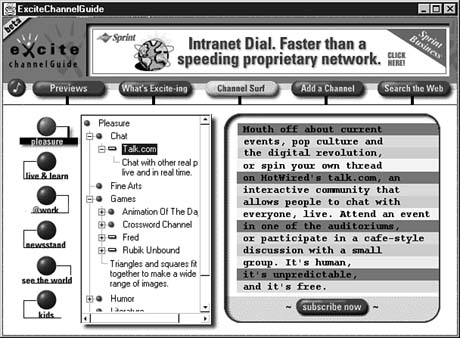
Castanet is a way to send out computer programs that automatically update themselves on the computers of people who request them. It's a service not unlike television, where you turn to a channel and immediately start receiving the broadcast signal of that channel. In fact, the Java programs sent by this method are called channels. Figure 3.7 shows a Castanet channel offered by Excite that presents the lineup of other channels that are currently available. Like TV listings, Excite's guide offers previews of each channel and a way to immediately request them. If Excite updates its guide channel program, Castanet sends that update automatically over the Internet. No effort is required on the user's end to keep up with new versions of the software.
Figure 3.7. The Excite guide to Castanet channels, which itself is a channel.
Java is not able to send out its programs in this manner, so Castanet requires the use of special software called the Tuner. The Castanet Tuner is a sophisticated Java program that runs from the command line. Although Netscape has announced plans to include the Tuner's functionality in a future version of its software, this feature has not become available at the time of this writing. To find out more about downloading the Tuner for your system, visit the following Web page:
http://www.marimba.com/products/castanet-tuner.asp
The Tuner is several megabytes in size, so you might not want to install it on your system immediately. Visit the Marimba Web site to find out more about channels and what services they offer.
Castanet illustrates a point about Java that sometimes get lost: Although Java is most popular as a way to write Web page programs, it is not limited to use on the Internet. You can use it to write any kind of software.
Workshop: Putting Java on Your Desktop
The last stop on your whirlwind tour of Java is ESPNET SportsZone, the electronic edition of the cable sports channel. So far, your guides have asked nothing of you other than an occasional wardrobe change, but that's going to change. Redirect your Web browser to the following address:
http://espnet.sportszone.com
If you're using a browser such as Netscape Navigator or Microsoft Internet Explorer, your first assignment is to find the Java programs on this page. This assignment ought to be a lot easier than finding Waldo in those Where's Waldo? children's guides, but if you need a hint, here it is: They're the parts with changing text and graphics.
ESPN uses Java programs to provide constant updates to scores and headlines in the same way it uses a sports ticker during some events. In the scoreboard program, scores are frequently updated in the program's window, along with graphical advertisements.
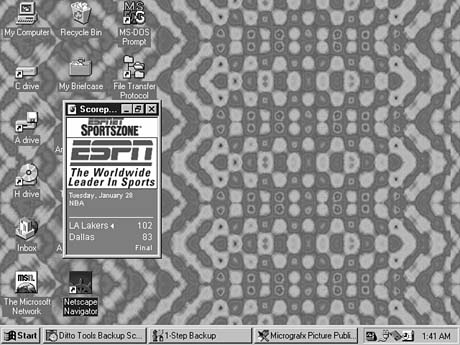
The scoreboard Java program is offered as part of a Web page, but it has a special feature that adds to its usefulness. It can be detached from the page and placed on your system's desktop as a stand-alone window. Click the Display on Desktop button and then minimize your Web browser. This might be more sports than you're able to handle in a short period of time, but it shows how Java can present information in a way much different from standard Web pages. Figure 3.8 shows the scoreboard program on a Windows 95 desktop.
Figure 3.8. Scores are presented in a desktop window with the ESPNet SportsZone Scorepost program.
Once you're completely caught up on the sports events that have taken place during your world-in-an-hour jaunt, it's time to put away your luggage and get ready for a return to programming. More Web sites and other items of note for Java programmers are described in Appendix A, "Where to Go from Here: Java Resources."
Q&A
- Q Can I use the sample Java programs from the JavaSoft Web site on my own
home page?
A JavaSoft encourages the use of its sample programs on Web sites. Take a look at the directories that were created when you installed the Java Developer's Kit on your system. You will find more than a dozen sample programs along with the .java files that were used to compile them. These programs can be a valuable resource when you're working on your own Java programs later on.
Q What other ways have been devised to offer programs on Web pages?
A Several programming strategies are aimed at making Web pages smarter. The main competitor to Java is ActiveX, an extension of Microsoft technology called the Component Object Model. ActiveX programs are similar in function to Java programs--they are placed on Web pages and are run when browsers are equipped to handle them. The primary differences are that ActiveX uses a way to verify the identity of ActiveX programmers, and ActiveX programs are not downloaded each time they are encountered. Unlike Java programs, an ActiveX program stays on a user's system. In addition to ActiveX, JavaScript and VBScript offer some programming capabilities on Web pages. These programs must be more simple than Java and ActiveX programs, however.
Q I ran a useful Java program on a Web page. Can I run it on my system without the browser?
A Under most circumstances, no. Java programs typically are developed either to run on a Web page or to run from the command line. A program can be written so that it works in both ways, but most of the programs you will find in a directory such as Gamelan do not include this functionality. You'll learn much more about the different types of Java programs during Chapter 4, "Understanding How Java Programs Work."
Q If Java programs are platform-independent, why are some Java programs such as SunSoft Java WorkShop only available for specific systems?
A Java programs might be limited to specific systems such as PC compatibles because the programs include the use of non-Java programming for some features. For example, a Java program might use a program written in C++ to communicate with a modem because Java does not support this capability in its current version. Java is still relatively young in its development, and some of its goals concerning complete platform independence have not been achieved yet. Web programs are the area where Java's multiplatform promise is most fully realized. Anyone with a Java-capable Web browser can use one of Java's Web programs on a page.
Q Is there a print edition of JavaWorld?
A At present, JavaWorld is distributed strictly through the World Wide Web. However, several newsstand magazines are available that cover the language, including Java Report, Dr. Dobb's Journal, and others.
Q Can a Java program I run on a Web page give my computer a virus?
A Because of security restrictions that prevent Web programs from reading, writing, or modifying files, there's no way for a virus to be transmitted from a Java program on a Web page to your system. Java programs that you download and run from the command line have the same risk of viruses as any program you download. If you're using programs received over the Internet, you need to acquire a good antivirus program and use it regularly.
Quiz
If your mind hasn't taken a vacation by this point in the hour, test your knowledge of this chapter with the following questions.
Questions
- 1. How did object-oriented programming get its name?
(a) Programs are considered to be a group of objects working together.
(b) People often object because it's hard to master.
Its parents named it.
2. Which of the following isn't a part of Java's security?
(a) Web programs cannot run programs on the user's computer.
(b) The identity of a program's author is verified.
Java windows are labeled as Java windows.
3. What is a program's capability to handle more than one task called?
(a) Schizophrenia
(b) Multiculturalism
Multithreading
Answers
- 1. a. It's also abbreviated as OOP.
2. b. ActiveX programs verify the author of the program, but this security method is not implemented with Java.
3. c. This also is called multitasking, but the term multithreading is used in conjunction with Java because an independently running part of a program is called a thread.
Activities
Before unpacking your luggage, you can explore the topics of this hour more fully with the following activities:
- Use the Gamelan directory at http://www.gamelan.com
to find out what card games have been developed using Java.
- Find the sample Java programs by searching the JavaSoft site, and download one
of them to your computer.


Popular Tutorials
-
 MS Access
1109
MS Access
1109
-
 C++
1222
C++
1222
-
 HTML
584
HTML
584
-
 JavaScript
616
JavaScript
616
-
 Vbscript
873
Vbscript
873
-
 Oracle
473
Oracle
473
-
 VC++
875
VC++
875
-
 SQL
2959
SQL
2959
-
 XML
514
XML
514
-
 Java
814
Java
814
-
 Perl
455
Perl
455
-
 Linux
451
Linux
451