Web based School
- Chapter 4
- Understanding How Java Programs Work
- Creating an Application
- Listing 4.1. The full text of Root.java.
- Sending Arguments to Applications
- Listing 4.2. The full text of NewRoot.java.
- Applet Basics
- Listing 4.3. The full text of RootApplet.java.
- Listing 4.4. The full text of RootApplet.asp.
- Sending Parameters to Applets
- Workshop: Viewing the Code Used to Run Applets
- Summary
- Q&A
- Quiz
- Activities
- Understanding How Java Programs Work
Chapter 4
Understanding How Java Programs Work
An important distinction to make in Java programming is where your program is supposed to be running. Some programs are intended to work on your computer; you type in a command or click on an icon to start them up. Other programs are intended to run as part of a World Wide Web page. You encountered several examples of this type of program during the previous hour's whirlwind vacation.
Java programs that run locally on your own computer are called applications. Programs that run on Web pages are called applets. During this hour, you'll learn why that distinction is important, and the following topics will be covered:
- How applications work
- Organizing an application
- Sending arguments to an application
- How applets work
- The required parts of an applet
- Sending parameters to an applet
- Using HTML tags to put an applet on a page
Creating an Application
Although Java has become well-known because it can be used in conjunction with World Wide Web pages, you can also use it to write any type of computer program. The BigDebt program that you wrote during Chapter 2, "Writing Your First Program," is an example of a Java application.
To try out another program, use your word processor to open up a new file and enter everything from Listing 4.1. Remember not to enter the line numbers and colons along the left-hand side of the listing; these items are used to make parts of programs easier to describe in the guide. When you're done, save the file as Root.java.
Listing 4.1. The full text of Root.java.
 1: class Root {
 2:         public static void main(String[] arguments) {
 3:                 int number = 225;
 4:                 System.out.println("The square root of "
 5:                         + number
 6:                         + " is "
 7:                         + Math.sqrt(number) );
 8:         }
 9: }
Before you can test out this application, you need to compile it with the javac
compiler tool. While in the same directory as the Root.java file, compile
it with the following command:
javac Root.java
If you have entered Listing 4.1 without any typos, including all punctuation and every word capitalized as shown, it should compile without any errors. The javac compiler responds to a successful compilation by not responding with any message at all.
You run Java applications in the same way you would run any program that's installed on your computer. Because they require the use of the java interpreter to run, the most common way that you'll run a Java program is probably by typing a command like the following at a command-line prompt:
java DrumMachine
This command would cause the java interpreter to look for a Java program called DrumMachine.class in the current directory. If it found one, it would start running it. To run the Root application, type the following:
java Root
The output should resemble the following:
The square root of 225 is 15.0
When you run a Java application, the interpreter looks for a main() block and starts handling Java statements at that point. If your program does not have a main() block, as most applets do not, the interpreter will respond with an error.
Sending Arguments to Applications
Because Java applications are usually run from a command line, you can send information to applications at the same time that you run them. The following example uses the java interpreter to run an application called DisplayTextFile.class, and it sends two extra items of information to the application: readme.txt and /p:
java DisplayTextFile readme.txt /p
The extra information you can send to a program is called arguments. The first argument, if there is one, is provided one space after the name of the application. Each additional argument is also separated by a space. You can send as many arguments as you want to a Java application. In order to do something with them, however, you have to write some statements in the application to handle them.
To see how arguments work in an application, create a new file in your word processor called NewRoot.java. Enter the text of Listing 4.2 into the file and save it when you're done. Compile the program with the javac compiler tool, while correcting any errors that are caused by typos.
Listing 4.2. The full text of NewRoot.java.
 1: class NewRoot {
 2:         public static void main(String[] arguments) {
 3:                 int number = 0;
 4:                 if (arguments.length > 0)
 5:                         number = Integer.parseInt( arguments[0] );
 6:                 System.out.println("The square root of "
 7:                         + number
 8:                         + " is "
 9:                         + Math.sqrt(number) );
10:         }
11: }
This program is similar to the Root program except for Lines 3-5. Don't
worry about the specific statements used in these lines; they use some advanced features.
What's important to note is what these lines are accomplishing: If an argument is
sent to the NewRoot program when it is run, the argument is stored in the
number variable.
To try the program out, use the Java interpreter with a command such as the following:
java NewRoot 169
This command causes the output to report that the square root of 169 is 13.0. Try the program several times with different numbers.
Arguments are a useful way to customize the performance of a program. They are often used to configure a program so that it runs a specific way. Java applications use arguments, but applets use a different way to receive information as they are run.
Applet Basics
Applets--programs that can run on World Wide Web pages--were the thing that made Java a computer magazine cover subject upon its release. Applets put a spotlight on the ways that Java was different and remarkable. Before Java, World Wide Web pages were a combination of text, images, and forms that used gateway programs running on the computer that hosted the pages. These gateway programs required special access to the Web page server machine, so most Web users did not have the ability to use them. Writing them required even more expertise.
In contrast, programmers of all skill levels can write Java applets, and you'll write several during the span of these 24 Chapters. You can test applets with any Web browser that handles Java programs and put one on a Web page without any special access from a Web provider. The Java programs that you toured during the previous hour were all applets. Their structure differs from applications in several important ways, and they are designed specifically for presentation on the World Wide Web.
As stated previously, applets do not have a main() block like applications do. Applets have several different sections that are handled depending on what is happening in the applet. These sections are detailed fully during Chapter 13, "Learning How Applets Work." Two of the sections are the init() block statement and the paint() block. init() is short for initialization, and it is used to set up anything that needs to be set up as an applet first runs. The paint() block is used to display anything that should be displayed.
To see an applet version of the Root application, create a new file in your word processor and call it RootApplet.java. Enter the code in Listing 4.3; save it when you're done. Compile the file with the javac compiler tool by typing the following:
javac RootApplet.java
Listing 4.3. The full text of RootApplet.java.
 1: public class RootApplet extends java.applet.Applet {
 2:         int number;
 3:
 4:         public void init() {
 5:            number = 225;
 6:     }
 7:
 8:         public void paint(java.awt.Graphics g) {
 9:            g.drawString("The square root of " +
10:                           number +
11:                           " is " +
12:                   Math.sqrt(number), 5, 50);
13:     }
14: }
This program contains a lot of the same statements as the Java application that did
the same thing. The main difference is in how it is organized--the main()
block has been replaced with an init() block and a paint() block.
The sample programs in this hour are provided primarily to introduce you to the way Java programs are structured. Some aspects of these programs will be introduced fully later, so don't feel like you're falling behind. The main purpose of this hour is to get the programs to compile and see how they function when you run them.
Unlike applications, compiled Java applets cannot be tested using the java interpreter tool. You have to put them on a Web page and view that page in one of two ways:
- Use a Web browser that can handle Java applets, such as the current versions
of Netscape Navigator or Microsoft Internet Explorer.
- Use the appletviewer tool that comes with the Java Developer's Kit.
To create a Web page that can display the RootApplet program, return to your word processor and create a new file. Enter Listing 4.4 in that file and save it as RootApplet.asp.
Listing 4.4. The full text of RootApplet.asp.
1: <applet code="RootApplet.class" height=100 width=300>
2: </applet> This Web page contains the bare minimum needed to display a Java applet on a Web page. The <APPLET> tag is used to specify that a Java program is being put on the page, the code attribute provides the name of the applet, and the height and width attributes describe the size of the applet's display area. These items will be described in detail during Chapter 13.
For now, use the appletviewer tool to take a look at this page. Type the following at the command line:
appletviewer RootApplet.asp
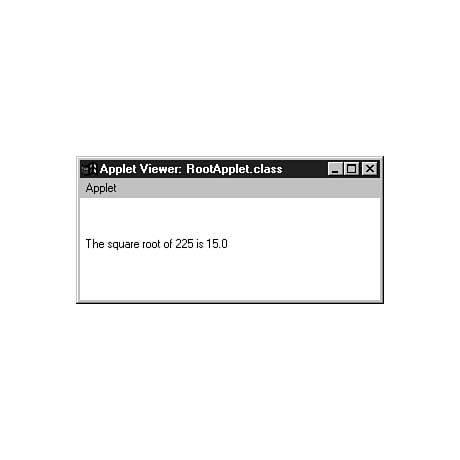
Figure 4.1 shows what the applet looks like using appletviewer.
Figure 4.1. The RootApplet applet displayed with the appletviewer tool.
Sending Parameters to Applets
Java applets are never run from the command line, so you can't specify arguments the way you can with applications. Applets use a different way to receive information at the time the program is run. This information is called parameters, and you can send parameters through the HTML page that runs the applet. You have to use a special HTML tag for parameters called <PARAM>.
Load the file RootApplet.java back into your word processor. The init() block of the program should resemble the following:
public void init() {
    number = 225;
}
Replace these three lines with the following statements:
public void init() {
                String parameter = getParameter("NUMBER");
                if (parameter != null)
                        number = Integer.parseInt(parameter);
}
Save the file and then compile it by typing the following at the command line:
javac RootApplet.java
Before you can try this change out, you need to modify the Web page RootApplet.asp so that it sends a parameter. Load the page into your word processor and add a line between the <APPLET> line and the </APPLET> line, so that the code resembles the following:
<applet code="RootApplet.class" height=100 width=300>
<param name="NUMBER" value=196>
</applet>
Save the file when you're done, and load the page using appletviewer again. The output should resemble Figure 4.2. Change the value of the VALUE attribute in the RootApplet.asp file and run the program again. Try this several times, and you'll see that your program is now flexible enough to handle any number.
Figure 4.2. The modified RootApplet program displayed with appletviewer.
You can use as many parameters as needed to customize the operation of an applet, as long as each has a different NAME attribute specified along with the <PARAM> tag.
Workshop: Viewing the Code Used to Run Applets
As a brief workshop to better familiarize yourself with the <APPLET> tag and how it can be used to alter the performance of an applet, visit this guide's World Wide Web site at the following address:
http://www.prefect.com/java24
Visit this site using either the current version of Netscape Navigator or Microsoft Internet Explorer. Go to the section of the site labeled Chapter 4 Showcase, and you'll be given a guided tour through several working examples of applets. On each of these pages, you can use a pull-down menu command to view the HTML tags that were used to create the page. With Navigator, the command is View | Document Source, and with Internet Explorer, the command is View | Source. Compare the parameters that are used with each applet to the way the applet runs.
Appendix C, "This guide's Web Site," describes other things you can do on this guide's site. The Web site is intended as a complement to the material covered in this guide and a way to find out about corrections, revisions, or other information that makes these 24 Chapters more productive.
Summary
During this hour, you got a chance to create both a Java application and an applet. These two types of programs have several important differences in the way they function and the way they are created. The next several hours will continue to focus on applications as you become more experienced as a Java programmer. Applications are easier to test because they don't require you to create a Web page to view them; they can be easier to create as well. The last several hours of the guide focus on applets, however, because that's the area where beginning programmers are most likely to want to put their skills to work.
Q&A
- Q Can a single Java program be both an applet and an application?
A It is possible to make a program serve as both applet and application, but it's often an unwieldy solution unless the program is simple. An applet could be set up to run as an application also by including a main() block in the applet, but you would not be able to use the init() block or paint() block in the automatic fashion they are used in an applet. Most programs are written either as an application or as an applet, rather than attempting to do both.
Q Do all arguments sent to a Java application have to be strings?
A Java puts all arguments into strings for storage when an application runs. When you want to use one of these arguments as an integer or some other non-string type, you have to convert the value. You'll learn how to do this during the coming hours.
Q Why don't Java applets require the same kind of special access as gateway programs?
A Java applets don't have the same access requirements because they don't pose the same risk to a Web site provider. Gateway programs don't have any kind of security in place to prevent the program from attempting to do harmful things to the machine running the Web page. Java applets, on the other hand, have strict restrictions to prevent them from being used to write harmful programs. Also, Java programs do not run on the Web site's machine--they run on the system of the person viewing the page. This means that the Web site's machine will not slow down due to numerous people running a Java applet on a page.
Quiz
Test your knowledge of the material covered in this chapter by answering the following questions.
Questions
- 1. Which type of Java program can be run by the java interpreter
tool?
(a) Applets
(b) Applications
none
2. What special HTML tag is used to put a Java program onto a Web page?
(a) <APPLET>
(b) <PROGRAM>
<RUN>
3. If you get into a fight with someone over the way to send information to a Java application, what are you doing?
(a) Struggling over strings
(b) Arguing about arguments
Feudin' on functionality
Answers
- 1. b. Applications are run with the interpreter tool, and Web pages containing
applets can be run with the appletviewer tool as well as Java-capable World
Wide Web browsers.
2. a. The <APPLET> tag is used along with the <PARAM> tag to send parameters to the applet.
3. b. Can't we all get along?
Activities
If you'd like to apply your acumen of applets and applications, do the following activities:
- Check out the Gamelan site at http://www.gamelan.com
and use the search term Marquee to see links and descriptions to all of the applets
that have been written to display text in a marquee sign format. Each of these applets
use parameters to modify the text that is displayed.
- Write a Java applet that can handle a parameter named X and a parameter
named Y. Display the two numbers in a drawString() statement like
the one in the RootApplet program.


Popular Tutorials
-
 MS Access
1109
MS Access
1109
-
 C++
1222
C++
1222
-
 HTML
584
HTML
584
-
 JavaScript
616
JavaScript
616
-
 Vbscript
873
Vbscript
873
-
 Oracle
473
Oracle
473
-
 VC++
875
VC++
875
-
 SQL
2959
SQL
2959
-
 XML
514
XML
514
-
 Java
814
Java
814
-
 Perl
455
Perl
455
-
 Linux
451
Linux
451