Web based School
- Chapter 13
- Learning How Applets Work
- Standard Applet Methods
- Putting an Applet on a Web Page
- A Sample Applet
- Listing 13.1. The full text of BigDebtApplet.java.
- Listing 13.2. The full text of BigDebtApplet.asp.
- Workshop: Enhancing the BigDebtApplet Project
- Listing 13.3. The full text of Ouch.java.
- Listing 13.4. The full text of Ouch.asp.
- Summary
- Q&A
- Quiz
- Activities
- Learning How Applets Work
Chapter 13
Learning How Applets Work
Now that Java is making the transition from a child prodigy to an established language, it is being used for all kinds of large-scale business software and other applications. However, the core of interest in the language remains in a new type of program that Java made possible: the applet. Applets are programs designed to run as part of a World Wide Web page. When a Java applet is encountered on a page, it is downloaded to the user's computer and begins running.
During this hour you'll be introduced to applet programming. Programming applets with Java is much different from creating applications with Java. Because applets must be downloaded off a page each time they are run, applets are smaller than most applications to reduce download time. Also, because applets run on the computer of the person using the applet, they have numerous security restrictions in place to prevent malicious or damaging code from being run.
The following topics will be covered:
- Setting up an applet
- Displaying information in an applet
- Stopping and starting an applet
- Putting an applet on a Web page
- Using applet HTML tags and attributes
Standard Applet Methods
All applets are subclasses of the Applet subclass, which is part of the java.applet package of classes. Being part of this hierarchy enables the applets that you write to use all the behavior and attributes they need to be run off of a World Wide Web page. Before you begin writing any other statements in your applets, they will be able to interact with a Web browser, load and unload themselves, redraw their window in response to changes in the browser window, and other functions.
In applications, programs begin running with the first statement of the main() block statement and end with the last } that closes out the block. There is no main() method in a Java applet, so there is no set starting place for the program. Instead, an applet has a group of standard methods that are handled in response to specific events as the applet runs.
The following are the events that could prompt one of the applet methods to be handled:
- The program is loaded for the first time
- Something happens that requires the applet window to be redisplayed
- The program stops at a specific point
- The program restarts after a stop
- The program is unloaded as it finishes running
The following is an example of a bare-bones applet:
public class Skeleton extends java.applet.Applet {
    // program will go here
}
Note that unlike applications, applet class files must be public in order to work. (However, if your applet uses other class files of your own creation, they do not have to be declared public.) This class inherits all of the methods that are handled automatically when needed: init(), paint(), start(), stop(), and destroy(). However, none of these methods do anything. If you want something to happen in an applet, you have to override these methods with new versions in your applet program. The two methods you will override most often are paint() and init().
The paint() Method
The paint()method should be a part of almost every applet that you write because you can't display anything without it. Whenever something needs to be displayed or redisplayed on the applet window, the paint() method handles the task. You also can force paint() to be handled with the following statement:
repaint();
Otherwise, the main reason paint() occurs is when something is changed in the browser or the operating system running the browser. For example, if a Windows 95 user minimizes a Web page containing an applet, the paint() method will be called to redisplay everything that was on-screen in the applet when the applet is later restored to full-size.
Unlike the other methods that you will be learning about during this hour, paint() takes an argument. The following is an example of a simple paint() method:
public class paint(Graphics screen) {
    // display statements go here
}
The argument is a Graphics object. The Graphics class of objects is used to handle all attributes and behavior that are needed to display text, graphics, and other information on-screen. (You'll learn about drawString(), one of the methods of the Graphics class, later this hour.) If you are using a Graphics object in your applet, you have to add the following import statement before the class statement at the beginning of the source file:
import java.awt.Graphics;
If you are using several classes that are a part of the java.awt package of classes, use the statement import java.awt.*; instead. It makes all of these classes available for use in your program.
The init() Method
The init() method is handled once--and only once--when the applet is run. As a result, it's an ideal place to set up values for any objects and variables that are needed for the applet to run successfully. This method is also a good place to set up fonts, colors, and the screen's background color.
Caution: Variables and objects should not be created inside an init() method because they will only exist within the scope of that method. For example, if you create an integer variable called displayRate inside the init() method and try to use it in the paint() method, you'll get an error when you attempt to compile the program. Create any variables that you need to use throughout a class as object variables right after the class statement and before any methods.
The start() and stop() Methods
At any point when the applet program starts running, the start() method will be handled. When a program first begins, the init() method is followed by the start() method. After that, in many instances there will never be a cause for the start() method to be handled again. In order for start() to be handled a second time or more, the applet has to stop execution at some point.
The stop()method is called when an applet stops execution. This event can occur when a user leaves the Web page containing the applet and continues to another page. It also can occur when the stop() method is called directly in a program.
In the programs that you'll write as you're starting out with the Java language, start() and stop() will have the most use in animation. You'll learn more about this use during Chapter 18, "Creating Animation."
The destroy() Method
The destroy() method is an opposite of sorts to the init() method. It is handled just before an applet completely closes down and completes running. This method is used in rare instances when something has been changed during a program and should be restored to its original state. It's another method that you'll use more often with animation than with other types of programs.
Putting an Applet on a Web Page
Applets are placed on a Web page in the same way that anything unusual is put on a page: HTML commands are used to describe the applet, and the Web browser loads it along with the other parts of the page. If you have used HTML to create a Web page, you know that it's a way to combine formatted text, images, sound, and other elements together. HTML uses special commands called tags that are surrounded by < and > marks, including <IMG> for the display of images, <P> for the insertion of a paragraph mark, and <CENTER> to center the text that follows until a </CENTER> tag is reached.
The performance of some of these HTML tags can be affected by attributes that determine how they function. For example, SRC is an attribute of the <IMG> tag, and it provides the name of the image file that should be displayed. The following is an example of an <IMG> tag:
<IMG SRC="Graduation.jpg">
You can place applets on a Web page by using an <APPLET> tag and several attributes. The following is an example of the HTML required to put an applet on a page:
<APPLET CODE="StripYahtzee.class" CODEBASE="javadir" HEIGHT=300 WIDTH=400>
Sorry, no dice ... this requires a Java-enabled browser.
</APPLET>
The CODE attribute identifies the name of the applet's class file. If more than one class file is being used with an applet, CODE should refer to the main class file that is a subclass of the Applet class.
If there is no CODEBASE attribute, all files associated with the applet should be in the same directory as the Web page that loads the program. CODEBASE should contain a reference to the directory or subdirectory where the applet and any related files can be found. In the preceding example, CODEBASE indicates that the StripYahtzee applet can be found in the javadir subdirectory.
The HEIGHT and WIDTH attributes designate the exact size of the applet window on the Web page and must be big enough to handle the things you are displaying in your applet.
In between the opening <APPLET> tag and the closing </APPLET> tag, you can provide an alternate of some kind for Web users whose browser software cannot run Java programs. In the preceding example, a line of text is displayed indicating that Java is required to play the game.
Another attribute that you can use with applets is ALIGN. It designates how the applet will be displayed in relation to the surrounding material on the page, including text and graphics. Values include ALIGN="Left", ALIGN="Right", and others.
A Sample Applet
The first program that you wrote was a Java application that revealed a depressing fact about the U.S. financial condition--one minute's worth of the national debt. If it isn't too painful a prospect, you'll take a look at how applets are structured by writing the same program as an applet.
Load your word processor and create a new file called BigDebtApplet.java. Enter the text of Listing 13.1 into the file and save it when you're done.
Listing 13.1. The full text of BigDebtApplet.java.
 1: import java.awt.*;
 2:
 3: public class BigDebtApplet extends java.applet.Applet {
 4:     int debt;
 5:
 6:     public void init() {
 7:         debt = 59000000;
 8:         debt = debt / 1440;
 9:     }
10:
11:     public void paint(Graphics screen) {
12:         screen.drawString("A minute's worth of debt is $" + debt, 5, 50);
13:     }
14: }
This applet does not need to use the start(), stop(), or destroy()
methods, so they are not included in the program. Compile the program with the javac
compiler tool.
Using the drawString() Method
The drawString() method is one of the things you can use in a paint() method to display information. It is similar in function to System.out.println() statement, which cannot be used in an applet. The drawString() method is part of the Graphics class, so you must use it in the paint() method or another method that has the Graphics object that was sent to the paint() method.
The following three arguments are sent to drawString():
- The text to display, which can be several different strings and variables strung
together with the + operator
- The x position (in an (x,y) coordinate system) where the string should be displayed
- The y position where the string should be displayed
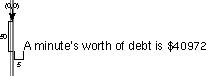
The (x,y) coordinate system in an applet is used with several methods. It begins with the (0,0) point in the upper-left corner of the applet window. Figure 13.1 shows how the (x,y) coordinate system works in conjunction with the statement on Line 12 of BigDebtApplet.java.
Figure 13.1. Drawing a string to an (x,y) position.
Testing the BigDebtApplet Program
Although you have compiled the BigDebtApplet program into a class file, you cannot run it using the java interpreter. If you do, you'll get an error message such as the following:
In class BigDebtApplet: void main(String argv[]) is not defined
The error occurs because the java interpreter runs Java applications beginning with the first statement of the main() block. To run an applet, you need to create a Web page that loads the applet. To create a Web page, open up a new file on your word processor and call it BigDebtApplet.asp. Enter Listing 13.2 and then save the file.
Listing 13.2. The full text of BigDebtApplet.asp.
 1: <html>
 2: <head>
 3: <title>The Big Debt Applet</title>
 4: </head>
 5: <body bgcolor="#000000" text="#FF00FF">
 6: <center>
 7: This a Java applet:<br>
 8: <applet code="BigDebtApplet.class" height=150 width=300>
 9: You need a Java-enabled browser to see this.
10: </applet>
11: </body>
12: </html>
Normally, you can test the Java applets that you write using the appletviewer
tool that comes with the Java Developer's Kit. You can see the output of the BigDebtApplet
applet by typing the following:
appletviewer BigDebtApplet.asp
However, appletviewer only runs the applets that are included in a Web page and does not handle any of the other elements such as text and images. To see the BigDebtApplet.asp file, load it into a browser that can handle Java programs, such as the current versions of Microsoft Internet Explorer and Netscape Navigator. Figure 13.2 shows a screen capture of BigDebtApplet.asp loaded into Internet Explorer.
Figure 13.2. The BigDebtApplet program on a Web page displayed by Microsoft Internet Explorer.
Caution: At the time of this writing, the current versions of Netscape Navigator and Microsoft Internet Explorer do not support any new feature introduced with version 1.1 of the Java language. This hour's applet works, but many others in later hours do not. Use the appletviewer tool to run applets unless you know your browser software fully supports Java 1.1.
Workshop: Enhancing the BigDebtApplet Project
As a short exercise to close out the hour, you'll enhance the BigDebtApplet program by making it accumulate the debt over time, displaying how much the national debt grows each second.
Open up a new file with your word processor and call it Ouch.java. Enter Listing 13.3 and save the file when you're done.
Listing 13.3. The full text of Ouch.java.
 1: import java.awt.*;
 2: import java.util.*;
 3:
 4: public class Ouch extends java.applet.Applet {
 5:     int debt = 683;
 6:     int totalTime = 1;
 7:
 8:     public void paint(Graphics screen) {
 9:         screen.drawString(totalTime + " second's worth of debt is $"
10:             + (debt * totalTime), 5, 30);
11:         for (int i = 0; i < 5000000; i++);
12:         totalTime++;
13:         repaint();
14:     }
15: }
This file uses an empty for loop in Line 11 to approximate the passage of
a second's time. Whether it actually pauses for a second depends on your processor
speed and anything else that's currently running on your computer. The call to repaint()
in Line 13 at the end of the paint() method causes the paint()
method to be called again, starting over at the beginning of the method on Line 9.
To try out the program, you need to compile it with the javac compiler tool and create a Web page that runs the applet. Create a new file on your word processor and enter Listing 13.4 into the file. Save it when you're done.
Listing 13.4. The full text of Ouch.asp.
1: <applet code="Ouch.class" height=300 width=300>
2: </applet>
This Web page only contains the HTML tags that are required to add an applet to a
page. Load this Web page into the appletviewer tool by typing the following
at a command line:
appletviewer Ouch.asp
You will see an applet that begins with the calculation of a second's worth of debt. At a regular interval, another second's debt will be added. The following is an example of the text that is displayed as the applet runs:
13 second's worth of debt is $8879
Summary
This hour was the first of several that will focus on the development of applets. You got a chance to become acquainted with the init() and paint() methods, which you will be using frequently when you're developing applets.
Writing applets is a good way for beginners to develop their skills as Java programmers for the following reasons:
- Applets are usually smaller in scope, making their creation a less daunting task.
- You can find thousands of sample applets on the World Wide Web, including many
with the source file available to learn from.
- You can make applets available to a global audience at low to no cost through the Web, exposing your work to more people who can offer comments and suggestions.
There's a "code war" of sorts afoot among the hundreds of Java programmers who are putting their work on the Web, and many new applets announced on sites like http://www.jars.com demonstrate new things that can be done with the language.
Q&A
- Q Can arguments be sent to applets, as they can to applications?
A You can't use arguments, but parameters serve a similar function to arguments in applet programming. You can use the <PARAM> tag with its NAME and VALUE attributes to send parameters to Java programs. It's described fully in Chapter 15, "Sending Parameters to Applets."
Q Is there a reason why the CODEBASE attribute should be used in an <APPLET> tag?
A If all Java programs are grouped into their own subdirectory, as indicated by CODEBASE, this structure might improve the way a Web site is organized, but there's no other reason why using CODEBASE is better than omitting it. The choice is a matter of personal preference.
Q What happens if the height and width specified for an applet don't leave enough room for the information that is displayed in the paint() method?
A The information will be drawn off-screen beyond the edges of the applet window and won't be visible at any point while the applet runs. Choosing the right dimensions for an applet is largely a matter of trial-and-error until you find the right size for both the HEIGHT and WIDTH attributes of the <APPLET> tag. Fortunately, you can change the Web page's HTML without having to recompile the Java program.
Quiz
The following questions test your knowledge of applets.
Questions
- 1. What type of argument is used with the paint() method?
(a) A Graphics object
(b) A Boolean variable
None
2. Which method is handled right before an applet finishes running?
(a) decline()
(b) destroy()
demise()
3. Why can't all variables needed in an applet be created inside the init() method?
(a) The scope of the variables would be limited to the method only.
(b) Federal legislation prohibits it.
They can be created there without any problems.
Answers
- 1. a. The Graphics object keeps track of the behavior and attributes
needed to display things on-screen in the applet window.
2. b.
3. a. Variables that are used in more than one method of a class should be created right after the class statement but before any methods begin.
Activities
You can apply your applet programming knowledge with the following activity:
- Create an applet that displays the values of an array in the applet window and
adds one to some of the values each time the applet is repainted. Drag other windows
atop the running version of this program to force it to require repainting. This
exercise demonstrates how the paint() method is called for behind the scenes.


 + object2.y + ", " + object2.z +")");
26: System.out.println("\tIt's being moved -20 units on the x, y and z 27: axes");
28: object2.translate(-20,-20,-20);
29: System.out.println("The 3D point ends up at (" + object2.x + ", "
30: + object2.y + ", " + object2.z +")");
31: }
32: }
+ object2.y + ", " + object2.z +")");
26: System.out.println("\tIt's being moved -20 units on the x, y and z 27: axes");
28: object2.translate(-20,-20,-20);
29: System.out.println("The 3D point ends up at (" + object2.x + ", "
30: + object2.y + ", " + object2.z +")");
31: }
32: }
After you compile this file and run it with the java interpreter, the following should be shown:The 2D point is located at (11, 22) It's being moved to (4, 13) The 2D point is now at (4, 13) It's being moved -10 units on both the x and y axes The 2D point ends up at (-6, 3) The 3D point is located at (7, 6, 64) It's being moved to (10, 22, 71) The 3D point is now at (10, 22, 71) It's being moved -20 units on the x, y and z axes The 3D point ends up at (-10, 2, 51)Summary
When people talk about the miracle of birth, they're probably not speaking of the way a superclass can give birth to subclasses or the way behavior and attributes are inherited in a hierarchy of classes. However, if the real world worked the same way that object-oriented programming does, every grandchild of Mozart would get to choose whether to be a brilliant composer. All descendants of Mark Twain could wax poetic about Mississippi riverboat life. Every skill your direct ancestors worked to achieve would be handed to you without an ounce of toil.
On the scale of miracles, inheritance isn't quite up to par compared with continuing the existence of a species and getting a good tax break. However, it's an effective way to design software with a minimum of redundant work.
Q&A
- Q Can a class have more than one superclass so that it inherits additional
methods and behavior?
A It is possible with some object-oriented programming languages but not Java. One of the goals when Java was developed was to provide a simpler language than an object-oriented language such as C++, and limiting inheritance to a single superclass was one way to acheive this. You can use a special type of class called an interface to inherit behavior that isn't received from superclasses.
Q Most Java programs created up to this point have not used extends to inherit from a superclass. Does this mean they exist outside of the class hierarchy?
A All classes that you create in Java are part of the hierarchy because the default superclass for the programs you write is Object. The equals() and toString() methods are part of the behavior that automatically is inherited from Object.
Q When is the full name of a class, such as java.applet.Applet, needed in an extends clause instead of a shorter name such as Applet?
A You must use the full name whenever you don't use an import java.applet.Applet; or import.java.applet.*; statement at the beginning of your program. The import statement is used solely to make it easier to refer to class names in programs. Each class of objects in Java has a full name that identifies the group of classes it belongs to. For instance, the Math class is part of the java.lang group of classes. A group of classes is also called a package.
Quiz
To determine what kind of knowledge you inherited from the past hour's work, answer the following questions.
Questions
- 1. If a superclass handles a method in a way you don't want to use in
the subclass, what can you do?
(a) Delete the method in the superclass.
(b) Override the method in the subclass.
Write a nasty letter to the editor of the San Jose Mercury News hoping that Java's developers will read it.
2. Which of the following is not a superclass of Applet?
(a) Dialog
(b) Container
Component
3. What statement can you use to refer to the methods and variables of a superclass?
(a) this
(b) call
super
Answers
- 1. b. Because you can override the method, you don't have to change any
aspect of the superclass or the way it works.
2. a. Dialog has some common superclasses with Applet, but it isn't a superclass, so Applet does not inherit any behavior or attributes from it.
3. c. A this statement refers to the current object, and super refers to the superclass.
Activities
If a fertile imagination has birthed in you a desire to learn more, you can spawn more knowledge of inheritance with the following activities:
- Create a Point4D class that adds a t coordinate to the (x,y,z)
coordinate system created by the Point3D class. The t coordinate
stands for time, so you need to ensure that it does not get set to a negative value.
- Take the members of a football team's offense--lineman, wide receiver, tight
end, running back, and quarterback. Design a hierarchy of classes that represent
the skills of these players, putting common skills higher up in the hierarchy. For
example, blocking is behavior that should probably be inherited by the linemen and
tight end classes, and speed is something that should be inherited by wide receivers
and running backs.
- Q Can a class have more than one superclass so that it inherits additional
methods and behavior?
Popular Tutorials
-
 MS Access
1109
MS Access
1109
-
 C++
1222
C++
1222
-
 HTML
584
HTML
584
-
 JavaScript
616
JavaScript
616
-
 Vbscript
873
Vbscript
873
-
 Oracle
473
Oracle
473
-
 VC++
875
VC++
875
-
 SQL
2959
SQL
2959
-
 XML
514
XML
514
-
 Java
814
Java
814
-
 Perl
455
Perl
455
-
 Linux
451
Linux
451