Web based School


- 26 — Creating Graphs with grap
26 — Creating Graphs with grap
26 — Creating Graphs with grap
By Susan Peppard
What is grap?
grap is a troff preprocessor that uses pic to construct different types of graphs. Its use in data analysis is limited. For example, you can use grap to determine whether a population is growing exponentially. grap, then, is used primarily to include
graphs in troff documents. Like the other troff preprocessors, it is fussy about syntax. You can't simply sit down and toss off three or four complicated graphs. You have to read the documentation. grap, like pic, faces stiff competition from the PC-based
packages.
The Basics
One of the more endearing qualities of UNIX is its inconsistency. You would expect the grap macros to be .GS and .GE, and you would be wrong. The grap macros are .G1 and .G2. In addition to these macros, all that grap requires for a primitive graph is
some data. Take, for example, the grades on a test:
.G1

75

78

81

52

63

61

70

71

84

58

.G2
These dismal grades, after sorting, produce a scatter point graph.
Because grap has a copy facility similar to that of pic, you can simplify your code even more by putting the data in a separate file. (See Chapter 25.) For example,
.G1

copy "test.scores"

.G2
If you want the graph to have a solid line instead of scatter points, simply add a line of code that says draw solid immediately after the .G1 macro.
Adding Bells, Whistles, and Ticks
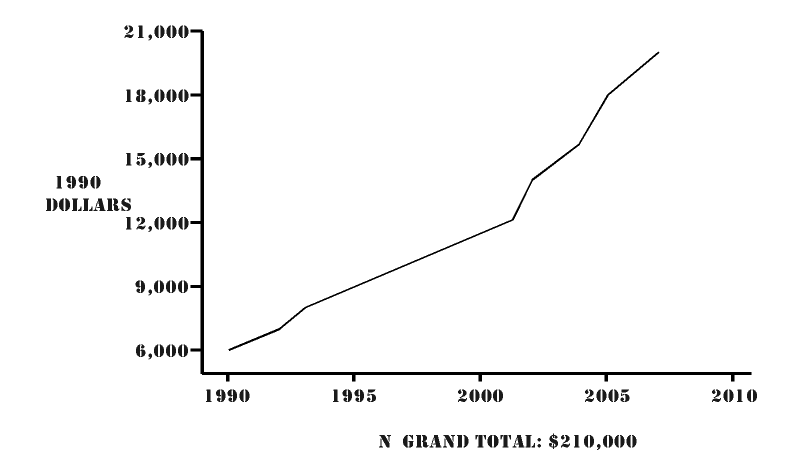
You can make your graph much more attractive by drawing a frame, adding labels, and specifying ticks. The following code, for example, produces a more sophisticated graph.
frame invis ht 2 wid 3 left solid bot solid

label left "1990" "Dollars" left .5

label bot "Grand Total:  $210,000"

ticks left out at 6000 "6,000", 9000 "9,000", 12000 "12,000", 15000 "15,000",\

18000 "18,000", 21000 "21,000"

ticks bot at 1990 "1990", 1995 "1995", 2000 "2000", 2005 "2005", \

2010 "2010"

draw solid

copy "cost.child"

.G2
Here, the frame is shown only on the bottom and left side. The x and y coordinates have labels. Also, the ticks have been specified explicitly; they are not determined by grap.
The data file—in this case, cost.child—also must contain no commas.
You can specify ticks as out. This means that the ticks themselves, but not their labels, appear outside the grap frame. You can also specify ticks as in, in which case they appear inside the frame.
If there are too many dates to fit across the bottom of a graph, you might want to use apostrophes in the labels, as in '10, '20, and '30. To do this, you must tell grap that your label is a literal. (This is what C programmers have to do all the time.)
If you want to specify the first and last dates in full, you need to use two tick lines. The following code, for example, produces bottom labels of 1900, '05, '10, '15, and so on, up to 1950:
ticks bottom out at 0 "1900", 50 "1950"

ticks bottom out from 05 to 45 by 5 "'%g"
Notice the words at 0 in the previous example. grap recognizes x,y coordinates, and unlike pic, it understands that 0,0 is the intersection of the x and y axes. To use coordinates, you use the coord command, as in
coord x first-value, y last-value
Without the coord command, grap automatically pads your first and last values, giving you blank space at the beginning and at the end of your graph. coord suppresses padding.
Likewise, use coord if you want an exponential graph rather than a linear graph.
You can plot the figures for low-income and high-income families on the graph shown in Figure 26.1.
Figure 26.1. The cost of raising a child, by income level.
The following code produced Figure 26.1.
.G1

frame invis ht 2 wid 3 left solid bottom solid

label left "1990" " Dollars" left .4

"High" ljust at 2008,27000

"Middle" ljust at 2008,20000

"Low" ljust at 2008,14000

ticks left out at 3000 "3,000", 6000 "6,000",\

9000 "9,000", 12000 "12,000", 15000 "15,000",\

18000 "18,000", 21000 "21,000", 24000 "24,000",\27000 "27,000", 30000 "30,000"

ticks bottom at 1990 "1990", 1995 "1995", 2000 "2000", 2005 "2005", 2010 "2010"

copy "cost2.child"

draw dotted

copy "cost.child"

new solid

copy "cost3.child"

new dashed

.G2
The data file is formatted like this:
1990     4330

1991     4590

1992     4870

1993     5510

1994     5850

1995     6200

1996     6550

1997     6859

1998     7360

1999     7570

2000     8020

2001     8500

2002     10360

2003     10980

2004     11640

2005     13160

2006     13950

2007     14780
Adding Shapes and Other Features
grap does more than just draw lines. It can print a grid. It can draw a circle, ellipse, or arrow. In fact, grap can draw just about anything that pic can.
grap has a macro facility just like that of pic:
define name X commands X
For the delimiter, you can use any character that isn't in the command text. You can also use braces. grap permits up to nine arguments, just as pic does.
In addition to data explicitly specified in a file, grap works with functions that more or less describe the data. The following code, for example, produces a sine curve:
frame ht 1 wid 3

draw solid

pi=atan2(0,-1)

for i from 0 to 2*pi by .1 do { next at i, sin(i) }
Summary of grap Commands
Table 26.1 summarizes the grap commands. Square brackets indicate that an argument is optional. A pipe between arguments means that you must use only one of the arguments.
Command |
Syntax |
Description |
|
frame |
frame [ht expr] [wid expr] [[side] [descr]] |
Specifies the dimensions for the frame drawn around the graph |
|
side |
top|bot|right|left |
Refers to the frame |
|
descr |
solid|invis|dotted|dashed |
Describes the lines used to draw the frame. You can control dotting and dashing by specifying the distance between dots or the length of and distance between dashes. |
|
label |
side list |
Specifies the placement of and the text for labels |
|
shift |
left|right|up|down expr |
Specifies the shift |
|
list |
rjust|ljust, above|below, size expr |
Encloses items in quotation marks. You can modify the placement. size expr reduces the point size. This is useful for labels or for putting words or symbols in the graph itself. |
|
coord |
coord [name] [x expr,expr] [y expr,expr] [log x|log y|log log] |
Specifies points on a graph and suppresses padding |
|
ticks |
ticks [side] in|out |
Specifies ticks on the side(s) of graph. The ticks can be inside or outside the frame. |
|
grid |
grid side [descr] |
Draws a grid with solid, dotted, dashed lines |
|
point |
[name] expr, expr |
Identify a point in a graph |
|
line |
line|arrow from point to point [descr] |
Draws a line (solid, dashed, dotted, and so on) |
|
circle |
circle at point [radius expr] |
Draws a circle |
|
draw |
draw [name] descr |
Draws a graph (solid, dotted, dashed, and so on) |
|
new |
new [name] |
Draws a new graph in the same frame |
|
next |
next name at point |
Continues plot of data in name at point. Default is current position. |
|
for |
for var from expr to expr [by expr] |
Looping function for grap |
|
if |
if expr then X anything X else X anything X |
Conditional statement for grap |
|
graph |
graph Picname |
Labels a graph. The label must start with an uppercase letter. |
|
define |
define name X commands X |
Defines a macro |
|
copy |
copy "filename" |
Copies the specified file into the graph file. copy is used for data files. |
|
sh |
sh X anything X |
Executes a shell command from within grap |
|
pic |
pic anything |
Draws a pic construct from within grap |
|
assignment |
var = expr |
Assigns a value to a variable |
In addition to the commands listed in Table 26.1, grap provides for predefined strings and built-in functions.
Predefined strings include bullet, plus, box, star, dot, times, htick, vtick, square, and delta.
Built-in functions include log (base 10), exp (base 10), int, sin, cos, atan2, sqrt, min, max, and rand.
Summary
grap gives you a quick and relatively easy way of inserting graphs into memos or other text files. It can produce line and bar graphs, but no pie charts, no color, and no shading. Nevertheless, grap can be a useful tool. Like pic, grap is
system-sensitive, so allow time for debugging.
Popular Tutorials
-
 MS Access
1109
MS Access
1109
-
 C++
1222
C++
1222
-
 HTML
584
HTML
584
-
 JavaScript
616
JavaScript
616
-
 Vbscript
873
Vbscript
873
-
 Oracle
473
Oracle
473
-
 VC++
875
VC++
875
-
 SQL
2959
SQL
2959
-
 XML
514
XML
514
-
 Java
814
Java
814
-
 Perl
455
Perl
455
-
 Linux
451
Linux
451