Web based School
Chapter 6
Using Environment Variables in Your Programs
- Understanding Environment Variables
- Printing Your Environment Variables
- Sending Environment Variables to Your E-Mail Address
- Using the Two Types of Environment Variables
- Finding Out Who Is Calling at YourWeb Page
- Getting the Username of Your Web Site Visitor
- Using the Cookie
- Returning the Cookie
- Learning Perl
- Summary
- Q&A
It seems like every time you turn around, you run into some code that uses environment variables. Environment variables are certainly integral to making your CGI program work. In this chapter, you will learn all about CGI environment variables and become familiar with the types of environment variables on your server. In addition, you will learn about two programs that let you see the environment variables with which your CGI program is working.
In particular, you will learn about these topics:
- Understanding environment variables
- Using the Path environment variable
- Printing environment variables
- Mailing environment variables
- Using subroutines in Perl
- Defining each CGI environment variable
- Knowing who is calling your Web page
- Using the Netscape cookie
Understanding Environment Variables
How does my program figure out how much data to read? Can I tell what type of browser is calling my CGI program? How can I get the name of the person who called my Web page? What do all these environment variables mean? What are environment variables? STOP!
That one is a good place to start.
You're familiar with variables by now; they are the placeholders for data that can change and data that you want to reference again elsewhere in your program. Well, that's what environment variables are, with one extra feature. That extra feature has to do with a term called scope.
Program Scope
When you set a variable in your CGI program, only your CGI program knows about that variable. In fact, by using the local command in Perl, you can limit the "knowledge" of a variable to the block of code in which you are executing. Just add the local(variable list); command between any enclosing curly braces ({}), and you get variables that only the code in those enclosing braces knows about. Any code outside the block of code or curly braces has no knowledge of the variables inside the block of code.
If you take the program fragment in Listing 6.1 as an example, the print statement on line 4 prints Mozilla/1.1N (Windows; I; 16bit)
and the print statement on line 6 prints testing scope. The rules of block scope can be summed up as Whatever is defined with the local command is limited in scope to the enclosing code block.
Listing 6.1. A program fragment illustrating block scope.
1: $browser = "testing scope";
2: {
3: local($browser) = $ENV{'HTTP_USER_AGENT'};
4: print "$browser \n" ;
5: }
6: print "$browser \n" ;
Why would you want to do this? Well, the most common application is for subroutine parameter passing. By assigning the incoming parameter list to a local variable list, you change from a call by reference to a call by value paradigm. This means that your CGI code can modify the input parameters and not affect the code that called your subroutine. The best advice I can give you is to use local variables-especially in subroutines. You'll find that you save a lot of debugging time as you develop your CGI programs.
Let's get back to environment variables. Remember that the difference we're talking about is file variables versus environment variables and the scope of those environment variables. The scope of environment variables is the process in which they execute.
This means that environment variables are the same for every process started within the same executing shell. Did I lose you with that sentence? I'll try to restate it; I'm trying to avoid the use of the word environment to describe environment variables. Every process or program you start has an environment of data with which it begins. Part of the data the program starts with is the environment variable data. Every process or program you start has the same environment variables available to them.
So enough with explanations. Let's talk some details. If I type env at the UNIX command line, what do I get? The simple answer is that I get the environment variables available to my program when executing from the command line. But first, you might be asking, "Why do I care about what type of environment variables are available from the command line?" You care because you should be testing your CGI programs by first executing them at the command line. This at least gets rid of all the syntax errors.
When you run your CGI program from the command line, however, not all the environment variables your program may need are available. So this is only the beginning of testing your program. In addition to being aware of what is available to your program at the command line, you need to understand what the differences are between command-line environment variables and when someone calls your CGI program from a Web page.
Listing 6.2 shows the environment variables available to my CGI programs from the command line. Probably the most important variable that is different between the command line variables and the CGI environment variables is the Path variable.
Listing 6.2. The environment variables from a user logon.
TERM=vt102
HOME=/usr/u/y/yawp
PATH=/usr/local/bin:/bin:/usr/bin:/usr/X11/bin:/usr/andrew/bin:/
usr/openwin/bin:/usr/games:.
SHELL=/bin/tcsh
MAIL=/var/spool/mail/yawp
LOGNAME=yawp
SHLVL=1
PWD=/usr/u/y/yawp
USER=yawp
HOST=langley
HOSTTYPE=i386-linux
OPENWINHOME=/usr/openwin
MANPATH=/usr/local/man:/usr/man/preformat:/usr/man:/usr/X11/man:/usr/openwin/man
MINICOM=-c on
HOSTNAME=langley.io.com
LESSOPEN=|lesspipe.sh %s
LS_COLORS=:
LS_OPTIONS=-8bit -color=tty -F -T 0
WWW_HOME=lynx_guidemarks.asp
The Path Environment Variable
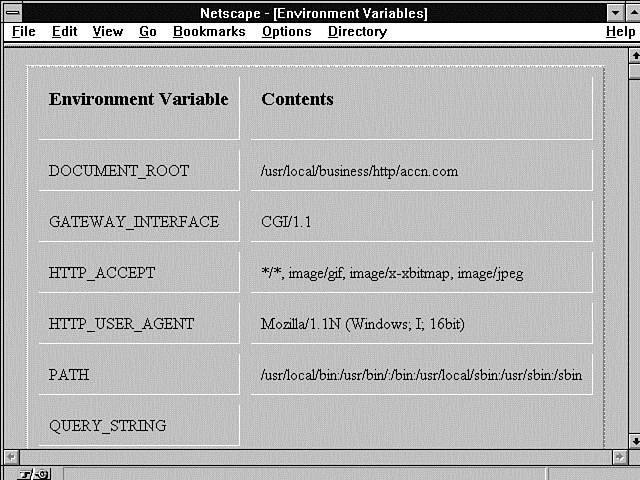
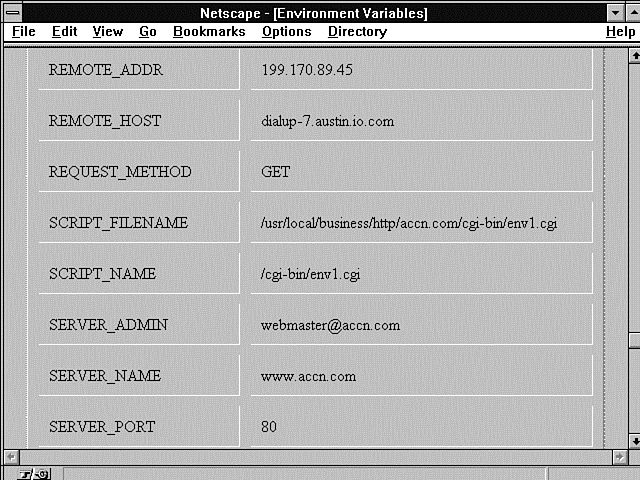
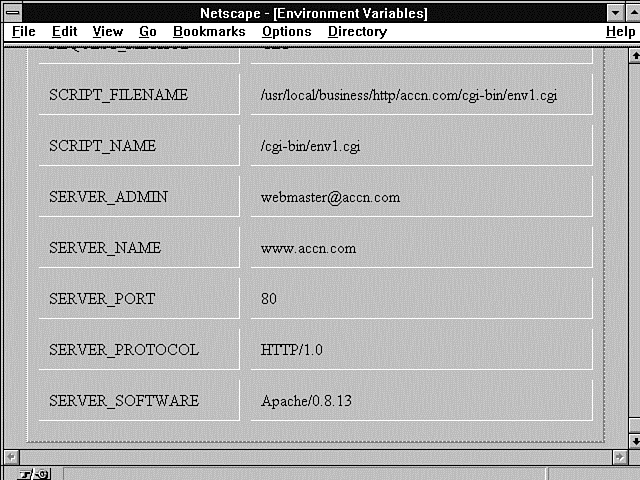
You can find the Path environment variable in Listings 6.2 and 6.3, as well as Figures 6.1 through 6.3 (and it's different for each figure). This is very important to you! The Path environment variable defines how your CGI program finds any other data or programs within your server. If your CGI program includes another file, when the Perl interpreter goes to search for that file, it uses the Path environment variable to define the areas it will search. The same is true for system commands or other executable programs you run from within your CGI programs. The Path environment variable tells the system how and where to look for programs and files outside your CGI program.
Figure 6.1 : The CGI environment variables as printed by the Print Environment Variables program.
Figure 6.2 : The CGI environment variables as printed by the Print Environment Variables program.
Figure 6.3 : The CGI environment variables as printed by the Print Environment Variables program.
Let's use the Path environment variable in Listing 6.2 as an example. When you execute a program from the command line, UNIX looks at the Path environment variable. This variable tells UNIX in which directories to look for executable programs and data. UNIX reads the Path environment variable from left to right, so it starts looking in the first directory in the path defined in Listing 6.2. The first directory is /usr/local/bin. If your program can't find what it is looking for there, it looks in the next directory, /usr/bin. Each new directory is separated by the colon (:) symbol. Let's skip everything in the middle and move to the last directory. You might have missed this one, and it's one of the most important. The period (.) at the end of the Path environment variable line is not a grammatical end of sentence; it is a command to the UNIX system. The period, in this context, tells UNIX to look in the current directory. The current directory is the directory in which your CGI program resides.
It's not always desirable to look in the current directory last. If the server begins its search elsewhere first, it might find a program that has the same name as yours and run it instead of your CGI program. Also, it's slower. If the program you want to run is in the current directory and the server has to search through every directory in the Path environment variable before it finds it in the current directory, that's time wasted! Take a look at the Server Side Include Path environment variable in Listing 6.3. Suppose that you're executing a CGI program that uses another CGI program that's in the same directory. The server has to search through every directory until it finds the current directory (.). That's 33 searches before it finds the correct path. Remember that the Path environment variable is used by your operating system to find the programs and data your CGI programs need to execute.
Getting the environment variables on your server is not very difficult. The SSI environment variables in Listing 6.3 are from a single SSI command: <!--# exec cmd="env" -->
You would think that running an SSI would be the same as running a command from the command line. Obviously, it's not! This is a clear example where you can see the difference between running your command from the command line and running it from within your CGI program.
Listing 6.3. The environment variables from an SSI.
DOCUMENT_NAME=env.shtml
SCRIPT_FILENAME=/usr/local/business/http/accn.com/cgiguide/chap6/env.shtml
SERVER_NAME=www.accn.com
DOCUMENT_URI=/cgiguide/chap6/env.shtml
REMOTE_ADDR=199.170.89.42
TERM=dumb
HTTP_COOKIE=s=dialup-3240811768697386
HOSTTYPE=i386
PATH=/home/c/cloos/bin:/usr/local/gnu/bin:/usr/local/staff/bin:/usr/local/X11R5/
bin:/usr/X11/bin:
/etc:/sbin:/usr/sbin:/usr/local/bin:/usr/contrib/bin:/usr/games:/usr/ingres/
bin:/usr/ucb:/home/c/cloos/bin:
/usr/local/gnu/bin:/usr/local/staff/bin:/usr/local/X11R5/bin:/usr/X11/bin:/etc:/
sbin:/usr/sbin:/usr/local/bin:
/usr/contrib/bin:/usr/games:/usr/ingres/bin:/usr/ucb:/usr/local/bin:/bin:/usr/
bin:/usr/X11/bin:/usr/andrew/bin:
/usr/openwin/bin:/usr/games:.:/sbin:/usr/sbin:/usr/local/sbin:/usr/X11/bin:/usr/
andrew/bin:/usr/openwin/bin:
/usr/games:.
SHELL=/bin/tcsh
SERVER_SOFTWARE=Apache/0.8.13
DATE_GMT=Friday, 22-Sep-95 13:56:58 CST
REMOTE_HOST=dialup-4.austin.io.com
LAST_MODIFIED=Friday, 22-Sep-95 08:55:11 CDT
SERVER_PORT=80
DATE_LOCAL=Friday, 22-Sep-95 08:56:58 CDT
DOCUMENT_ROOT=/usr/local/business/http/accn.com
OSTYPE=Linux
HTTP_USER_AGENT=Mozilla/1.1N (Windows; I; 16bit)
HTTP_AccEPT=*/*, image/gif, image/x-xbitmap, image/jpeg
DOCUMENT_PATH_INFO=
SHLVL=1
SERVER_ADMIN=webmaster@accn.com
_=/usr/bin/env
Printing Your Environment Variables
The next question you should be asking is, "Are the SSI environment variables different from the environment variables available to my CGI program?" Figures 6.1 through 6.3 show listings of the environment variables available when I run a CGI program on my server. Listing 6.4 shows the CGI program for printing these environment variables.
Listing 6.4. A CGI program for printing environment variables.
01: #!/usr/local/bin/perl
02: push(@Inc, "/cgi-bin");
03: require("cgi-lib.pl");
04:
05: print &PrintHeader;
06:
07: print "<html>\n";
08: print "<head> <title> Environment Variables </title> </head>\n";
09: print "<body>\n";
10:
11: print <<"EOF";
12: <center>
13: <table border=2 cellpadding=10 cellspacing=10>
14: <th align=left><h3>Environment Variable</h3>
15: <th align=left> <h3>Contents </h3><tr>
16: EOF
17: foreach $var (sort keys(%ENV))
18: {
19:     print "<td> $var <td> $ENV{$var}<tr>";
20: }
21: print <<"EOF"
22: </table>
23: </body>
24: </html>
25: EOF
This CGI program is a simple little script that you now should be comfortable reading and understanding. It has a few functions in it that I haven't talked about yet. Because both these functions are useful for lots of other purposes, I'll use this program to introduce them to you. The print environment variable's CGI program uses the Perl sort function and the Perl keys function (I mentioned the keys function in previous chapters). Both these functions are handy tools to have available in your programming toolbox. The keys function enables you to determine how your associative array is indexed, and the sort function puts the array of indexes returned from keys into alphabetical order.
As you can see, the environment variables available to your CGI program are even different from the environment variables available to your SSI programs.
Why is there such a difference? As I said earlier, environment variables are based on the process from which your program executes. The command line, SSIs, and CGI program all have different process environments. The command-line environment is based on your initial logon environment. From the command line, you get a custom environment that you can customize through startup scripts.
Because it is started by your Web server, the SSI environment starts with the environment available to a CGI program. When it executes a UNIX command like "env", however, it also gets the environment available at the command line. This happens because the SSI command must open a command-line process in order to run. So it gets the existing CGI environment variables plus the new environment variables available when it opened the command-line process.
Your CGI program gets its environment from your Web server-in this case, the Apache/0.8.13.
Because each method of printing these environment variables starts with a different executing environment, the environment variables available to each are different.
The keys function is solely for use with Perl's associative arrays. Remember that associative arrays are indexed by strings. This can make programming painful when you are trying to get data out and you are not sure what's in the array. This is clearly the case with the ENV array. You really don't know what's in it. For one thing, the same environment variables are not always available to your CGI program. I'll talk about that in more detail later in this chapter. Of course, Perl makes things easy rather than hard. So there must be a simple way to get the data out of an associative array, even if you don't know what the indexes are.
Anyway, the keys function returns an array or a list (arrays and lists are the same thing as far as Perl is concerned) of the indexes to an associative array. The order of the returned indexes is based on how the associative array first was constructed. You can control the order in which your program sees the returned values by using the sort function, however.
The Perl sort function sorts on an input array. This means that the array input from keys is passed to sort. Sort modifies the array and returns an array alphabetically sorted, from a to z. You can invert the sort order, from z to a, by using the reverse command.
The Print Environment Variables program uses the keys and sort functions on line 17 of Listing 6.4. The keys function is passed the associative %ENV array. It returns a list of all the indexes or keys to the %ENV array. The sort function then sorts the list in alphabetical order.
Sending Environment Variables to Your E-Mail Address
So far, you've seen how to send environment variables back to you through your Web browser, but what if you want to save those variables on your local computer? You could just use the File Save As function on your browser, of course, but that doesn't format the data in a very usable manner. The other option is to save the data to a local file on your server. That might present a couple of problems for you, though. First, you might not have the privileges you need to write a file to your server. I hope this isn't the case, and I suggest changing servers when you can if you encounter this situation. Not all Server Administrators are as helpful as mine, though.
Second, and more likely, you don't want to have to deal with reading the file on a UNIX system. Heck-you probably would have to Telnet in and then use some arcane editor like emacs or vi.
Instead of this headache, you can use the program in Listing 6.5 to mail your environment variable back to your user account. This program was written by Matthew D. Healy and is available at this URI: http://paella.med.yale.edu/~healy/perltest
This example has lots of useful potential for you. First, it shows you how to use the mail program. I go into detail on mailers in Chapter 11, "Using Internet Mail with Your Web Page," but this is a nice introduction. Second, this program shows you your environment variables URI encoded and decoded. This makes a great reference for the future. Third, you obviously can adapt this program to other purposes.
As you go though this program, you will learn about Perl subroutines and how they receive and return variables, call-by-reference and call-by-value parameter passing, and the Perl special variables $_, @_, and |.
Listing 6.5. A CGI program for mailing environment variables.
001: #!/usr/local/bin/perl
002:
003: #perltest.p
004: #for testing cgi-bin interface
005: # Put this in your cgi-bin directory, changing the e-mail address below...
006:
007: #sub to remove cgi-encoding
008: sub unescape {
009:     local ($_)=@_;
010:     tr/+/ /;
011:     s/%(..)/pack("c",hex($1))/ge;
012:     $_;
013: }
014:
015: # -------------------------------------------------------------------------
016: # The escape and unescape functions are taken from the wwwurl.pl package
017: # developed by Roy Fielding <fielding@ics.uci.edu> as part of the Arcadia
018: # project at the University of California, Irvine. It is distributed
019: # under the Artistic License (included with your Perl distribution
020: # files).
021: # -------------------------------------------------------------------------
022:
023: #++++++++++++++++++++++++++++++++++++++++++++++++++++++++++++++++++++++++++
024: #.PURPOSE       Encodes a string so it doesn't cause problems in URL.
025: #
026: #.REMARKS
027: #
028: #.RETURNS       The encoded string
029: #--------------------------------------------------------------------------
030:
031: sub cgi_encode
032: {
033:     local ($str) = @_;
034:     $str = &escape($str,'[\x00-\x20"#%/+;<>?\x7F-\xFF]');
035:     $str =~ s/ /+/g;
036:     return( $str );
037: }
038:
039: # =========================================================================
040: # escape(): Return the passed string after replacing all characters
041: #           matching the passed pattern with their %XX hex escape chars.
042: #           Note that the caller must be sure not to escape reserved URL
043: #           characters (e.g. / in path names, ':' between address and port,
044: #           etc.) and thus this routine can only be applied to each URL.
045: #
046: #           $escname = &escape($name,'[\x00-\x20"#%/;<>?\x7F-\xFF]');
047: #
048: sub escape
049: {
050:     local($str, $pat) = @_;
051:
052:     $str =~ s/($pat)/sprintf("%%%02lx",unpack('C',$1))/ge;
053:     return($str);
054: }
055:
056: #now the main program begins
057:
058: #testing environment variables passed via URL...
059: print "Content-type: text/plain","\n";
060: print "\n";
061:
062: open (MAIL,"| mail name@foo.edu") ||
063:   die "Error: Can't start mail program - Please report this error to
  name@foo.edu";
064:
065:
066: print MAIL "Matt's New cgi-test script report","\n";
067: print MAIL "\n";
068: print MAIL "\n";
069: print MAIL "Environment variables" ,"\n";
070: print MAIL "\n";
071:
072:         foreach(sort keys %ENV)  #list all environment variables
073:            {
074:               $MyEnvName=$_;
075:               $MyEnvValue=$ENV{$MyEnvName};
076:               $URLed = &cgi_encode($MyEnvValue);
077:               $UnURLed = &unescape($MyEnvValue);
078:               print MAIL $MyEnvName,"\n";
079:               print MAIL "Value: ",$MyEnvValue,"\n";
080:               print MAIL "URLed: ",$URLed,"\n";
081:               print MAIL "UnURLed: ",$UnURLed,"\n";
082:               print MAIL "\n";
083:            }
084:
085:  if ($ENV{'REQUEST_METHOD'} eq "POST")
086:    {#POST data
087:
088:       print MAIL "POST data \n";
089:
090:     for ($i = 0; $i < $ENV{'CONTENT_LENGTH'}; $i++)
091:         {
092:           $MyBuffer .= getc;
093:         }
094:
095: print MAIL "Original data: \n";
096: print MAIL $MyBuffer,"\n";
097: print MAIL "unURLed: \n";
098: print MAIL &unescape($MyBuffer), "\n\n";
099:
100:       @MyBuffer = split(/&/,$MyBuffer);
101:
102:       foreach $i (0 .. $#MyBuffer)
103:         {
104:            print MAIL $MyBuffer[$i],"\n";
105:            print MAIL "FName:",&unescape($MyBuffer[$i]),"\n";
106:         }
107:    }
108:
109:
110: close ( MAIL );
111:
112: print "\n";
113: print "Thanks for filling out this form !\n";
114: print "It has been sent to name@foo.edu\n<p>\n";
Perl Subroutines
The program in Listing 6.5 is nicely segmented into several smaller subroutines. Subroutines break your logic up into smaller reusable pieces. You've seen this with the ReadParse function. It is a good habit to get into, and I highly recommend it.
This program has all its subroutines defined first, followed by the main program statements. The convention of declaring subroutines first comes from using compilers that require you to declare and/or define subroutines before you use them. You do not have to do this in Perl.
I prefer to define all my subroutines last. That way, the main program logic is always at the top of the file and easy to find. Anyway, if you use Perl, a subroutine can be defined anywhere in your CGI program. Perl treats the subroutine definition as a non-executable statement and just doesn't care where it finds it in your program.
When your program is compiled into memory, Perl builds a cross-reference table so that it can find all the subroutines you have defined. You therefore can call your subroutines regardless of where you define them.
All the parameters passed to your subroutine are in the special Perl variable @_. This array actually references the locations of the passed-in variables. So, if you change something in the @_ array, you are changing the contents of the passed-in parameters. This type of parameter passing is called pass by reference because any use of the variables in your subroutine actually references and modifies the passed parameters.
Usually, it is considered a smart idea to use another form of parameter passing: pass by value.
With this form of parameter passing, all the modifications to your subroutine's parameters are local to the subroutine. This means that the parameters have a scope local to the subroutine.
A convention has developed with Perl that simulates pass by value. If you use the local fun-ction, you create variables in which the scope is local to the subroutine. You often will see the first line of a subroutine as the local call. Then the subroutine operates on the variables defined in the local command. Each of the subroutines in this mail program contains a local command.
Finally, Perl subroutines act differently than most other languages in one important way. The result of the last line evaluated in the subroutine is returned automatically to the calling routine.
The Unescape Subroutine
As you can see, the last line of the subroutine unescape, repeated in Listing 6.6, takes advantage of this by having Perl evaluate the $_ variable. The side effect of this is that the local copy of $_ is returned to the calling subroutine. If you want to explicitly state the return value, you can do so by using a return statement.
Listing 6.6. The subroutine unescape.
1: #sub to remove cgi-encoding
2: sub unescape {
3: local ($_)=@_;
4: tr/+/ /;
5: s/%(..)/pack("c",hex($1))/ge;
6: $_;
7: }
Okay, let's take a closer look at the subroutines in this program. The subroutine unescape converts the URL-encoding input parameter much like ReadParse. The tr function is a built-in function and works much like the built-in s function. The tr stands for translate, and s stands for substitute.
The tr function translates all occurrences of the characters found in the search pattern to those found in the replacement list. So, in this case, it replaces every plus sign (+) with a space.
Substitute performs exactly the same function, but in its own way. I discussed substitute earlier, and I don't think it deserves a rehash here.
Perl has lots of different functions in it. Some of your choices are based on familiarity. In this case, using tr in unescape or s in ReadParse is not significantly different.
Line 5 of Listing 6.6, s/%(..)/pack("c",hex($1))/ge;
is the same as ReadParse. The difference you might notice about this function is the use of the $_ character. A lot of people find using the $_ variable confusing-at least initially. In case you are confused about what these functions are modifying, it is the $_ variable. This variable is the underlying variable or default for lots of Perl functions.
This code makes its own local copy from the input array @_ on line 3 of the globally scoped $_ variable and then returns the local copy on the last line.
One final note about subroutines: If no parameters are passed to the subroutine, the @_ array takes on the last value of the $_ variable.
The cgi_encode Subroutine
Now let's take a brief look at the cgi_encode subroutine, repeated in Listing 6.7 for convenience. It passes that strange-looking parameter with all the xs and pound signs (#) in it. What is it doing? Well, it's telling the escape routine to look for all the hexadecimal numbers between 00 and 20 and 7F and FF. These numbers are outside the boundaries of normal, printable ASCII characters. It also says to look for special characters like percent signs (%), single quotation marks ('), question marks (?), and so on.
Listing 6.7. The subroutine cgi_encode.
1: sub cgi_encode
2: {
3: local ($str) = @_;
4: $str = &escape($str,'[\x00-\x20"#%/+;<>?\x7F-\xFF]');
5: $str =~ s/ /+/g;
6: return( $str );
7: }
The escape routine does the opposite of the decode routine. It just converts all these special characters to their hexadecimal number equivalents. It does this using the substitute function and the unpack function. Unpack just works like a reverse pack function. (The pack function was covered in Chapter 5 "Decoding Data Sent to Your CGI Program.")
The Main Mail Program
Now that you understand all the subroutines, the main program is a snap. I have repeated the main program in Listing 6.8 so that you don't have to switch back and forth between pages. This means that most of the program was duplicated, but I personally like seeing the entire program in a guide. That way, when I look at the program, I can see how everything fits together.
Listing 6.8. The main program for mailing environment variables.
01: #now the main program begins
02: #testing environment variables passed via URL...
03: print "Content-type: text/plain","\n";
04: print "\n";
05:
06: open (MAIL,"| mail name@foo.edu") ||
07:   die "Error: Can't start mail program - Please report this error to
  name@foo.edu";
08:
09: print MAIL "Matt's New cgi-test script report","\n";
10: print MAIL "\n";
11: print MAIL "\n";
12: print MAIL "Environment variables" ,"\n";
13: print MAIL "\n";
14:
15:         foreach(sort keys %ENV)  #list all environment variables
16:            {
17:               $MyEnvName=$_;
18:               $MyEnvValue=$ENV{$MyEnvName};
19:               $URLed = &cgi_encode($MyEnvValue);
20:               $UnURLed = &unescape($MyEnvValue);
21:               print MAIL $MyEnvName,"\n";
22:               print MAIL "Value: ",$MyEnvValue,"\n";
23:               print MAIL "URLed: ",$URLed,"\n";
24:               print MAIL "UnURLed: ",$UnURLed,"\n";
25:               print MAIL "\n";
26:            }
27:
28:  if ($ENV{'REQUEST_METHOD'} eq "POST")
29:    {#POST data
30:       print MAIL "POST data \n";
31:     for ($i = 0; $i < $ENV{'CONTENT_LENGTH'}; $i++)
32:         {
33:           $MyBuffer .= getc;
34:         }
35:
36: print MAIL "Original data: \n";
37: print MAIL $MyBuffer,"\n";
38: print MAIL "unURLed: \n";
39: print MAIL &unescape($MyBuffer), "\n\n";
40:       @MyBuffer = split(/&/,$MyBuffer);
41:       foreach $i (0 .. $#MyBuffer)
42:         {
43:            print MAIL $MyBuffer[$i],"\n";
44:            print MAIL "FName:",&unescape($MyBuffer[$i]),"\n";
45:         }
46:    }
47:
48: close ( MAIL );
49: print "\n";
50: print "Thanks for filling out this form !\n";
51: print "It has been sent to name@foo.edu\n<p>\n";
Don't forget that the first line of code executed by Perl for the entire program begins after the comment about testing environment variables. Printing the content type with two newlines is the first code output by the program.
The rest seems kind of anticlimactic. A filehandle is opened. The filehandle is named Mail. From this point, every print command sends data to the UNIX mail program.
Each of the environment variables is encoded and decoded and then mailed to your username. You get to see the environment variable in each of its three formats:
- As it appears exactly in the environment variable array structure
- As it looked URL encoded
- As it should look URL decoded
Next, on lines 28-34, you can see how to check for and read Post data.
This is a simple for loop. It reads one character at a time, using the getc function, reading from the STDIN filehandle. Remember that Post data always is available at STDIN. You saw this handled differently in the ReadParse function. ReadParse read the entire input string in one line: read(STDIN,$in,$ENV{'CONTENT_LENGTH'});
Using a for loop and reading one character at a time works also, though, and it looks a lot more like traditional coding languages. The Post data then is encoded and decoded just like the environment data.
This stuff actually becomes pretty easy to understand if you just step through it one line at a time.
There is one bit of Perl magic here that I want to bring out. It's the vertical bar (|) used in the open statement. The vertical bar (|) used in an open command before the filename tells Perl that you want to send all your output data to a system command and not a file.
This makes your job of sending mail messages easy and very safe. By opening the mail program with the parameter name@foo, you told the mail program where you wanted to send the data. Anything sent to the mail program after the initial open statement is sent in the body of the mail message. Because everything is sent in the body of the mail message, any offensive hacker commands can never reach the command line. There is no concern about hacker commands getting to the UNIX shell and wreaking havoc.
Don't forget to close your filehandle Mail. This flushes the output buffer and initiates the sending of the mail.
Remember to change the line that opens up the mail account to point to your mailbox name; @ foo.edu should be replaced with your e-mail address.
When I used this program, accessing it through a registration form, it returned the data shown in Listing 6.9.
Listing 6.9. CGI environment variables returned by the Mail
Environment Variables program.
Matt's New cgi-test script report
Environment variables
DOCUMENT_ROOT
Value: /usr/local/business/http/accn.com
URLed: %2fusr%2flocal%2fbusiness%2fhttp%2faccn.com
UnURLed: /usr/local/business/http/accn.com
GATEWAY_INTERFACE
Value: CGI/1.1
URLed: CGI%2f1.1
UnURLed: CGI/1.1
HTTP_AccEPT
Value: */*, image/gif, image/x-xbitmap, image/jpeg
URLed: *%2f*,%20image%2fgif,%20image%2fx-xbitmap,%20image%2fjpeg
UnURLed: */*, image/gif, image/x-xbitmap, image/jpeg
HTTP_COOKIE
Value: s=dialup-7207812894493652
URLed: s=dialup-7207812894493652
UnURLed: s=dialup-7207812894493652
HTTP_REFERER
Value: http://www.accn.com/cgiguide/chap6/call-mail.asp
URLed: http:%2f%2fwww.accn.com%2fcgiguide%2fchap6%2fcall-mail.asp
UnURLed: http://www.accn.com/cgiguide/chap6/call-mail.asp
HTTP_USER_AGENT
Value: Mozilla/1.1N (Windows; I; 16bit)
URLed: Mozilla%2f1.1N%20(Windows%3b%20I%3b%2016bit)
UnURLed: Mozilla/1.1N (Windows; I; 16bit)
PATH
Value: /usr/local/bin:/usr/bin/:/bin:/usr/local/sbin:/usr/sbin:/sbin
URLed: %2fusr%2flocal%2fbin:%2fusr%2fbin%2f:%2fbin:%2fusr%2flocal%2fsbin:
%2fusr%2fsbin:%2fsbin
UnURLed: /usr/local/bin:/usr/bin/:/bin:/usr/local/sbin:/usr/sbin:/sbin
QUERY_STRING
Value:
first=Eric+&last=Herrmann&street=255+S.+Canyonwood+Dr.&city=Dripping+Springs&state=Texas
&zip=78620&phone=%28999%29+999-9999&simple=+Submit+Registration+
URLed:
first=Eric%2b&last=Herrmann&street=255%2bS.%2bCanyonwood%2bDr.&city=Dripping%2bSprings
&state=Texas&zip=78620&phone=%2528999%2529%2b999-
9999&simple=%2bSubmit%2bRegistration%2b
UnURLed: first=Eric &last=Herrmann&street=255 S. Canyonwood Dr.&city=Dripping
Springs&state=Texas&zip=78620&phone=(999) 999-9999&simple= Submit
Registration
REMOTE_ADDR
Value: 199.170.89.45
URLed: 199.170.89.45
UnURLed: 199.170.89.45
REMOTE_HOST
Value: dialup-7.austin.io.com
URLed: dialup-7.austin.io.com
UnURLed: dialup-7.austin.io.com
REQUEST_METHOD
Value: GET
URLed: GET
UnURLed: GET
SCRIPT_FILENAME
Value: /usr/local/business/http/accn.com/cgiguide/chap6/perltest.cgi
URLed: _%2fusr%2flocal%2fbusiness%2fhttp%2faccn.com%2fcgiguide%2fchap6%2fperltest.cgi
UnURLed: /usr/local/business/http/accn.com/cgiguide/chap6/perltest.cgi
SCRIPT_NAME
Value: /cgiguide/chap6/perltest.cgi
URLed: %2fcgiguide%2fchap6%2fperltest.cgi
UnURLed: /cgiguide/chap6/perltest.cgi
SERVER_ADMIN
Value: webmaster@accn.com
URLed: webmaster@accn.com
UnURLed: webmaster@accn.com
SERVER_NAME
Value: www.accn.com
URLed: www.accn.com
UnURLed: www.accn.com
SERVER_PORT
Value: 80
URLed: 80
UnURLed: 80
SERVER_PROTOCOL
Value: HTTP/1.0
URLed: HTTP%2f1.0
UnURLed: HTTP/1.0
SERVER_SOFTWARE
Value: Apache/0.8.13
URLed: Apache%2f0.8.13
UnURLed: Apache/0.8.13
Using the Two Types of Environment Variables
Not all environment variables are created equal. Why is it that you don't always know what's in the environment variable's associative array? The environment variable is the server's way of communicating with your CGI program, and each communication is unique.
The uniqueness of each communication with your CGI program is based on the request headers sent by the Web page client when it calls your CGI program. If your Web page client is responding to an Authorization response header from the server, it sends Authorization request headers. Because the request headers define a number of your environment variables, you can never be sure which environment variables are available.
Environment Variables Based on the Server
Some of the environment variables always are set for you and are not dependent on the CGI request. These environment variables typically define the server on which your CGI program runs. The environment variables discussed in the following subsections are based on your server type and always should be available to your CGI program.
GATEWAY_INTERFACE
The environment variable GATEWAY_INTERFACE is the version of the CGI specification your server is using. The CGI specification is defined at http://hoohoo.ncsa.uiuc.edu/cgi/
This is an excellent site for further information about CGI. At the time of this writing, CGI is at revision 1.1. You can see this in Figure 6.1. The format of the variable is CGI/revision number
SERVER_ADMIN
The environment variable SERVER_ADMIN should be the e-mail address of the Web guru on your server. When you can't figure out the answer yourself, this is the person to e-mail. Be careful, though. These people usually are very busy. You want to establish a good relationship early so that your Web guru will respond to your requests in the future. Make sure that you have tried all the simple things-everything you know first-before you ask this person questions. This is definitely an area in which "crying wolf" can have a negative effect on your ability to get your CGI programs working. When you have a tough problem that no one seems able to figure out, you want your Server Administrator to respond to your questions. So don't overload her with simple problems that you should be able to figure out on your own.
SERVER_NAME
The environment variable SERVER_NAME contains the domain name of your server. If a domain name is not available, it will be the Internet protocol (IP) number of your server. This should be in the same URI format as that in which your CGI program was called.
SERVER_SOFTWARE
The environment variable SERVER_SOFTWARE contains the type of server under which your CGI program is running. You can use this variable to figure out what type of security methods are available to you and whether SSIs are even possible. This way, you don't have to ask your Webmaster these simple questions.
Environment Variables Based on the Request Headers
This next set of environment variables gives your CGI program information about what is happening during this call to your program. These environment variables are defined when the server receives the request headers from a Web page. Some of these variables should look very familiar because they are directly related to the HTTP headers discussed in Chapter 2 "Understanding How the Server and Browser Communicate."
AUTH_TYPE
The AUTH_TYPE environment variable defines the authentication method used to access your CGI program. The AUTH_TYPE usually is Basic, because this is the primary method for authentication of the Net right now. AUTH_TYPE defines the protocol-specific authentication method used to validate the user. I discuss how to set up a user-password authentication scheme in Chapter 12, "Guarding Your Server Against Unwanted Guests." In the next chapter, you will use request headers and environment variables to perform user authentication.
Content-Length
The Content-Length environment variable specifies the amount of data attached to the end of the request headers. This data is available at STDIN and is identified with the Post or Put method.
Content-Type
The Content-Type environment variable defines the type of data attached with the request method. If no data is sent, this field is left blank. The content type will be application/x-www-form-urlencoded
when posting data from a form.
HTTP_REQUEST_METHOD
The HTTP_REQUEST_METHOD environment variable is the HTTP method request header converted to an environment variable. You might remember that the following request methods are possible: Get, Post, Head, Put, Delete, Link, and Unlink. Get and Post certainly are the most common for your CGI program and define where incoming data is available to your CGI program. If the method is Get, the data is available at the query string. If it is Post, the data is available at STDIN, and the length of the data is defined by the environment variable CONTENT_LENGTH. The Head request method normally is used by robots searching the Web for page links. The other methods are not quite as common and tell the server to modify a URL or file on the server.
PATH
The PATH environment variable is not strictly considered a CGI environment variable. This is because it actually includes information about your UNIX system path. This was discussed in "The Path Environment Variable," earlier in this chapter.
PATH_INFO
The PATH_INFO environment variable is set only when there is data after the CGI program (URI) and before the beginning of the QUERY_STRING variable. Remember that the query string begins after the question mark (?) on the link URI or Action field URI. PATH_INFO can be used to pass any type of data to your CGI program, but it usually sends information about finding files or programs on the server. The server strips everything after it finds the target CGI program (URI) and before it finds the first question mark. This information is URI-decoded and then placed in the PATH_INFO variable.
PATH_TRANSLATED
The PATH_TRANSLATED environment variable is a combination of the PATH_INFO variable and the DOCUMENT_ROOT variable. It is an absolute path from the root directory of the server to the directory defined by the extra path information added from PATH_INFO. This is called an absolute path. This type of path often is used when your CGI program moves in and out of different directories or different shell environments. As long as your server doesn't change, you can use the absolute path regardless of where you put or move your CGI program. Sometimes absolute paths are considered bad because you cannot move your CGI program to another server. You have to decide which is more likely:
- Your CGI program will change directories.
- You will change servers.
- The absolute path will change on your existing server. This can happen when your server adds or removes disks.
QUERY_STRING
The QUERY_STRING environment variable contains everything included on the URI after the question mark. The setup for a query string normally is performed by your browser when it builds the request headers. You can create the data for your own query string by including a question mark in your hypertext reference and then URI-encoding any data included after the question mark. This is just one more way to send data to your program. Two big drawbacks to using QUERY_STRING are the YUK! factor and the size of the input buffer. The YUK! factor means that your data is displayed back to your client in the Location field. The size problem means that you have a limitation on how much data you can send to your program using this method. The amount of data you can send without exceeding the input buffer is server specific, so I can't give you any hard rules. But you should try to limit all data you send using this method to less than 1,024 bytes.
REMOTE_ADDR
The REMOTE_ADDR environment variable has the numeric IP address of the browser or remote computer calling your CGI program. Read the REMOTE_ADDR from right to left. The furthest right number defines today's connection to the remote server. Or, at least, this is the case when your Web browser client connects from a modem to a commercial server.
REMOTE_HOST
The REMOTE_HOST environment variable contains the domain name of the client accessing your CGI program. You can use this information to help figure out how your script was called. If the domain name is unavailable to your server, this field is left empty. If this field is empty, the REMOTE_ADDR environment variable is filled in. Your program can read this environment variable from right to left. There can be more than one subhierarchy after the first period (.), so be sure to write your code to deal with more than one level of domain hierarchy to the left of the period.
REMOTE_IDENT
The REMOTE_IDENT environment variable is set only if the remote username is retrieved from the server using the IDENTD method. This occurs only if your Web server is running the IDENTD identification daemon. This is a protocol to identify the user connecting to your CGI program. Just having your system running IDENTD is not sufficient, however; the remote server making the HTTP request also must be running IDENTD.
REMOTE_USER
The REMOTE_USER environment variable identifies the caller of your CGI program. This value is available only if server authentication is turned on. This is the username authenticated by the username/password response to a response status of Unauthorized Access (401) or Authorization Refused (411).
SCRIPT_FILENAME
The SCRIPT_FILENAME environment variable gives the full path to the CGI program. You do not want to use this variable when building a self-referencing URI. Remember that the server is making some assumptions about how you will access your CGI program. The full pathname would be appended to the server's full pathname, thereby totally confusing your poor server. The server starts with the server name, and from there it determines the document root; then it adds the path to your CGI program.
SCRIPT_NAME
The SCRIPT_NAME environment variable gives you the path and name of the CGI program that was called. The path is a relative path starting at the document root path. You can use this variable to build self-referencing URLs. Suppose that you want to return a Web page and you want to generate an HTML that includes a link to the called CGI program. The print string would look like this: print "<a href=http://$SERVER_NAME$SCRIPT_NAME> This is a link to the CGI program you just called </a>";
SERVER_PORT
The SERVER_PORT environment variable defines the TCP port to which the request headers were sent. As discussed in Chapter 2 the port is like the telephone number used to call the server. The default port for server communications is 80. When you see a number appended to the domain name server, this is the port number to which the request was sent-for example, www.io.com:80. Because the default port is 80, it generally is not necessary to include the port number when making URI links.
SERVER_PROTOCOL
The SERVER_PROTOCOL environment variable defines the protocol and version number being used by this server. For the time being, this should be HTTP/1.0. The HTTP protocol is the only server protocol used for the WWW at the moment. But, like most good designs, this environment variable is designed to allow CGI programs to operate on servers that support other communications protocols.
Finding Out Who Is Calling at YourWeb Page
"How can I tell who is using my Web site?" This question is asked over and over again. It is asked by professionals and amateurs. It's natural to want to know who is using your Web site. In the next several pages, you will take a look at this question and see how close you can come to answering it. You'll start with the easier problems and work up to the harder problem of who is visiting your Web site.
Before you get started on this topic, let me give you the standard Net advice. The Internet is most loved for its anarchy and anonymity. People can cruise the Net and feel like they are doing it anonymously. Don't abuse the capability to get people's names or links, or you will find your Web site quickly blacklisted and abandoned. News travels quickly on the Net, and bad news about your Web site travels even faster.
Let's start with an easy one first. Suppose that your only goal is to figure out how your Web site is getting called. Where are all these hits coming from? Well, the environment variable with that answer is HTTP_REFERER.
Notice that this environment variable is prefixed with HTTP_. All the request headers sent by the browser are turned into environment variables by your server, the request headers are prefixed with HTTP_, and the request header is capitalized. This is both good and bad. Because not all browsers are created equal, you cannot depend on getting the same request headers with every call. In other words, not all browsers will send the Referer request header, so you might not have the HTTP_REFERER environment variable available. On the other hand, because all browsers tell the server what type of client they are, you can write your code to work with the browsers that send you the HTTP_REFERER environment variable. There are two ways to handle this, and I'll show you both methods.
First, you could check for the browser type. You did this back in Chapter 2. The browser type is in the environment variable HTTP_USER_AGENT. Listing 6.10 shows a code fragment for getting out Netscape's Mozilla and version number. This actually is probably the harder method. But if you want to do specific things based on the HTTP_USER_AGENT type, this is the way to go. You might want to build a table with all the different HTTP_USER_AGENTs you're interested in, and then you could use loop through the table to look for valid HTTP_USER_AGENTs.
Listing 6.10. A program fragment for decoding HTTP_USER_AGENT.
1: @user_agent = split(/\//,HTTP_USER_AGENT);
2: if ($user_agent[0] eq "Mozilla"){
3: @version = split(/ /, $user_agent[1]);
4: $version_number = substr($version_number, 0, 3)};
If you just want to make sure that the HTTP_REFERER environment variable is defined, use the Perl defined function. Because all you are trying to do is determine whether the HTTP_Referer environment variable is set, this seems like a more straightforward approach.
Use the Perl fragment if (defined ($ENV{'HTTP_REFERER'})
to determine whether HTTP_REFERER is set and then perform a specific operation. From here, you can open a file or send yourself mail.
Back to HTTP_REFERER. This environment variable contains the full URI reference to the calling Web page. Just save the value to a file, and you've got the link back to the calling Web page.
That's the easy one. Now take a look at what is and isn't possible with some other environment variables that contain more specific information about your Web site visitor. First, the two that are the most likely to have information in them: the REMOTE_HOST and the REMOTE_ADDR variables.
The REMOTE_HOST environment variable usually is filled in. It contains the domain name of your Web site visitor's server as you normally would type it in the Location field of your Web browser. You can use this field to begin getting some ideas on how your Web site is linked around the Net. Or, you might have a list of trusted sites that you compare the REMOTE_HOST environment variable with to determine who you want to allow access to your Web page.
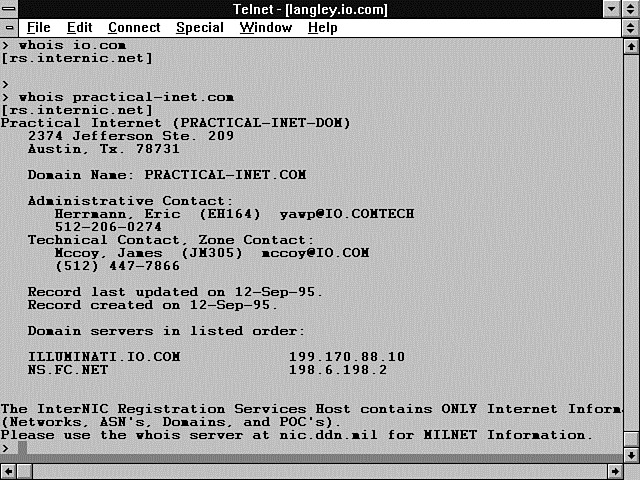
If you want more specific information about where in the country the calling Web site is located, use the InterNIC whois command. Telnet into your server and type the name of the REMOTE_HOST environment variable. Figure 6.4 shows an example of the whois command. As you can see, there is quite a bit of information provided here about what type of server is calling you. You might find this handy to use if you are having problems with a robot from this site and the 'bot does not contain an HTTP_FROM environment variable. With this information, you can go to the registered administrative contact and resolve your problems with the errant robot.
Figure 6.4 : Using the whois command to identify REMOTE_HOST .
Even if the REMOTE_HOST environment variable is not filled in, the REMOTE_ADDR always will be set. This variable contains the IP address of the calling Web page's server. You can use the whois command with this environment variable also. You are likely to get a different set of information back, however. The whois command used on the IP address returns the main server. You might find that your REMOTE_HOST name is only a subpart of an existing server. You normally will want to ignore the far right field in the IP address. InterNIC does not give registration information beyond the first three dotted decimal IP address numbers. You can see the results of the whois command in Figure 6.5. I have performed all these tasks manually, but you easily could add to the script fragment in Listing 6.11 to handle this type of work for you.
Figure 6.5 : Using the whois command to identify REMOTE_ADDR .
Before you save HTTP_REMOTE_ADDR, you should clean up the IP address. The IP address should be limited to the first three IP numeric registration levels. So, if the address in the HTTP_REMOTE_ADDR environment variable is 199.17.89.65.99, you only want 199.89.65. The Perl fragment in Listing 6.11 performs this work for you.
Listing 6.11. Cleaning up HTTP_REMOTE_ADDR.
($part1, $part2, $part3, $the_rest) = split(/\./$ENV{'HTTP_REMOTE_ADDR'}, 4);
$address = $part1 . '.' . $part2 . '.' . $part3;
print (output_file, "$address\n") ;
Getting the Username of Your Web Site Visitor
So far, you have been able to tell where the links to your Web site are originating from and to get information about the server where those links are connected.
Now let's look at the three environment variables that are supposed to contain the name of your Web site visitor: HTTP_IDENTD, HTTP_FROM, and REMOTE_USER.
First, let's deal with and then ignore the environment variable HTTP_IDENTD. This is a lousy means of confirming who is visiting your Web site. It only works if both the client and the server are running the IDENTD process. Even if the server is doing everything correctly, HTTP_IDENTD still can fail when you try to use this method, because you are dependent on the client's server also performing correctly. Even when everything works, the process requires extra communication between the server and the client, and that can really slow things down.
In the best of worlds, you are in charge of the server and you can turn on IDENTD yourself. But, more than likely, you are not the owner of the server and you would have to convince someone to turn on the IDENTD daemon. And you still must deal with the fact that your clients can come from any server in the world. There is no way you can force them to run IDENTD.
This all just seems like way too much work to me, so I suggest that you avoid the HTTP_REMOTE_IDENT environment variable as a solution to validating users. In the next chapter, you will learn how to set up basic user authentication using a username/password scheme. That methodology is much more reliable than the HTTP_REMOTE_IDENT environment variable.
So let's take a look at the last two environment variables: HTTP_FROM and REMOTE_USER.
HTTP_FROM is supposed to be set to the e-mail address of your Web site visitor. This has become an issue on the Net, though. People are afraid of unscrupulous Web sites getting their electronic name and address and selling it or using it for other commercial purposes. If junk e-mail isn't a problem for you yet, I'm betting it will be some time in the future.
So, to prevent themselves from getting a bad reputation, most browsers no longer support this feature. Or, if they do, they allow users to turn off this identification method. So, unfortunately for us, this environment variable is best used only as a default value for a return e-mail address.
Well, we are down to the last environment variable that can help us: the REMOTE_USER environment variable. Will this one tell you who is accessing your Web site? Yes-BUT, you won't like the way it is set. This environment variable is set only if an authentication scheme is being used between the browser and the server.
This isn't quite as hard as you might expect it to be. In order to set up user authorization, you need to set protections on your files or directories and create a password file for validated users. In Chapter 7 you will build an entire application that includes registering users, building a password file, and validating a user. So don't despair; I will cover how to do this in detail in the next chapter.
Unfortunately, I haven't given you any easy answers for how to get the name of someone visiting your site. It certainly is possible, and you can gather some information with existing environment variables. But in the long run, unless you want to validate every user, you are going to have to make do with less than you probably wanted to. At least now you have the full picture.
Using the Cookie
I have saved the dessert for last. The cookie, as it is fondly called, is one of the most powerful environment variables of the HTTP environment variables. I saved this variable for last for three reasons. First, it's only implemented for Netscape browsers. Second, it can really enhance your ability to treat a Web site visit as if a customer just entered your place of business. Third, it requires some detailed explanation.
One of the problems with building applications on the Internet is writing programs that remember what they were doing with customer X. When you cruise the Internet, each new link is a new connection to the server. It doesn't have any way of knowing what happened during the last connection. This means that each time your CGI program is invoked, you don't know what happened the last time.
Why do you care? Well, I expect online catalogs to be a major new programming application on the Internet, for example. But the first problem you run into is keeping track of what each customer is selecting for his purchases.
Imagine that you have three Web page customers at one time. Each of them is clicking on products, and your job is to keep track of who gets what. Just storing the data in a file isn't enough. If you have three customers, each making purchases, then you are going to need three separate files-one for each customer. How do you decide who is making the next purchase? Especially if they happen to be coming from the same server? Do you need to get the customer's name each time she makes a new selection? Yes! In some way, you must be able to separate your customers. Well, the Netscape cookie was built to help you solve that problem.
The Netscape cookie shows up in your environment variables only if the browser accessing your Web page is a Netscape browser. The environment variable is HTTP-Cookie, and it is a marvelous tool for maintaining state.
Remember that your browser sends a request header to your server, and then the server turns that request header into an environment variable. This means that after your CGI program sends the cookie to the browser, the browser is responsible for keeping track of it and returning it as a request header. So, each time your client submits one of your forms, you get a cookie that tells you which client it is.
Cookies are passed back and forth between the client and the server to identify a particular Web client. How does this chain of cookies get started?
When your Web site client first visits your Web page, he connects to your sever and probably requests your home page. Unless your home page is a CGI program, no cookies are exchanged yet. When your Web client submits to your CGI program the first time, no cookie exists. Your CGI program responds to the submittal with some type of Set-Cookie response header. You can generate a cookie based on the domain IP number and the current time. You then can send this cookie to the submitting browser as part of the normal response headers. This Set-Cookie response header might look like this: Set-Cookie: customer=$ENV{'HTTP_REMOTE_ADDR'} . $ENV{'DATE'};
This generates a unique cookie that the browser will send you the next time your Web client clicks on any Web page within your server root. You now can identify this client every time he accesses any Web page on your server root because the browser always will send this unique cookie, and your CGI program that previously saved the cookie can compare the cookie the browser sent with the saved cookie. The idea is that the requested URI will get only cookies that it knows how to interpret.
The Set-Cookie response header is made up of several fields. The format of the Netscape cookie is not very complex. The server sends to the browser a Set-Cookie response header. The only required field in the Set-Cookie response header is the name of the cookie and the value to assign to that cookie. So a valid Set-Cookie response header is Set-Cookie: customer=Jessica-Herrmann;
The Set-Cookie response header has several fields. Each field can be used only once per Set-Cookie response header. If you need to send more than one name=value pair back to the client browser, it is okay to send multiple Set-Cookie response headers in a single response header chain.
If all the fields of the Set-Cookie response header are used, the cookie looks like this: Set-Cookie: customer=Steve-Herrmann; expires=$ENV{'DATE'} + 2 HOURS ; domain=www.practical-inet.com; path=/cgiguide ;
The semicolon (;) is used to separate the cookie fields.
The Name=Value Field
The Name=Value field is required and defines the uniqueness of a cookie to the browser. Don't be confused by this and the name/value pairs of forms. The name in this field should be set to a variable name that you will use in your CGI program-for example, customer or guide. The value probably will be based on something your customer submits. You can send only one name=value pair per Set-Cookie response header. You can send multiple Set-Cookie response headers, however.
The Name field is the only required field of the Set-Cookie request header.
The Expires=Date Field
The Expires=Date field is a command to the browser. It tells the browser to remember this cookie only until the expiration date given in the Expires field. When the expiration time is reached, the cookie is forgotten and is not sent to the server on any further connections.
This field is not required; if it is not set, the browser remembers the cookie throughout one Internet connection. So you can browse for hours, change Web pages, and return; as long as you don't close Netscape, it remembers your cookie.
The Domain=Domain_Name Field
The Domain=Domain_Name field should be set to the domain name of the server from where URI is fetched. So, if your form is submitted to www.practical-inet.com/cgiguide/chap6/test-cookie.cgi
the Domain field should be Domain=www.practical-inet.com
The Domain field is not required and defaults to the server that generated the Set-Cookie response header.
The Path=Path Field
The Path=Path field is used to limit the URIs with which the cookie can be used. So, if I want a cookie to match only if you stay in my chap6 directory, I can send a Set-Cookie request header with a path of /cgiguide/chap6.
The path is not required, and if it is not included, it is set to the path to the URI sending the Set-Cookie request header.
Returning the Cookie
When the browser is deciding which cookies to send with the request headers, it looks at the domain name it is accessing and matches all those cookies. Then, it looks at the URI and the path and matches any cookies that have a path matching the path of the URI.
This works because the match is from most general to specific. If the path is / or the server root, everything from the server root and below matches. If the path is /cgiguide/chap6/, everything in the Chapter 6directory and below is a path and URI match, and the browser is sent that cookie.
Think of a cookie as a ticket. A ticket is given each time your browser accesses a URI that sends a Set-Cookie response header. The ticket has information on it about who should get a copy of the ticket. The browser's job is to look at each ticket it has in memory each time it accesses a URI. If the information on the ticket says that this URI should get a copy of the ticket, the browser sends a copy along with its regular request headers.
Your code can look at the ticket and then determine from the Name=Value field to which customer the ticket belongs. Then you can go to the files that contain customer session information. Compare the cookie with the cookies in each file until you find a match. Or use the cookie to create a unique filename and get the correct file without performing a search.
Learning Perl
In this "Learning Perl" section, you will learn about managing files and some of Perl's more important special variables. You will use files throughout your CGI programs, so it's a good idea to have a strong foundation in dealing with files and filehandles. Later in this section, in "Using Perl's Special Variables," you'll learn about a group of special variables; these can make your coding task easier, but they also make your programming more cryptic. Use Perl's special variables as you need them, but use them with care.
Exercise 6.1. Using files with Perl
You've already seen several examples of reading and writing to files. During this exercise, you'll learn about some of Perl's built-in functions for manipulating files.
In the programming world, just like in any other profession, the experts seem to forget that they didn't understand everything when they started programming. I try not to be guilty of this, but I'm sure there are times when more explanation would be helpful. The goal of this exercise is to remove any barriers to understanding how a program reads and writes to files.
Let's start with the basic concepts of a filename-which also is referred to as a file variable-and a filehandle.
Understanding the Filename and Pathname
The filename is the actual name of the file your program is trying to read from your hard disk into computer memory or write from computer memory to your hard disk. If the file your program is trying to read from or write to can be in a different directory than the directory from which the program was started, you should supply the full path to the file in your program. The path to your file is called the pathname. The pathname to the file should start at the root directory. If you are using a UNIX platform, this means starting your pathname with a forward slash (/). If you are using a Windows/DOS platform, this usually means starting the path with the disk drive letter and then a backward slash (C:\).
On a UNIX platform, if you were reading a file from your home directory, it might be expressed as this: /export/home/usr/herrmann/input_data.txt
The filename is input_data.txt. The pathname is /export/home/usr/herrmann/. You can use this filename and pathname in your program store by just referencing it inside double quotation marks like this: "/export/home/usr/herrmann/input_data.txt"
I recommend that you save this pathname and filename to a variable for use throughout your program, as shown here: $inFile = "/export/home/usr/herrmann/input_data.txt";
The $inFile variable is referred to as a file variable. You can use either format to open a file for reading or writing. As far as Perl is concerned, they are exactly the same thing.
Understanding the Filehandle
The filehandle is not the same thing as a filename or a file variable. The filehandle has special meaning to the Perl interpreter; it is Perl's attempt to find the filename you passed to Perl using the open command. If Perl is successful at finding the file, it creates a special link to the file in computer memory. This link remains in effect until you use the close command on the filehandle or you use the same filehandle in another open command.
After you open a file, especially for writing, it is very important
to close the filehandle when you are done working with the file.
If you are writing to a file, its likely that all the data is
not written to your file when your program executes the
print or write
statement. Writing to files or any input/output (I/O) operation
is usually much slower than the speed of your CPU. Your operating
system usually tries to help by collecting a group of file output
operations before actually performing the output. This is called
output buffering. Usually, the final contents of the output
buffer are not written to the file until you close a filehandle.
Emptying the output buffer by closing the file or by using some
other means is called flushing the buffer.
| Tip |
| Things usually will work out okay if you don't close your file. But programming is not about usually. I guarantee that if you do not close all the files you open after you are done with them, you will have problems with your programs. The problems created by not closing your files will be the most irritating types of problems. They won't happen all the time, and they won't have the same results each time they happen. You will save yourself countless headaches and lost hours in program debugging if you always close open filehandles after you are done manipulating the file. |
Opening and Closing the File
Always remember to open a file before trying to read it. Doesn't that sound silly? Yet it's a common mistake to try to read a file without opening it. The computer doesn't have x-ray vision any more than you do. You can't read a guide until you've opened the cover, and a computer can't read a file until you open the file for it. The syntax for the open command is quite simple: open(FILEHANDLE,"filename");
The filename also can be a file variable. If you are using a filename, remember to use double quotation marks around the filename.
Closing a file is even easier than opening a file. The syntax of the close command is close(FILEHANDLE);
Exercise 6.2. Using filehandles
This exercise is a minor rewrite of Exercise 5.1, Using ARGV, to illustrate the use of filehandles. Take a careful look at the two programs; they produce identical results. Listing 6.12 contains the program you should type in for this exercise.
Listing 6.12. Using filehandles.
01: #!/usr/local/bin/perl
02: if ($#ARGV < 2)
03:    {
04:     print<<"end_tag";
05:
06: # $0 opens a file for reading and changes a name in the file
07: # use: $0 OLD_NAME NEW_NAME FILE_LIST
08: #      param 1 is the old value
09: #      param 2 is the new value
10: #      param +2 is file list.
       There is no programatic limit to the number of files processed
11: # the original file will be copied into a .bak file
12: # the original file will be overwritten with the substitution
13: # the script assumes the file(s) to be modified are
14: # in the directory that the script was started from
15: # SYMBOLIC LINKS are NOT followed
16: end_tag
17:     exit(1);
18:    }
19:
20: $OLD = shift; # dump arg(0)
21: $NEW = shift; # dump arg(1)
22: # now argv has just the file list in it.
23:
24: select(OUTFILE);
25: while (<>)
26:    {
27:     next if -l $ARGV; #skip this file if it is a sym link
28:     $count++ ;
29:     print STDOUT "." if (($count % 10) == 0);
30:
31:     if ($ARGV ne $oldargv) #have we saved this file ?
32:        {
33:        close(OUTFILE);
34:        print STDOUT "\nprocessing $ARGV ...";
35:        $count = 0 ;
36:        rename($ARGV, $ARGV . '.bak'); #mv the file to a backup copy
37:        $oldargv = $ARGV ;
38:        open (OUTFILE, ">$ARGV");# open the file for writing
39:        }
40:     s/$OLD/$NEW/go;# perform substitution
41:                    # o - only interpret the variables once
42:     print; #dump the file back into itself with changes
43:     }
44: close(OUTFILE);
45: select(STDOUT);
On line 24, select(OUTFILE);
the default filehandle is changed from STDOUT to OUTFILE. The select command selects the default filehandle used by the print command. I find it interesting that OUTFILE can be used as a filehandle before it actually is associated with an open file. Perl trusts you to do the right thing. So you'd better, or your program is really going to get confused.
Line 25, while(<>)
replaces the double while loop of Exercise 5.1. This while conditional expression does the following:
- Shifts the output array $ARGV[n] into the scalar variable $ARGV
- Opens the new file for reading
- Reads a line from the file into $_
You should notice that you had to move lines 34 and 35 of Listing 5.13 inside the block of statements following the if statement on line 31. You need to do this so that these lines will be executed only when a new file is opened. This was accomplished in Listing 5.13 because the inner while loop executed until each file was completely read, and only then was a new file opened for reading.
Line 29, print STDOUT "." if (($count % 10) == 0);
illustrates using STDOUT as a filehandle. Have you figured out what happens if you forget to include STDOUT in the print statement? Your output goes to the selected filehandle, which is your file. Try it and see.
Line 33, close(OUTFILE);
seems just as out of place as line 24. The first time through the code, there isn't any open file. But you should get in the habit of closing your filehandles before opening a new file. This close takes care of closing the open filehandle for the remaining times through the loop when the filehandle is open.
Using Perl's Special Variables
Perl has lots of special variables to help make your programming task easier. For the novice, however, these special variables can make life very confusing. All kinds of neat things seem to be happening in the code, but you can't figure out what makes the code work. In this section, you will learn about some of the more common special variables. Perl has more special variables than are listed here, but this list includes the variables I think you'll see most of the time.
The Input and Output Special Variable: $|
The input and output special variable ($|) affects when your print and write statements actually send data to your file. According to the Perl manual, it only affects the selected filehandle, so you first must use select(FILEHANDLE);
before setting the input and output special variable ($|).
The input and output special variable ($|) can have an impact on your HTML and CGI programs. If you are printing to the default selected filehandle, which is STDOUT, and $| equals 0, your output is held in memory until Perl decides that it has enough output data to bother with. This is called output buffering and is an efficient method of managing printing. Printing is typically a very slow operation as far as the computer is concerned, so the computer tries to limit the number of times it prints by doing a bunch of printing at a time.
You normally don't care about this, but if you are sending HTML through a CGI program and you also are doing some other processing with that CGI program, you probably want the HTML to go to your user as soon as it's ready. Your computer may buffer that data until your program is done unless you tell it not to.
To make the computer send your data (HTML) as soon as it executes the print command, set $| to 1: $|=1;
To let the computer buffer your data for efficiency, set $| to 0: $|=0;
Remember that $| only affects the selected filehandle. If you want to be sure that you're affecting STDOUT or a particular file, always select the file before setting $|.
The Global Special Variable: $_
The global special variable ($_ ) is the stealth special variable. You never see it, even when it's used in action, unless it wants you to see it. This is probably one of the more popular and well-known special variables. The global special variable ($_ ) has different meanings based on how it is used in your program. That makes it even more confusing to the unwary. You'll think you understand this variable, because you've seen it used to print file data. But that's not its only meaning, and it only means this when reading files. For the sake of your own sanity, I suggest that you think of the global special variable ($_ ) as two separate variables.
First, when the global special variable ($_ ) is used in its input context, it is the default variable for data storage. This means that if you're using the angle brackets (<>) as an input symbol for reading from a file, each line you read from that file is placed, one line at a time, into $_. Read that sentence one more time, please. Don't get confused. The global special variable ($_ ) does not contain every line of the file you just read in. It contains the last line you read in from your file.
So, when you write while (<>){...}
each line of the file is being read into $_ each time the conditional expression of the while loop is executed.
You also could write while($line = <>){...}
and the line from your file would be stored in the variable $line.
When you print something, the global special variable ($_ ) is used if you don't give the print command any data to print. The print and chop functions follow these rules:
- print; and print $_; are equivalent.
- When you use the chop function, $_ is the default variable.
- chop ; and chop $_; are equivalent.
The second way to view the global special variable ($_ ) is as the default variable in Perl functions that operate on data.
Specifically,
- The pattern-matching command
/PATTERN/ - The substitution function s/Match_Pattern/Replacement_Pattern/
- The pattern separator function
split(Split_Field)
Honestly, there are Perl functions that use $_, but these are the most common ones I think you'll see. When you see these functions/commands and you don't see them operating on any specific data, they are using the global special variable ($_ ). And the global special variable ($_ ) had better have been set by something earlier in your code, or these functions are not going to work very well.
The pattern-matching command generally is used inside the if conditional expression: if (/Pattern/){...}
In this case, Pattern is being matched against the global special variable ($_ ).
The substitution command is used quite frequently in this context: $newdata = s/$OLD/$NEW/g ;
or even s/$OLD/$NEW/g;
In the first case, if $OLD can be found in the global special variable ($_ ), each occurrence is replaced with $NEW. The resulting string is stored in $newdata. The second case works just like the first case, but the data is stored back into the global special variable ($_ ).
Split is one of my favorite functions. When you see it used without a variable as input, the global special variable ($_ ) is the default variable on which split operates. This means that the following code is equivalent: split(/\s+/); split(/\s+/,$_)
The Multiline Special Variable: $*
You probably won't use this one very often, but like most special tools, when you need it, you'll be glad you knew about it. $* changes the pattern-matching operators so that they match on multiple lines of input. Normally, each match is performed on just one line. As soon as a newline character is found, the match or substitution operator thinks it is done. Sometimes you want to read in several lines of data and match even if a newline character (\n) is in the middle of the line. When you want to do this type of matching, set $* to 1: $*=1;
The default for $* is 0, which means to match only on one line at a time.
Remember to set the multiline special variable ($*) back to 0 when you're done using it for your special case: $*=0;
Command Line Input Special Variables
The special variables ARGV, $ARGV, @ARGV, $#ARGV, and $0 are all closely related and tied to the command line. Each of these command-line variables is explained in the following list:
- @ARGV contains everything typed on the command line after the program name and before you press Enter or a carriage return. All this data is placed in the @ARGV array.
- $#ARGV isn't really a special variable. It contains the number of array cells (minus 1) in @ARGV just as any other $#array_name variable would. But you'll find it very handy, so don't forget it.
- $ARGV is used when you
are reading in a list of files from the command line. When you
use the special Perl syntax for opening a list of files from
@ARGV (while (<>))
$ARGV is set to the current open filename. - ARGV is used just like $ARGV, but it refers to the current open filehandle.
- $0 contains the name
of the program as called from the command line.
The following line illustrates how each of these variables would be set: :
> test.pl file1 file2 file3 file4 - $0 equals test.pl.
- $#ARGV equals 3.
- $ARGV is set to file1, then file2, file3, and file4 as the files are read through the while(<>){...} operator.
- ARGV will be the filehandle for each file as it is read through the while(<>){...} operator.
Summary
In this chapter, you learned that there are three types of environment variables; the ones you get at the command line, within your CGI program, and for SSI commands are each different. This happens because the scope of environment variables is at the process level, and the process environment is different for each.
You learned that scope defines the area within which a variable can be used and that you can limit the scope of a variable to the enclosing code block (enclosed in curly braces) by using the Perl local function.
This chapter discussed the two types of CGI environment variables: the server environment variables and the environment variables based on HTTP request headers. The server environment variables always are available for your CGI program, but the set of HTTP request header environment variables differs with every client connection.
This chapter also covered how you can use the HTTP request header environment variables to get a lot of information about each visitor to your Web site, but getting the name of that visitor often is difficult. Finally, you learned that the Netscape cookie is an excellent means of maintaining information about each client who connects to your Web site.
Q&A
| In this chapter, you told us about the Path environment variable issued for searching for programs. In the last chapter, you said this was done with the @Inc array. What gives? | |
| Would you believe me if I told you that I told you the truth both times? Well, I did. The difference is who or what is doing the looking. The @Inc array is another of Perl's special variables, so it must be used by Perl. And, of course, it is. It is used only when you use the require function. The require function tells Perl to add whatever Perl code is in the require parameter list to the list of code it will execute. The require command only uses the list of directories in the @Inc array as a search path. But when you try to execute a system or another CGI program from within your CGI program, the Path variable is used by the UNIX operating system to search for the system command you requested. | |
| If I modify my environment variables, will they be there when I try to use them the next time? | |
| No. Environment variables have process scope. This means that they are available to every executing program within that process. As soon as your CGI program stops executing, however, the process that enclosed it ends. So any environment variables that you set end with that process. When your CGI program is started again, even if from exactly the same connection, an entire new process is started with an entire new set of environment variables. |


Popular Tutorials
-
 MS Access
1109
MS Access
1109
-
 C++
1222
C++
1222
-
 HTML
584
HTML
584
-
 JavaScript
616
JavaScript
616
-
 Vbscript
873
Vbscript
873
-
 Oracle
473
Oracle
473
-
 VC++
875
VC++
875
-
 SQL
2959
SQL
2959
-
 XML
514
XML
514
-
 Java
814
Java
814
-
 Perl
455
Perl
455
-
 Linux
451
Linux
451