Overview
What is PC Garbage Remover?
Safely scan and remove the garbage from your hard drive, and improve your pc performance.
In depth
A closer look at PC Garbage Remover
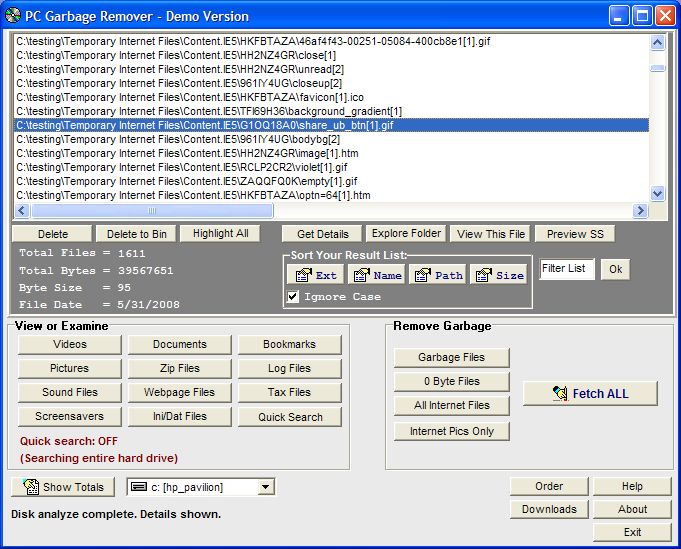
Safely scan and remove many different garbage files on your computer, freeing up extra disk space and keeping your system at peak performance. You can automatically remove various garbage/junk files, temp files, and 0 byte files. You can also select and remove the previously viewed webpages and webpage graphics, which are stored on your computer everytime you visit a website. Other file types which you can search through are zipped files, screensavers, old tax documents, previously logged data, old and new bookmarks, text files and word processor documents, videos, graphics, and sound files. You can delete directly into the trash bin or delete permanently. This includes a quick search option which allows you to on search only specific folder lists, or bypass lists of folders to speed up searches. You can also sort the list of found data by file extension, filename, file size, or file path. This software includes the ability to immediately view your data or multimedia files found. No extra run time files are needed. (Demo. Runs on all Windows systems).
Verdict
Should you download PC Garbage Remover?
PC Garbage Remover runs on
Windows 95/98/Me/NT/2000/Windows 10/11
and is available under the
Time-limited Trial
license
— the installer is 638 KB.
We’ve catalogued it under
Uninstallers and Disk Cleaners.
✓
Verified clean. Every PC Garbage Remover build on SoftLookup is scanned for viruses, spyware, adware, trojans and backdoors. We re-test on every update.
Sponsored
At a glance
PC Garbage Remover specifications
- Last updated
- Jan 19, 2025
- License
- Time-limited Trial
- Operating system
- Windows 95/98/Me/NT/2000/Windows 10/11
- File size
- 638 KB
- Price
- $24.95
- Page views
- 657
Help fellow users decide. Share your experience with PC Garbage Remover.