Overview
What is PDF2EXE?
PDF2EXE : Convert PDF items to EXE files, making PDFs readable on any computer without Adobe software, as well as compress and encrypt PDF data before converting it to EXE
In depth
A closer look at PDF2EXE
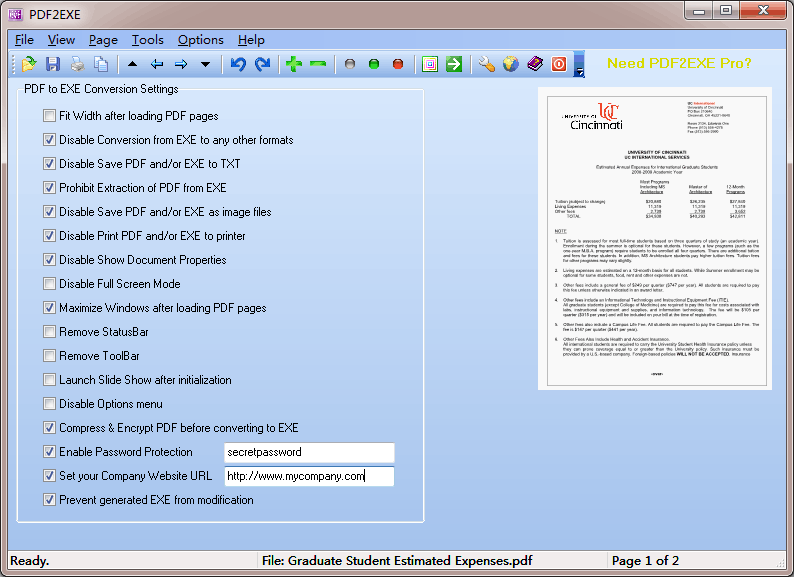
PDF2EXE The tool reveals a clean design that allows you to preview the content of the PDF files directly in the main window. You may switch to a presentation or full screen view mode, zoom in or out of the pages, rotate pages to different angles, go to the next, previous, first, or last page, as well as jump to a specific page. The program is also able to reveal document properties, such as filename, author, title, subject, keyword, creator, producer, PDF version, page size, total number of pages, encryption, security method, user/master password, and document accessibility.
Requirements
System requirements
Windows 10 64-bit / Windows 10 / Windows 8 64-bit / Windows 8 / Windows 7 64-bit / Windows 7
Verdict
Should you download PDF2EXE?
PDF2EXE runs on
Windows 10/11
and is available under the
Time-limited Trial
license
— the installer is 1.6 MB.
We’ve catalogued it under
Word Processing.
✓
Verified clean. Every PDF2EXE build on SoftLookup is scanned for viruses, spyware, adware, trojans and backdoors. We re-test on every update.
Sponsored
At a glance
PDF2EXE specifications
- Last updated
- Apr 25, 2026
- Requirements
- Windows 10 64-bit / Windows 10 / Windows 8 64-bit / Windows 8 / Windows 7 64-bit / Windows 7
- License
- Time-limited Trial
- Operating system
- Windows 10/11
- File size
- 1.6 MB
- Price
- Free
- Page views
- 700
Help fellow users decide. Share your experience with PDF2EXE.