Overview
What is Password Maintenance?
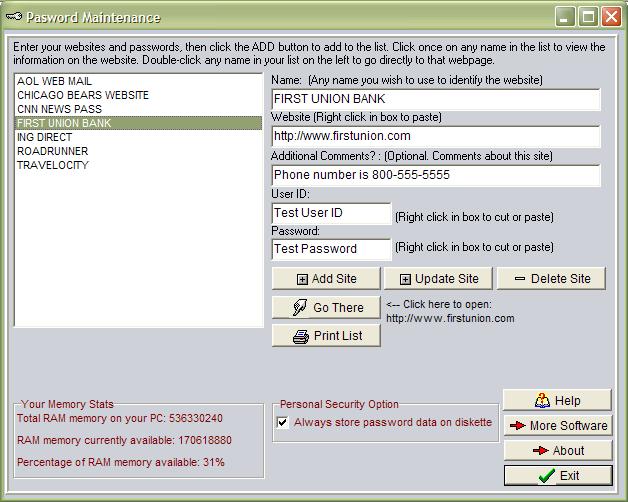
Manage all your passwords and websites, auto fill password boxes and websites automatically, and even store your data on USB or diskette for better security.
In depth
A closer look at Password Maintenance
Manage all your passwords and websites with the ability to automatically fill in your user id and password on each website. You can automatically click and open any website in your list, keep your website list in alphabetical order, and fill in the password and user id information with one simple button click. This also includes an option to store all your password data on diskette, USB, or any other external device to better secure your passwords, as your password files will not even exist on your pc if you choose this option. You can also print a list of all your passwords and websites on paper for safe backup storage, and you can add, update, and delete websites and passwords in your list. You can also easily swap between your password list and browser screen, and easily select and open other websites in your list. (Runs on all Windows systems).
Verdict
Should you download Password Maintenance?
Password Maintenance runs on
Windows 10/11
and is available under the
Shareware
license
— the installer is 535 KB.
We’ve catalogued it under
Privacy and Access Control.
✓
Verified clean. Every Password Maintenance build on SoftLookup is scanned for viruses, spyware, adware, trojans and backdoors. We re-test on every update.
Sponsored
At a glance
Password Maintenance specifications
- Last updated
- Mar 5, 2025
- License
- Shareware
- Operating system
- Windows 10/11
- File size
- 535 KB
- Price
- $14.95
- Page views
- 421
Help fellow users decide. Share your experience with Password Maintenance.