Transmission for macOS — free, open-source BitTorrent client with native Apple Silicon support. Lightweight, fast, simple. Latest version 4.1.1. Free download for Mac.
M1-M4
Apple Silicon Native
About Transmission for macOS
Transmission is one of the most popular and respected BitTorrent clients available for macOS. While it's a cross-platform application available for Mac, Windows, and Linux, it has been particularly celebrated for its native Mac experience — it doesn't feel like a port. The Mac version is built specifically for macOS, follows Apple's Human Interface Guidelines, uses native UI controls, and integrates with macOS features like the Notification Center, Dark Mode, and the Touch Bar.
Since version 4.0 (released February 2023), Transmission has been fully Apple Silicon native, running optimally on M1, M2, M3, and M4 Macs without any Rosetta translation overhead. The current version 4.1.1 (released February 2026) continues this native support while adding numerous bug fixes and performance improvements over the major 4.1.0 release.
Why Transmission is the standard Mac BitTorrent client: When Ubuntu chose Transmission as its default BitTorrent client, one of the most-cited reasons was its easy learning curve. The Mac version inherits this simplicity while adding genuine native Apple polish. It's the BitTorrent client most macOS power users recommend to friends and family.
Why Choose Transmission for Mac
🍎 True Native Mac App
Not a cross-platform afterthought. Built for macOS with native UI controls and Apple HIG compliance.
⚡ Apple Silicon Native
Runs natively on M1/M2/M3/M4 Macs since v4.0. No Rosetta translation. Optimal battery efficiency.
🪶 Tiny Memory Footprint
One of the lowest memory usages of any major BitTorrent client. Doesn't slow your Mac.
🎯 Simple by Default
Defaults just work. No configuration needed for typical use. Power users get advanced options when needed.
🔒 Open Source (GPLv3)
Source code on GitHub. No telemetry, no ads, no hidden bundles. Trust through transparency.
🧲 Magnet Link Support
Handle magnet links and .torrent files. Click a magnet link in Safari and Transmission opens.
📁 Watch Directories
Configure folders that auto-add .torrent files dropped into them. Useful for automation workflows.
🌐 Web Interface
Built-in web UI lets you control Transmission remotely from any browser. Useful for headless setups.
🚦 Speed Controls
Global speed limits, per-torrent limits, scheduled limits, and the alternate "turtle mode" for low-bandwidth times.
🛡 Privacy Features
Encryption, blocklists, peer exchange (PEX), DHT support. Configurable to your security comfort level.
🔌 Port Forwarding
UPnP and NAT-PMP for automatic router configuration. No manual port forwarding hassle.
🏷 Tracker Editing
Add, remove, or edit trackers per torrent. Useful when trackers go offline.
How to Install Transmission on Mac
Standard Installation (.dmg)
- Download Transmission-4.1.1.dmg from this page or the official transmissionbt.com.
- Mount the disk image by double-clicking the .dmg file. A window opens showing Transmission and your Applications folder.
- Drag Transmission to Applications. Just drag the Transmission icon onto the Applications folder shortcut in the same window.
- Eject the disk image. Drag it to the Trash or right-click → Eject.
- Launch Transmission from your Applications folder or Launchpad.
- Handle Gatekeeper if needed. On first launch, macOS may say "Transmission can't be opened because Apple cannot check it for malicious software." Right-click the app → Open → confirm. This is one-time only.
Installation via Homebrew
If you use Homebrew (the popular Mac package manager), installation is even simpler:
- Open Terminal.app
- Run:
brew install --cask transmission
- Homebrew downloads, verifies, and installs Transmission automatically
- Launch from Applications when complete
- Update anytime with:
brew upgrade --cask transmission
Installation via MacPorts
For MacPorts users:
- Open Terminal.app
- Run:
sudo port install transmission
- MacPorts compiles and installs from source
How to Use Transmission
Adding a Torrent
Transmission supports multiple ways to add torrents:
- Drag and drop: Drop a .torrent file directly onto the Transmission window or its Dock icon
- Open .torrent files: Double-click any .torrent file — if Transmission is set as the default handler, it opens automatically
- Magnet links: Click magnet links in Safari, Chrome, or Firefox — they open in Transmission
- Manual URL entry: File menu → Open URL (Cmd+U) → paste a magnet link or .torrent URL
- Watch directory: Configure a folder in Preferences; any .torrent dropped in there auto-loads
Managing Active Torrents
- Pause/Resume: Select torrent → Cmd+Y or click the pause/play icon
- Verify integrity: Right-click → Verify Local Data
- Open download folder: Right-click → Show in Finder
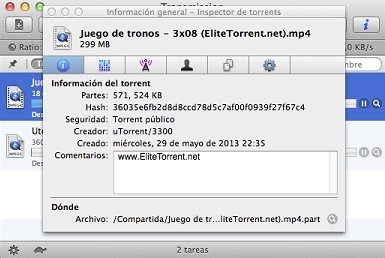
- Inspector: View detailed info, peer list, tracker stats — Cmd+I
- Speed limits: Set per-torrent or global limits via right-click or preferences
System Requirements
| Operating System | macOS 10.15 (Catalina) or later |
|---|
| Architecture | Apple Silicon (M1/M2/M3/M4) native + Intel x86_64 |
|---|
| Memory (RAM) | 1 GB minimum, 2 GB+ recommended for many simultaneous torrents |
|---|
| Disk Space | ~30 MB for installation, plus space for downloads |
|---|
| Internet | Required (broadband recommended) |
|---|
| Network | UPnP or NAT-PMP-capable router for automatic port forwarding (optional but recommended) |
|---|
What's New in Transmission 4.1.1 and 4.1.0
Version 4.1.1 (February 2026) — Maintenance Release
20+ bug fixes from the 4.1.0 release. Key improvements:
- Fixed filesystem error reporting to RPC clients querying free disk space
- Fixed queue position display issues
- Fixed torrent queuing order persistence between sessions
- Fixed wrong mime-type icons for MP4 video files
- Fixed crash when pausing torrent while editing its tracker list
- Performance improvements across various operations
Version 4.1.0 (January 2026) — Major Update
The first major release in nearly 3 years brought significant improvements:
- µTP performance: Significantly faster downloads via Micro Transport Protocol
- IPv6 dual-stack: Full support for IPv6 trackers and IPv6 Local Peer Discovery
- Sequential downloading: Optional download files in order (useful for streaming)
- Web proxy support: Route web connections through a proxy server
- Verify after download: New option to verify torrent integrity immediately upon completion
- Native macOS icons: Switched to SF Symbols on macOS for menu and toolbar icons
- JSON-RPC 2.0 API: New RPC protocol for advanced integrations
- BEP-7 module support: Compatibility with trackers using older protocols
Transmission vs Other Mac BitTorrent Clients
Honest comparison of the popular Mac BitTorrent options:
| Client | Strengths | Limitations | Best For |
|---|
| Transmission | Native Mac feel, lightweight, free, open-source, Apple Silicon native | Fewer advanced features than power-user alternatives | Most users, simplicity-focused |
| qBittorrent | Feature-rich, search built-in, strong community | Less native Mac feel (Qt-based), heavier UI | Power users wanting features |
| Folx | Polished UI, supports HTTP/FTP downloads too | Free version limited, pushes paid upgrade | Users wanting download manager + torrent |
| Deluge | Highly extensible plugins, configurable | Complex setup, less Mac-native | Tinkerers and Linux migrants |
| WebTorrent Desktop | Streams torrents, modern UI | Limited compared to full clients | Streaming-focused use |
| µTorrent (Mac) | Familiar to former Windows users | Ad-bundled in past, BitTorrent Inc owned | Not generally recommended for Mac |
Honest take: If you want the best free BitTorrent client for Mac, Transmission is the consensus choice. If you need power-user features (built-in search, RSS automation, advanced filtering), qBittorrent is the alternative. For most Mac users, Transmission is simply the right answer.
Transmission Across Platforms
Transmission is cross-platform with consistent functionality:
🍎 macOS
Native Cocoa app. Apple Silicon native. Most polished interface of any platform.
🪟 Windows
Qt-based interface, Windows 11 ready. Modernized UI in v4.0.
🐧 Linux (GTK)
GTK interface following GNOME HIG. Default BitTorrent client for Ubuntu.
🖥 Linux (Qt)
Qt-based version available for KDE and other Qt-preferring environments.
🌐 Web Interface
All platforms include a web UI for remote control via browser.
🤖 Headless Daemon
transmission-daemon for headless servers, NAS devices, Raspberry Pi setups.
Common Use Cases
Downloading Linux Distributions
Linux distributions are commonly distributed via BitTorrent because it's faster and reduces load on official servers. Ubuntu, Fedora, Debian, Linux Mint, Arch Linux, and other distros all offer torrent downloads. Transmission is ideal for this — fast, reliable, and lets you seed the ISO afterward to help others.
Open-Source Software Distribution
Many large open-source projects use BitTorrent for releases. LibreOffice, Apache projects, large research datasets, and others. Faster than HTTP downloads and reduces server bandwidth costs.
Public Domain & Creative Commons Content
The Internet Archive, Project Gutenberg, and many academic institutions distribute public domain books, documentaries, and historical content via BitTorrent. Transmission is the right tool for accessing this content.
Scientific Datasets
Researchers share large datasets (genomics, climate data, astronomy, etc.) via BitTorrent. Academic Torrents and similar networks make terabyte-scale datasets accessible.
Game Updates and Mods
Some game distributors and mod communities use BitTorrent for large updates and mod packages. Reduces server costs for free content distribution.
Privacy and Security
Important: When you use BitTorrent, your IP address is visible to other peers in the swarm. This is by design of the protocol. Below are the realistic security considerations.
Built-in Privacy Features
- Encryption: Transmission supports protocol encryption — connections to other peers are encrypted, making traffic harder to identify by ISPs or network monitors
- Peer blocklists: Block known bad-actor peer IP ranges
- Peer Exchange (PEX): Exchange peer information directly, reducing reliance on trackers
- DHT (Distributed Hash Table): Find peers without tracker servers
- Local Peer Discovery (LPD): Find peers on your local network for faster transfers
VPN Recommendations
For additional privacy, many users run Transmission behind a VPN that allows port forwarding and BitTorrent traffic. Established VPN services with strong reputations:
- Mullvad — privacy-focused, accepts cash, no logs
- ProtonVPN — Swiss-based, strong privacy laws, free tier available
- IVPN — accountless option, audited no-logs
- NordVPN, ExpressVPN, Surfshark — popular commercial options with port forwarding plans
Configure your VPN's BitTorrent-compatible server before launching Transmission for privacy-conscious downloads.
Legal Use of Transmission
Transmission is a tool. What you do with it is your responsibility.
The BitTorrent protocol itself is completely legal — it's how Linux distributions are distributed, how Internet Archive shares content, and how scientific datasets reach researchers. However, downloading copyrighted content without permission may violate copyright laws in your jurisdiction.
Legitimate Use Examples
- Downloading Linux distributions (Ubuntu, Fedora, etc.)
- Open-source software releases
- Public domain books, films, and documents
- Creative Commons-licensed content
- Internet Archive material
- Scientific datasets from Academic Torrents
- Software updates from publishers using BitTorrent for distribution
- Backing up your own files for distributed storage
Legal Considerations
- Check copyright before downloading. Just because something's torrentable doesn't mean it's legal to download.
- Your jurisdiction matters. Copyright enforcement varies dramatically by country.
- Your ISP may monitor. Some ISPs throttle BitTorrent or send copyright violation notices.
- Educational resources. Many universities provide guidance on responsible file sharing.
Troubleshooting Common Issues
Downloads are slow
Multiple causes possible. Check your seeder count (need at least one seeder for downloads). Verify port forwarding (Transmission > Preferences > Network — should show "open"). Try enabling DHT and PEX. If your ISP throttles BitTorrent, try a VPN with BitTorrent-friendly servers.
"Transmission can't be opened" on first launch
Right-click the Transmission app → Open → confirm in the dialog. macOS Gatekeeper warns about apps not signed through the App Store. After the first override, it remembers and won't ask again.
Transmission keeps high CPU usage
Usually caused by too many simultaneous torrents or aggressive verification. Limit active torrents in Preferences. If using older Transmission versions, upgrade to 4.1.1 — performance improvements help.
Magnet links don't open in Transmission
Transmission may not be set as the default magnet link handler. Open Safari → Preferences → there should be an option to manage URL schemes, OR install a small utility like "Default Apps for Mac" to set Transmission as the magnet handler.
Apple Silicon Mac shows "x86_64" performance
You may have an older Transmission version. Update to 4.0+ which is Apple Silicon native. Verify in Activity Monitor — the architecture should show "Apple" rather than "Intel" for Transmission.
Frequently Asked Questions
What is Transmission for macOS?
A free, open-source BitTorrent client for Mac. Native macOS app with Apple Silicon support since v4.0. Lightweight, fast, follows Apple UI standards. The most-recommended free Mac BitTorrent client.
Is Transmission free?
Yes, completely free and open-source under GPLv3. No premium tiers, no ads, no in-app purchases, no commercial restrictions. Source code on GitHub.
Does Transmission support Apple Silicon?
Yes. Transmission 4.0+ is fully Apple Silicon native. Runs on M1/M2/M3/M4 Macs without Rosetta. Universal binary also supports Intel Macs.
What macOS versions does Transmission support?
Transmission 4.1.1 requires macOS 10.15 (Catalina) or later. For older Macs, use older Transmission versions (with reduced features and security).
How do I install Transmission on Mac?
Download the .dmg, double-click to mount, drag the app to Applications, eject the disk image. Or use Homebrew: brew install --cask transmission.
Is using Transmission legal?
Transmission itself is legal — it's a file transfer tool. Legal uses include Linux distros, open-source software, public domain content, scientific data. Downloading copyrighted material without permission may violate laws in your jurisdiction.
How does Transmission compare to qBittorrent?
Transmission is simpler and more native to Mac. qBittorrent has more features but heavier UI. For most users, Transmission is the right answer; for power users wanting RSS automation and built-in search, qBittorrent.
What's new in 4.1.1?
20+ bug fixes from 4.1.0. The major 4.1.0 release added µTP performance improvements, IPv6 dual-stack tracker support, sequential downloading, web proxy support, and native macOS icons (SF Symbols).
Does Transmission support magnet links?
Yes. Click magnet links in browsers and they open in Transmission, or paste them via File > Open URL (Cmd+U).
Software Information
| Software Name | Transmission |
|---|
| Also Known As | Transmission BitTorrent, Transmission Mac |
|---|
| Project | Transmission Project (transmissionbt.com) |
|---|
| Source Code | github.com/transmission/transmission |
|---|
| Category | Mac Software / Internet / BitTorrent |
|---|
| License | GNU GPL v3 (Open Source) |
|---|
| Latest Version | 4.1.1 |
|---|
| Operating System | macOS 10.15+ (Catalina or later) |
|---|
| Architecture | Apple Silicon native + Intel x86_64 |
|---|
| File Size | ~12 MB |
|---|
| User Rating | 4.8/5 (2,156 reviews) |
|---|
⬇ Download Transmission for Mac
Related Software on Softlookup
Software entry last updated: April 27, 2026.
Transmission 4.1.1 for macOS — Free BitTorrent Client Download (Apple Silicon Native) 2026 runs on
Mac
and is available under the
OpenSource under LGPL
license
— the installer is 11 MB.
We’ve catalogued it under
Chating.
Help fellow users decide. Share your experience with Transmission 4.1.1 for macOS — Free BitTorrent Client Download (Apple Silicon Native) 2026.