Overview
What is Image Thumbnailer and Converter?
Create thumbnail images, convert images, create webpages, adjust image sizes, rename files, and view your photos an entire folder at a time.
In depth
A closer look at Image Thumbnailer and Converter
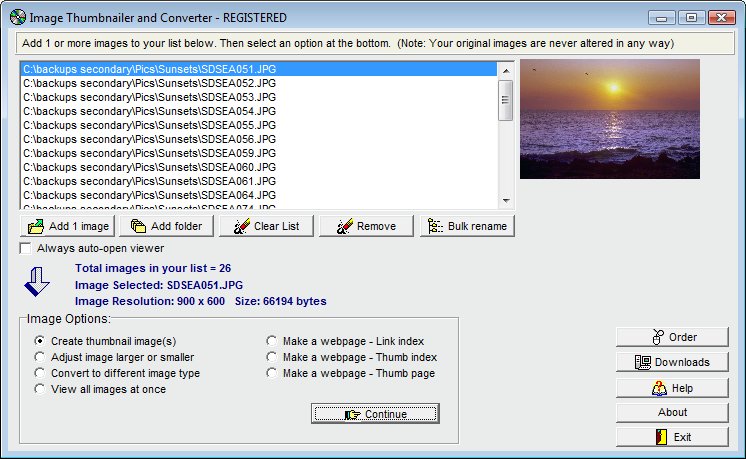
Create thumbnail images, convert images, create webpages, adjust image sizes, rename files, and view your photos an entire folder at a time. You can also automatically create webpages of thumbnail pictures, which open full-sized pictures when clicked. When creating thumbnails, a picture preview window is included to continually show your new photo image as the size is being adjusted, and you can instantly calculate new image sizes with one button click. You can create thumbnails based on a percentage, or create thumbnails based on an exact pixel height and width. This also has the ability to convert image types a folder at a time, and you can also use the photo viewer to view all your images as thumbnails. A jpeg compression option is included to help save even more space on all jpeg images, and a complete, built-in image viewer includes zoom-in and zoom-out features, along with full screen view. Another feature is the ability to rename files an entire folder at a time based on various options you choose. (Runs on all Windows systems.)
Verdict
Should you download Image Thumbnailer and Converter?
Image Thumbnailer and Converter runs on
Windows 95/98/Me/NT/2000/Windows 10/11
and is available under the
Shareware
license
— the installer is 806 KB.
We’ve catalogued it under
Graphics Conversion.
✓
Verified clean. Every Image Thumbnailer and Converter build on SoftLookup is scanned for viruses, spyware, adware, trojans and backdoors. We re-test on every update.
Sponsored
At a glance
Image Thumbnailer and Converter specifications
- Last updated
- Feb 7, 2025
- License
- Shareware
- Operating system
- Windows 95/98/Me/NT/2000/Windows 10/11
- File size
- 806 KB
- Price
- $24.95
- Page views
- 695
Help fellow users decide. Share your experience with Image Thumbnailer and Converter.