Overview
What is Multi Clipboard?
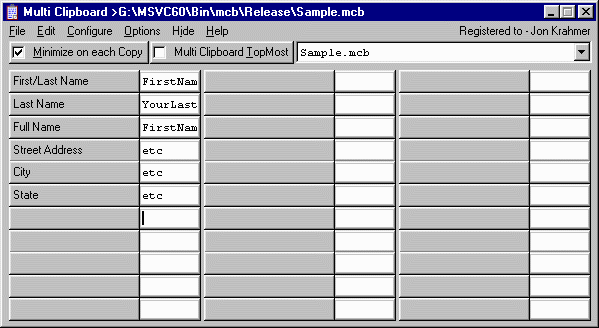
Copy any 1 of 1000s of pre-written text fields into the Windows Clipboard. When filling in forms, etc, it is nice to have all the information on a given subject at your disposal. With Multi Clipboard you can access to 1000s of fields.
In depth
A closer look at Multi Clipboard
This is a handy time saving Program if you are involved in disseminating information or [Canned Messages], such as from a Help Desk or providing Tech-Support. There are 33 text fields per page or project. You can have as many pages as you want. You can have 1000s of fields if you wish. Any one of these 1000s of fields can be easily copied into the Windows clipboard using the [Copy] button found just to the left of said field. Once copied, the text can be pasted into any Windows application. Each field holds up to 10240 text characters. You can copy from other editors and word processors and paste directly into these fields, or put the blinking cursor in the edit box and select the [Edit Selected Field] button. Any time you copy text from another Windows application, you can paste into these fields using a variety of methods. One easy method of copying and pasting from one application or program to another is to use the Copy command [Ctrl+C] and the Paste command [Ctrl+V].
Verdict
Should you download Multi Clipboard?
Multi Clipboard runs on
Windows 9X/ME/2K/XP/2003
and is available under the
Shareware
license
— the installer is 349 KB.
We’ve catalogued it under
Clipboard Tools.
✓
Verified clean. Every Multi Clipboard build on SoftLookup is scanned for viruses, spyware, adware, trojans and backdoors. We re-test on every update.
Sponsored
At a glance
Multi Clipboard specifications
- Last updated
- Feb 2, 2025
- License
- Shareware
- Operating system
- Windows 9X/ME/2K/XP/2003
- File size
- 349 KB
- Price
- $19.99
- Page views
- 553
Help fellow users decide. Share your experience with Multi Clipboard.