Web based School
Chapter 12
Inheriting Methods from Other Classes
This might be a surprise to you, but your Java objects are ideally suited for childbearing. When you create a program as an object--a set of attributes and behavior--you have designed something that's ready to pass these qualities on to offspring. Like most offspring, these child objects will take on a lot of the attributes and behavior of their parent. They also can do some things differently than their parent does and can add some extra attributes and behavior that pop is incapable of.
This system is called inheritance, and it's something every superclass parent gives to its subclass children. Inheritance is one of the most useful aspects of object-oriented programming, and you'll be learning more about it during this hour.
The following topics will be covered:
- Superclasses and subclasses
- An inheritance hierarchy
- Overriding methods
- Creating a subclass
- Positioning behavior
The Power of Inheritance
Without knowing it, you have used inheritance every time you used one of the standard Java classes such as String or Math. Java classes are organized into a pyramid-shaped hierarchy of classes in which all classes descend from the Object class.
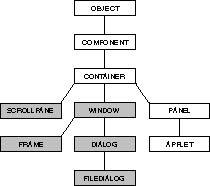
A class of objects inherits from all superclasses that are above it. To get a working idea of how this works, look at the Applet class. This class is the superclass of all applets, which are Java programs that you will write for the World Wide Web. The family tree of Applet is shown in Figure 12.1. Each of the boxes is a class, and the lines connect a superclass above to any subclasses that it has below.
Figure 12.1. The family tree of the Applet class.
At the top is the Object class. Applet has four superclasses above it in the hierarchy: Panel, Container, Component, and Object. The Applet class inherits attributes and behavior from each of these classes because each is directly above it in the hierarchy of superclasses. Applet does not inherit anything from the five shaded classes in Figure 12.1, which include Dialog and Frame, because they are not above it in the hierarchy.
If this seems confusing, think of the hierarchy as a family tree. Applet will inherit from its parents, their parents, and on upward. It even might inherit some things from its great- great-grandparent Object. The Applet class won't inherit from its siblings or its cousins, however.
Setting up a complicated hierarchy of classes is a difficult thing, but it makes it easier to create new programs later on. The amount of work you need to do to write a new class of objects is reduced. Creating a new class boils down to the following task: You only have to define the ways in which it is different from an existing class. The rest of the work is done for you.
As an example, consider the popular video game Tetris. It has been adapted for dozens of different operating systems, processors, and programming languages since being written by Soviet mathematician Alexey Pajitnov and has been created as a Java class by several programmers. In case you somehow avoided Tetris during the past decade by lapsing into a coma or falling into a deep meditative trance, the game works as follows: Blocks of different shapes fall from the top of the screen, and you must organize them into unbroken horizontal lines before they stack up too high.
The Java source file for several adaptations of Tetris is available for your use. If you wanted to create a new version of Tetris based on one of these existing classes, you could make your game a subclass of an existing Tetris game. All you would have to do is create the things that are new or different about your version, and you'd end up with a new game.
Inheriting Behavior and Attributes
The behaviors and attributes of a class are a combination of two things: its own behavior and attributes and all behavior and attributes it inherited from its superclasses.
The following are some of the behavior and attributes of Applet:
- The equals() method determines whether an Applet object has
the same value as another object.
- The setBackground()method sets the background color displayed on the applet window.
- n The add()method adds user interface components such as buttons
and text fields to the applet.
- The showStatus()method displays a line of text in a Web browser's status bar.
The Applet class can use all of these methods, even though showStatus() is the only one it didn't inherit from another class. The equals() method is defined in Object, setBackground() comes from Component, and add() comes from Container.
Overriding Methods
Some of the methods defined in the Applet class of objects also were defined in one of its superclasses. As an example, the resize() method is set up in the Applet class and the Component class. This method calls on the Web browser displaying the applet to resize the applet's display area. When a method is defined in a subclass and its superclass, the subclass method is used. This enables a subclass to change, replace, or completely wipe out some of the behavior or attributes of its superclasses.
Creating a new method in a subclass to change behavior inherited from a superclass is called overriding the method. You need to override a method any time the inherited behavior will produce an undesired result.
Establishing Inheritance
You establish a class as the subclass of another class with the extends statement, as in the following:
class AnimatedLogo extends java.applet.Applet {
    // program goes here
}
This statement establishes the AnimatedLogo class of objects as a subclass of Applet, using the full class name of java.applet.Applet. As you will see during the next hour, all applets in Java must be subclasses of Applet because they need the functionality this class provides in order to run on a World Wide Web page.
One method that AnimatedLogo will have to override is the paint() method, which is used to redraw all things that are shown on the program's display area. The paint() method is implemented by the Component class and is passed all the way down to AnimatedLogo. However, the paint() method does not do anything. It exists so that subclasses of Component have a method they can use when the display must be redrawn.
To override a method, you must start the method in the same way it started in the superclass it was inherited from. A public method must remain public, the value sent back by the method must be the same, and the number and type of arguments to the method must not change.
The paint() method of the Component class begins as follows:
public void paint(Graphics g) {
When AnimatedLogo overrides this method, it must begin with a statement like this:
public void paint(Graphics screen) {
The only difference is in the name of the Graphics object, which does not matter when determining if the methods are created in the same way. Because both paint() methods are public, return no value because of the void statement, and have a Graphics object as their only parameter, they match.
Workshop: Creating a Subclass
To see an example of inheritance at work, you will create a class called Point3D that represents a point in three-dimensional space. A two-dimensional point can be expressed with an (x,y) coordinate. Applets use an (x,y) coordinate system to determine where text and graphics should be displayed. Three-dimensional space adds a third coordinate, which can be called z.
The Point3D class of objects should do three things:
- Keep track of an object's (x,y,z) coordinate.
- Move an object to a new (x,y,z) coordinate when needed.
- Move an object by a certain amount of x, y, and z values as needed.
Java already has a standard class that represents two-dimensional points; it's called Point. It has two integer variables called x and y that store a Point object's (x,y) location. It also has a move() method to place a point at the specified location and a translate() method to move an object by an amount of x and y values.
Run your word processor and create a new file called Point3D.java. Enter the text of Listing 12.1 into the file, and save it when you're done.
Listing 12.1. The full text of Point3D.java.
 1: import java.awt.*;
 2:
 3: public class Point3D extends Point {
 4:     public int z;
 5:
 6:     public Point3D(int x, int y, int z) {
 7:         super.x = x;
 8:         super.y = y;
 9:         this.z = z;
10:     }
11:
12:     public void move(int x, int y, int z) {
13:         this.z = z;
14:         super.move(x, y);
15:     }
16:
17:     public void translate(int x, int y, int z) {
18:         this.z += z;
19:         super.translate(x, y);
20:     }
21: }
Compile this file with the javac compiler tool, and you will have a class
you can use in programs. The Point3D class does not have a main()
block statement, so you cannot run it with the java interpreter.
The Point3D class only has to do work that isn't being done by its superclass, Point. This work primarily involves keeping track of the integer variable z and receiving it as an argument to the move() method, translate() method, and Point3D() constructor method.
All of the methods use the statements super and this. The this statement is used to refer to the current Point3D object, so this.z = z; in Line 9 sets the object variable z equal to the z value that was sent as an argument to the method in Line 6.
The super statement refers to the superclass of the current object, Point. It is used to set variables and call methods that were inherited by Point3D. A subclass that overrides a method still can call the original method with the super statement. An example of this is Line 14, which calls the move() method of Point to set the (x,y) coordinates of the Point3D object. Because Point already is equipped to handle the x and y axes, it would be redundant for the Point3D class of objects to do the same thing.
To test out the Point3D class that you have compiled, create a program that uses Point and Point3D objects and moves them around. Create a new file in your word processor and enter Listing 12.2 into it. Save the file as TryPoints.java.
Listing 12.2. The full text of TryPoints.java.
 1: import java.awt.*;
 2:
 3: class TryPoints {
 4:     public static void main(String[] arguments) {
 5:         Point object1 = new Point(11,22);
 6:         Point3D object2 = new Point3D(7,6,64);
 7:
 8:         System.out.println("The 2D point is located at (" + object1.x + ", "
 9:             + object1.y + ")");
10:         System.out.println("\tIt's being moved to (4, 13)");
11:         object1.move(4,13);
12:         System.out.println("The 2D point is now at (" + object1.x + ", "
13:             + object1.y + ")");
14:         System.out.println("\tIt's being moved -10 units on both the x and y 15:         axes");
16:         object1.translate(-10,-10);
17:         System.out.println("The 2D point ends up at (" + object1.x + ", "
18:             + object1.y + ")\n");
19:
20:         System.out.println("The 3D point is located at (" + object2.x + ", "
21:             + object2.y + ", " + object2.z +")");
22:         System.out.println("\tIt's being moved to (10, 22, 71)");
23:         object2.move(10,22,71);
24:         System.out.println("The 3D point is now at (" + object2.x + ", "
25:             + object2.y + ", " + object2.z +")");
26:         System.out.println("\tIt's being moved -20 units on the x, y and z 27:         axes");
28:         object2.translate(-20,-20,-20);
29:         System.out.println("The 3D point ends up at (" + object2.x + ", "
30:             + object2.y + ", " + object2.z +")");
31:     }
32: }
After you compile this file and run it with the java interpreter, the following
should be shown:
The 2D point is located at (11, 22)
    It's being moved to (4, 13)
The 2D point is now at (4, 13)
    It's being moved -10 units on both the x and y axes
The 2D point ends up at (-6, 3)

The 3D point is located at (7, 6, 64)
    It's being moved to (10, 22, 71)
The 3D point is now at (10, 22, 71)
    It's being moved -20 units on the x, y and z axes
The 3D point ends up at (-10, 2, 51)
Summary
When people talk about the miracle of birth, they're probably not speaking of the way a superclass can give birth to subclasses or the way behavior and attributes are inherited in a hierarchy of classes. However, if the real world worked the same way that object-oriented programming does, every grandchild of Mozart would get to choose whether to be a brilliant composer. All descendants of Mark Twain could wax poetic about Mississippi riverboat life. Every skill your direct ancestors worked to achieve would be handed to you without an ounce of toil.
On the scale of miracles, inheritance isn't quite up to par compared with continuing the existence of a species and getting a good tax break. However, it's an effective way to design software with a minimum of redundant work.
Q&A
- Q Can a class have more than one superclass so that it inherits additional
methods and behavior?
A It is possible with some object-oriented programming languages but not Java. One of the goals when Java was developed was to provide a simpler language than an object-oriented language such as C++, and limiting inheritance to a single superclass was one way to acheive this. You can use a special type of class called an interface to inherit behavior that isn't received from superclasses.
Q Most Java programs created up to this point have not used extends to inherit from a superclass. Does this mean they exist outside of the class hierarchy?
A All classes that you create in Java are part of the hierarchy because the default superclass for the programs you write is Object. The equals() and toString() methods are part of the behavior that automatically is inherited from Object.
Q When is the full name of a class, such as java.applet.Applet, needed in an extends clause instead of a shorter name such as Applet?
A You must use the full name whenever you don't use an import java.applet.Applet; or import.java.applet.*; statement at the beginning of your program. The import statement is used solely to make it easier to refer to class names in programs. Each class of objects in Java has a full name that identifies the group of classes it belongs to. For instance, the Math class is part of the java.lang group of classes. A group of classes is also called a package.
Quiz
To determine what kind of knowledge you inherited from the past hour's work, answer the following questions.
Questions
- 1. If a superclass handles a method in a way you don't want to use in
the subclass, what can you do?
(a) Delete the method in the superclass.
(b) Override the method in the subclass.
Write a nasty letter to the editor of the San Jose Mercury News hoping that Java's developers will read it.
2. Which of the following is not a superclass of Applet?
(a) Dialog
(b) Container
Component
3. What statement can you use to refer to the methods and variables of a superclass?
(a) this
(b) call
super
Answers
- 1. b. Because you can override the method, you don't have to change any
aspect of the superclass or the way it works.
2. a. Dialog has some common superclasses with Applet, but it isn't a superclass, so Applet does not inherit any behavior or attributes from it.
3. c. A this statement refers to the current object, and super refers to the superclass.
Activities
If a fertile imagination has birthed in you a desire to learn more, you can spawn more knowledge of inheritance with the following activities:
- Create a Point4D class that adds a t coordinate to the (x,y,z)
coordinate system created by the Point3D class. The t coordinate
stands for time, so you need to ensure that it does not get set to a negative value.
- Take the members of a football team's offense--lineman, wide receiver, tight
end, running back, and quarterback. Design a hierarchy of classes that represent
the skills of these players, putting common skills higher up in the hierarchy. For
example, blocking is behavior that should probably be inherited by the linemen and
tight end classes, and speed is something that should be inherited by wide receivers
and running backs.


Popular Tutorials
-
 MS Access
1109
MS Access
1109
-
 C++
1222
C++
1222
-
 HTML
584
HTML
584
-
 JavaScript
616
JavaScript
616
-
 Vbscript
873
Vbscript
873
-
 Oracle
473
Oracle
473
-
 VC++
875
VC++
875
-
 SQL
2959
SQL
2959
-
 XML
514
XML
514
-
 Java
814
Java
814
-
 Perl
455
Perl
455
-
 Linux
451
Linux
451