Web based School
Chapter 15
Sending Parameters to Applets
Now that you have had some experience writing computer programs, you might be feeling one of the strongest emotions of the programmer: compiler angst. Even though it takes no more than 15 seconds to compile most programs, that time can seem interminable when you're debugging a program. Write, Save, Compile, Aargh--an error! Write, Save, Compile, Aargh! Write, Save, Compile, Aargh!... As this vicious cycle repeats itself, it's easy to become world-weary as a program is compiled and recompiled.
One of the driving forces behind parameter use in Java applets is the fear and loathing of compilation. Parameters enable you to change elements of an applet without editing or recompiling anything. They also make the program more useful.
The following topics will be covered during this hour:
- Sending parameters to Java applets
- Receiving parameters in an applet program
- Checking for nonexistent parameters
- Converting parameters from one type to another
- Writing a program that uses parameters
Sending Parameters from a Web Page
Parameters are stored as part of the Web page that contains an applet. They are created using the HTML tag <PARAM> and its two attributes: NAME and VALUE. You can have more than one <PARAM> tag with an applet, but all of them must be between the opening <APPLET> tag and the closing </APPLET> tag. The following is an <APPLET> tag that includes several parameters:
<APPLET CODE="ScrollingHeadline.class" HEIGHT=50 WIDTH=400>
<PARAM NAME="Headline1" VALUE="Dewey defeats Truman">
<PARAM NAME="Headline2" VALUE="Stix nix hix pix">
<PARAM NAME="Headline3" VALUE="Man bites dog">
</APPLET>
This example could be used to send news headlines to an applet that scrolls them across the screen. Because news changes all the time, the only way to create a program of this kind is with parameters. No other solution would work; just imagine how long it would take to recompile a Java program every time a Dallas Cowboy ran afoul of the law.
You use the NAME attribute to give the parameter a name. This attribute is comparable to giving a variable a name. The VALUE attribute gives the named parameter a value.
Receiving Parameters in the Applet
You have to do something in your Java program to retrieve the parameters on the Web page or they will be ignored. The getParameter() method of the Applet class retrieves a parameter from a <PARAM> tag on a Web page. The parameter name, which is specified with the NAME attribute on the page, is used as an argument to getParameter(). The following is an example of getParameter() in action:
String display1 = getParameter("Headline1");
The getParameter() method returns all parameters as strings, so you have to convert them to other types as needed. If you want to use a parameter as an integer, you could use statements such as the following:
int speed;
String speedParam = getParameter("SPEED");
if (speedParam != null)
    speed = Integer.parseInt(speedParam);
This example sets the speed variable by using the speedParam string. You have to test for null strings before setting speed because the parseInt() method cannot work with a null string. When you try to retrieve a parameter with getParameter() that was not included on a Web page with the <PARAM> tag, it will be sent as null, which is the value of an empty string.
Workshop: Handling Parameters in an Applet
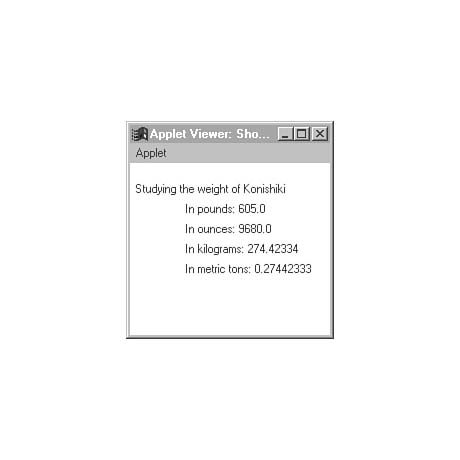
This hour's workshop project has little practical value, except perhaps as a taunting device. The ShowWeight applet takes a person's weight and displays it under several different units. The applet takes two parameters: a weight in pounds and the name of the person who weighs that amount. The weight is used to figure out the person's weight in ounces, kilograms, and metric tons, and all of these are displayed.
Create a new file with your word processor and give it the name ShowWeight.java. Enter Listing 15.1 into the file. Then save and compile the file.
Listing 15.1. The full text of ShowWeight.java.
 1: import java.awt.*;
 2:
 3: public class ShowWeight extends java.applet.Applet {
 4:     float lbs = (float)0;
 5:     float ozs;
 6:     float kgs;
 7:     float metricTons;
 8:     String name = "somebody";
 9:
10:     public void init() {
11:         String lbsValue = getParameter("weight");
12:         if (lbsValue != null) {
13:             Float lbsTemp = Float.valueOf(lbsValue);
14:             lbs = lbsTemp.floatValue();
15:         }
16:         String personValue = getParameter("person");
17:         if (personValue != null)
18:             name = personValue;
19:
20:         ozs = (float)(lbs * 16);
21:         kgs = (float)(lbs / 2.204623);
22:         metricTons = (float)(lbs / 2204.623);
23:     }
24:
25:     public void paint(Graphics screen) {
26:         screen.drawString("Studying the weight of " + name, 5, 30);
27:         screen.drawString("In pounds: " + lbs, 55, 50);
28:         screen.drawString("In ounces: " + ozs, 55, 70);
29:         screen.drawString("In kilograms: " + kgs, 55, 90);
30:         screen.drawString("In metric tons: " + metricTons, 55, 110);
31:     }
32:
33: }
The init() method is where the two parameters are loaded into the applet.
Because they come from the Web page as strings, they must be converted into the form
you need: a floating-point number for the lbs variable and a string for
name. Converting a string to a floating-point number requires two steps:
converting the string to a Float object and then converting that object
to a variable of the type float.
As you learned with strings, objects and variables are treated differently in Java programs, and there are different things you can do with them. The reason there is a Float object and a float variable type is so you can use a floating-point number as either an object or a variable. The Float object class also has useful methods such as valueOf() and floatValue() that you can use to convert floating-point numbers into different types of variables.
Lines 20-22 are used to convert the lbs variable into different units of measure. Each of these statements has (float) in front of the conversion equation. This is used to convert the result of the equation into a floating-point number. You can use this structure to convert variables of one type to another. Put a variable type in parentheses in front of an equation that produces a result, and it will convert the result to that type.
The paint() method of the applet uses the drawString() method of the Graphics class to display a line of text on-screen. The paint() method has three arguments: the text to display and the x and y positions where the text should be shown.
Before you can test the ShowWeight applet, you need to create a Web page that contains the applet. Open up a new file on your word processor and name it ShowWeight.asp. Enter Listing 15.2 and save it when you're done.
Listing 15.2. The full text of ShowWeight.asp.
1: <applet code="ShowWeight.class" height=170 width=200>
2: <param name="person" value="Konishiki">
3: <param name="weight" value=605>
4: </applet>
Use the appletviewer tool to see the ShowWeight applet. This demonstration
uses Konishiki as its example because the American-born sumo wrestling champion weighs
in at more than 605 pounds, making him the largest of the bikini-wearing behemoths.
You can substitute anyone whose weight is either exemplary or well-known. Figure
15.1 shows an example of output from the applet. As you can see, Konishiki's workout
regimen doesn't include a lot of fat-free SnackWell's Devil's Food Cakes.
Figure 15.1. The output of the ShowWeight applet.
To make the applet display a different name along with a different value for the "weight" parameter, all you have to change is the ShowWeight.asp file. The applet itself will continue to work correctly.
Summary
If you visit a site such as Gamelan on the World Wide Web (http://www.gamelan.com), you'll see links to numerous applets that have been made available for public use, including some that offer the source file of the program. These applets often use parameters, especially for animation or scrolling text programs. During this hour you covered all aspects of parameter use in your applets. Parameters can greatly improve the usefulness and performance of applets.
Even if you're the paragon of programming patience and you can wait out the slowest compiler, you'll be using parameters in your Java applets. Like arguments for Java applications, parameters are a useful way to make one program perform in a variety of ways.
Q&A
- Q Why can't parameters be used with Java applications?
A Parameters must be stored in some sort of document, such as a Web page. With a Java application that runs from the command line, there's nowhere to put them. However, you can specify arguments on the command line when you run the program, and these are brought in as strings also. Handling arguments in applications has many similarities to handling parameters in applets.
Q Does the name of a parameter on a Web page have to be capitalized exactly as it is shown as an argument to the getParameter() method?
A Like all HTML tags and attributes, the NAME and VALUE attributes of the <PARAM> tag do not have to be capitalized a specific way to work. The text "Speed" and "speed" and "SPEED" all refer to the same parameter.
Quiz
Test your knowledge of parameters with the following questions.
Questions
- 1. What's the name of the HTML tag that is used to send a parameter to
a Java program?
(a) <APPLET>
(b) <VARIABLE>
<PARAM>
2. When the getParameter() method is used to load a parameter value into a program, what type of information is loaded?
(a) a String variable
(b) a different type depending on the parameter
an array of characters
3. If you try to load a parameter that is not included on the Web page that contains the applet, what will getParameter() do?
(a) crash the program with an error
(b) return the empty string null as a value
nothing
Answers
- 1. c. <PARAM> is the tag to send a parameter, and <APPLET>
is the tag to load the applet itself.
2. a. All parameters are received by an applet as String variables. They have to be converted to another type of variable or object if you want to use them differently.
3. b. The getParameter() method must return some kind of value. The null value is used to signify the lack of a parameter that matches the argument of getParameter().
Activities
If you're not overstuffed from the weighty subject of parameters, the following activities are suggested:
- Create an applet version of the Repeat application from Chapter 8, "Repeating
an Action with Loops," that takes the line to display over and over again as
a parameter.
- Add a parameter to the ShowWeight applet that specifies the ideal weight
of the person. Display how many weeks of dieting it would take them to reach it,
given five pounds of weight loss per week.


Popular Tutorials
-
 MS Access
1109
MS Access
1109
-
 C++
1222
C++
1222
-
 HTML
584
HTML
584
-
 JavaScript
616
JavaScript
616
-
 Vbscript
873
Vbscript
873
-
 Oracle
473
Oracle
473
-
 VC++
875
VC++
875
-
 SQL
2959
SQL
2959
-
 XML
514
XML
514
-
 Java
814
Java
814
-
 Perl
455
Perl
455
-
 Linux
451
Linux
451