Web based School
- Chapter 14
- Creating a Threaded Applet
- A Revolving-Link Applet
- Starting with init()
- Catching Errors as You Set Up URLs
- Handling Screen Updates in the Paint() Method
- Starting the Thread
- Handling Mouse Clicks
- Workshop: Revolving Links
- Listing 14.1. The full text of Revolve.java.
- Listing 14.2. The full text of Revolve.asp.
- Summary
- Q&A
- Quiz
- Questions
- Activities
- Creating a Threaded Applet
Chapter 14
Creating a Threaded Applet
A computer term that is used often to describe the hectic pace of daily life is multitasking. (Another term is used more often around here, but the editors asked that it be omitted.) Multitasking means to do more than one thing at once--such as surfing the Web at your desk while participating in a conference call and using the Buttmaster exercise device to achieve more shapely shanks. The term comes from the world of operating systems, where a multitasking computer is one that can handle more than one program at a time.
One of the most sophisticated features of the Java language is the ability to write programs that can multitask. Under Java, each of the simultaneous tasks the computer handles is called a thread and the overall process is called multithreading. Threading is useful in animation and many other programs. This hour covers the subject of programming a threaded applet.
The following topics will be covered:
- Using an interface with a program
- Creating threads
- Starting and stopping threads
- Pausing a thread
- Loading a Web page from an applet program
- Catching errors
- Displaying an applet with other Web page elements
A Revolving-Link Applet
To provide more information on how applets are programmed, this hour is an extended workshop describing the design of a threaded applet. The program you'll be writing will rotate through a list of Web site titles and the addresses used to visit them. The following six Web sites will be listed:
- The JavaSoft Web site at http://java.sun.com
- The Gamelan Java directory at http://www.gamelan.com
- The JavaWorld Web magazine at http://www.javaworld.com
- This guide's Web site at http://www.prefect.com/java24
- The Java Applet Ratings Service at http://www.jars.com
The title of each page and the Web address will be displayed in a continuous cycle. Users will be able to visit the currently displayed site by clicking anywhere on the applet with the mouse. This program operates over a period of time; information on each Web site must be shown long enough to be read, and the next site then will be shown. Because of this time element, threads are the best way to control the program.
Instead of entering this program into your word processor first and learning about it afterward, you'll get a chance to enter the full text of the Revolve applet at the end of the hour. Before then, each section of the program will be described.
The class Declaration
The first thing you need to do in this applet is to use import to make some classes available. The Thread class, which is part of the java.lang group of classes, comes with methods to start a thread, stop a thread, and pause a thread. All three of these methods will be useful in the Revolve applet.
The java.awt group of classes is needed because you'll be using one of them, Graphics, to display text on-screen. The java.net group will be used when you work with the Web addresses, and the java.applet group is needed when you tell the browser to load a new page. Finally, the java.awt.event group is needed to respond to mouse clicks so that a user can visit one of the addresses shown.
Use the following import statements:
import java.applet.*;
import java.awt.*;
import java.awt.event.*;
import java.net.*;
You might be wondering why the java.lang group of classes does not need to be imported. It automatically is available to all Java programs that you write and contains a lot of the classes you will use most often. The String, Integer, and Math classes are three examples of classes that belong to java.lang.
After you have used import to make some classes available, you're ready to begin the applet with the following statement:
public class Revolve extends Applet
    implements Runnable, ActionListener {
This statement creates the Revolve class as a subclass of the Applet class. It also uses a new statement called implements.
The implements statement enables this class to inherit some extra methods beyond those that were inherited from the Applet class. The Runnable and ActionListener classes are called interfaces. An interface is a special type of class that is only useful in conjunction with the implements statement. An interface extends the capabilities of a class. In this case, Runnable provides the behavior an applet needs in order to become a thread. By implementing the Runnable class, you will be able to use a run() method in this applet to make a thread begin running. The ActionListener interface enables the applet to respond to actions the user takes with the mouse. Implementing it enables the actionPerformed() method to be called when a mouse button is clicked.
Setting Up Variables
The first thing to do in the Revolve class is to create the variables and objects needed throughout the program. Create two arrays with six elements--an array of String objects called pageTitle and an array of URL objects called pageLink:
String[] pageTitle = new String[6];
URL[] pageLink = new URL[6];
The pageTitle array will store the titles of the six Web sites that will be displayed. The URL class of objects stores the value of a Web site address. URL has all the behavior and attributes that are needed to keep track of a Web address and use it to load the page with a Web browser. Both of these arrays are set up without any values at this point, so you'll have to provide them later.
The last two things to be created are an integer variable called current and a Thread object called runner:
int current = 0;
Thread runner;
The current variable will be used to keep track of which site is being displayed so that you can cycle through the sites. The Thread object runner represents the only thread this program runs. You will call methods of the runner object when you start, stop, and pause the operation of the applet.
Starting with init()
The init() method of an applet automatically is handled when the applet first starts to run. In this example, this method is used to assign values to the two arrays created for this applet, pageTitle and pageLink. It also is used to create a clickable button that will appear on the applet. The method consists of the following statements:
public void init() {
    Color background = new Color(255, 255, 204);
    setBackground(background);
    pageTitle[0] = "JavaSoft";
    pageLink[0] = getURL("http://java.sun.com");
    pageTitle[1] = "Gamelan";
    pageLink[1] = getURL("http://www.gamelan.com");
    pageTitle[2] = "JavaWorld";
    pageLink[2] = getURL("http://www.javaworld.com");
    pageTitle[3] = "Java 1.1 Programming in 24 Chapters";
    pageLink[3] = getURL("http://www.prefect.com/java24");
    pageTitle[4] = "Sams.net Developers' Resource Center";
    pageLink[4] = getURL("http://www.mcp.com/sams");
    pageTitle[5] = "Java Applet Rating Service";
    pageLink[5] = getURL("http://www.jars.com");
    Button goButton = new Button("Go");
    goButton.addActionListener(this);
    add(goButton);
}
The first two statements of this method set up a background color for the applet. You'll learn how to do this during Chapter 16, "Using Fonts and Color in Applets."
Strings are assigned to the six elements of the pageTitle array, which stores the title of each Web page. The elements of the pageLink array are assigned a value returned by the getURL() method, which you will be creating for this program.
The last three statements of the init() method are used to create a button that will appear on-screen when the applet runs. The button has the name goButton and is labeled with the text Go. The addActionListener(this); statement makes it possible for the program to respond when the user clicks the button. The add() statement adds the button to the applet's display area. Creating components like buttons and using them in programs will be explained in detail during Chapter 19, "Building a Simple User Interface," and Chapter 20, "Responding to User Events."
Catching Errors as You Set Up URLs
When you set up a URL object, you must make sure that the text used to set up the address is in a valid format. http://www.javasoft.com and http://www.gamelan.com are valid, but something such as http:www.javasoft.com would not be because of the missing // marks.
A special try-catch statement is used to catch errors inside the program instead of letting them cause it to stop running, as many errors do. The try statement lets your program try to do something that might cause an error. If an error does occur, the catch statement is used to catch the error before it brings the program to a crashing halt.
If you're having trouble with the concept of try and catch statements, think of what it would be like to be one of Superman's best pals. Jimmy Olsen and Lois Lane can try all kinds of dangerous stunts without worrying as much about the consequences if they make an error. No narrow ledge or runaway locomotive is too risky an endeavor for them to attempt to navigate. If they try and fail, Superman will be there to catch them. No matter what you try in a Java program, you can create a catch statement that will catch errors. The getURL() method takes a string of text as an argument. The string is checked to see whether it's a valid Web address, and if it is, the method returns that valid address. If it's erroneous, the method sends back a null value. The following is the getURL() method:
URL getURL(String urlText) {
    URL pageURL = null;
    try { pageURL = new URL(getDocumentBase(), urlText); }
    catch (MalformedURLException m) { }
    return pageURL;
}
The first line of this method includes three things, in this order:
- The type of object or variable that is returned by the method--a URL
object in this case. If this is void, no information is returned by the
method.
- The name of the method--getURL.
- The argument or arguments, if any, that this method takes--only one in this example, a String variable called urlText.
The try statement is followed by { and } marks. The program handles any statements between these marks, and if they generate any exception or error conditions, these will be sent to the catch statement.
The catch statement also has { and } marks as part of the statement. If catch is set up to catch an error from the try block statement, anything between the { and } marks will be handled. In this example, if a MalformedURLException error occurs during the try block of statements, any statements between the { and } marks after catch will be handled. Because there are no statements between { and } in this method, catch ignores any MalformedURLException errors that occur.
If the String variable sent to the method is a valid Web address, it will be sent back as a valid URL object. If not, null is returned. Because you were assigning values to six different URL objects in the pageURL array, the getURL() method makes this process easier to do.
Handling Screen Updates in the Paint() Method
The paint() method of any applet is handled when the screen needs to be updated. This situation can be caused by the Web browser or operating system outside of the applet if they obscure part of an applet window or change its dimensions in some way. The paint() method also can be manually called within an applet when the screen needs to be updated.
If you put a repaint(); statement in an applet, it forces the paint() method to be handled. This statement is a way you can tell the program that you have done something that requires a screen update. For example, if you are writing an animation program and you move an image from one place to another, you need to use repaint(); so that the image is shown in its new location.
The Revolve applet has a short paint() method:
public void paint(Graphics screen) {
    screen.drawString(pageTitle[current], 5, 60);
    screen.drawString("" + pageLink[current], 5, 80);
}
The two statements inside the method display lines of text on the screen at the (x,y) positions of (5, 60) and (5, 80). The first line that is displayed is an element of the pageTitle array. The second line that is displayed is the address of the URL object, which is stored in the pageLink array. The current variable is used to determine which elements of these arrays to display.
Starting the Thread
One of the objects created for this program is a Thread object called runner. In order for a thread to get started, a place is needed where the thread is given a value and told to begin running. In this applet, the runner thread will start whenever the start() method is handled and stop whenever stop() is handled.
The start() method of an applet is handled at two different times: Right after the init() method and every time the program is restarted after being stopped. An applet is stopped any time a user switches from the applet page to another Web page. It starts again when a user returns to the original page. The following is the start() method of the Revolve applet:
public void start() {
    if (runner == null) {
        runner = new Thread(this);
        runner.start();
    }
}
This method does only one thing: If the runner thread is not already started, it creates a new runner thread and starts it. The runner object equals null when it has not been started yet, so you can test for this condition with the if statement.
The statement runner = new Thread(this); creates a new Thread object with one argument--the this statement. Using this makes the applet itself the program that will run in the runner thread.
The runner.start(); statement causes the thread to begin running. When a thread begins, the run() method of that thread is handled. Because the runner thread is the applet itself, the run() method of the applet is handled.
Running the Thread
The run() method is where the main work of a thread takes place. It is comparable to the main() block statement of a Java application. In the Revolve applet, the following represents the run() method:
public void run() {
    while (true) {
        repaint();
        current++;
        if (current > 5)
            current = 0;
        try { Thread.sleep(10000); }
        catch (InterruptedException e) { }
    }
}
All of the statements in this method are part of a while loop that has the Boolean value true as its condition. Because a while loop will continue looping as long as its condition equals true, while (true) will cause the loop to continue indefinitely. The only way the thread will stop is for the stop() method to be automatically called when the Web browser shuts down or the page containing the applet is replaced with another page.
The run() method first uses the repaint(); statement to cause the paint() method to be handled. Next, the value of the current variable increases by one, and if current exceeds 5, it is set to 0 again. The current variable is used in the paint() method to determine which Web site information to display. Changing current causes a different site to be displayed the next time paint() is handled.
This method includes another try-catch statement that handles an error that might occur. The Thread.sleep(10000); statement causes a thread to pause for 10,000 milliseconds. This statement causes the thread to wait long enough for users to read the name of the Web site and its address. The catch statement takes care of any InterruptedException errors that might occur while the Thread.sleep() statement is being handled. These errors would occur if something interrupted the thread while it was trying to sleep().
Stopping the Thread
The stop() method is handled any time the applet is stopped because the applet's page is exited, and it is the best place to stop the running thread. The stop() method for the Revolve applet contains the following statements:
public void stop() {
    if (runner != null) {
        runner.stop();
        runner = null;
    }
}
The if statement tests to see whether the runner object is equal to null. If it is, there isn't an active thread that needs to be stopped. Otherwise, the statement uses the stop() method of the runner object to stop that thread and sets runner equal to null.
Handling Mouse Clicks
Anything the user does with a mouse or keyboard in an applet is called an event, and the process of responding to events in a program is called event-handling. You'll learn all about events in Chapter 20.
The last thing to take care of in the Revolve applet are mouse clicks. Whenever you click the Go button, the Web browser should open the Web site that is listed. This is done with a method called actionPerformed(). The actionPerformed() method is called whenever the button is clicked.
The following is the actionPerformed() method of the Revolve applet:
public void actionPerformed(ActionEvent evt) {
    runner.stop();
    AppletContext browser = getAppletContext();
    if (pageLink[current] != null)
        browser.showDocument(pageLink[current]);
}
The first thing that happens in this method is that the runner thread is stopped. The next two statements create a new AppletContext object called browser and check to see whether the currently displayed Web address is valid. If it is, the showDocument method of the AppletContext class is used to display a new Web page in the user's browser.
Workshop: Revolving Links
Now that all aspects of the Revolve applet have been described, you're ready to create the program and test it out. Run your word processor and create a new file called Revolve.java. Enter the text of Listing 14.1 and save the file when you're done.
Listing 14.1. The full text of Revolve.java.
 1: import java.applet.*;
 2: import java.awt.*;
 3: import java.awt.event.*;
 4: import java.net.*;
 5:
 6: public class Revolve extends Applet
 7:     implements Runnable, ActionListener {
 8:
 9:     String[] pageTitle = new String[6];
10:     URL[] pageLink = new URL[6];
11:     int current = 0;
12:     Thread runner;
13:
14:     public void init() {
15:         Color background = new Color(255, 255, 204);
16:         setBackground(background);
17:         pageTitle[0] = "JavaSoft";
18:         pageLink[0] = getURL("http://java.sun.com");
19:         pageTitle[1] = "Gamelan";
20:         pageLink[1] = getURL("http://www.gamelan.com");
21:         pageTitle[2] = "JavaWorld";
22:         pageLink[2] = getURL("http://www.javaworld.com");
23:         pageTitle[3] = "Java 1.1 Programming in 24 Chapters";
24:         pageLink[3] = getURL("http://www.prefect.com/java24");
25:         pageTitle[4] = "Sams.net Developers' Resource Center";
26:         pageLink[4] = getURL("http://www.mcp.com/sams");
27:         pageTitle[5] = "Java Applet Rating Service";
28:         pageLink[5] = getURL("http://www.jars.com");
29:         Button goButton = new Button("Go");
30:         goButton.addActionListener(this);
31:         add(goButton);
32:     }
33:
34:     URL getURL(String urlText) {
35:         URL pageURL = null;
36:         try { pageURL = new URL(getDocumentBase(), urlText); }
37:         catch (MalformedURLException m) { }
38:         return pageURL;
39:     }
40:
41:     public void paint(Graphics screen) {
42:         screen.drawString(pageTitle[current], 5, 60);
43:         screen.drawString("" + pageLink[current], 5, 80);
44:     }
45:
46:     public void start() {
47:         if (runner == null) {
48:             runner = new Thread(this);
49:             runner.start();
50:         }
51:     }
52:
53:     public void run() {
54:         while (true) {
55:             repaint();
56:             current++;
57:             if (current > 5)
58:                 current = 0;
59:             try { Thread.sleep(10000); }
60:             catch (InterruptedException e) { }
61:         }
62:     }
63:
64:     public void stop() {
65:         if (runner != null) {
66:             runner.stop();
67:             runner = null;
68:         }
69:     }
70:
71:     public void actionPerformed(ActionEvent evt) {
72:         runner.stop();
73:         AppletContext browser = getAppletContext();
74:         if (pageLink[current] != null)
75:             browser.showDocument(pageLink[current]);
76:     }
77: }
After you compile this program with the javac compiler tool, you need to
create a Web page to put the applet on. Create a new file with your word processor
and name it Revolve.asp. Enter Listing 14.2 and save the file. Note that
some HTML tags have been included so that you can see the applet in the way it might
be presented on a real page.
Listing 14.2. The full text of Revolve.asp.
 1: <html>
 2: <head>
 3: <title>Homer's Home Page</title>
 4: </head>
 5: <body bgcolor="#C4C4C4">
 6: <font face="Arial" size=3>
 7: <table>
 8: <tr>
 9:
10: <td bgcolor="#FFCCFF" width=300 valign="TOP" align="CENTER">
11: <h2>Homer's Home Page</h2>
12: <p>Welcome to the cyberspace home of Homer! This page is under construction.
13: </td>
14:
15: <td bgcolor="#FFFFCC" width=200 valign="TOP" align="RIGHT">
16: <i><b>Some of my favorite links:</b></i>
17: <applet code="Revolve.class" height=100 width=200>
18: </applet>
19: <center>
20: <i>Click to visit</i>
21: </center>
22: </td>
23:
24: </tr>
25: </table>
26: </font>
27: </body>
28: </html>
When you're done, load this file into appletviewer. You can test the applet
itself from this program, but you will not see the surrounding HTML or be able to
load a new Web page when the Go button is clicked. These features require the use
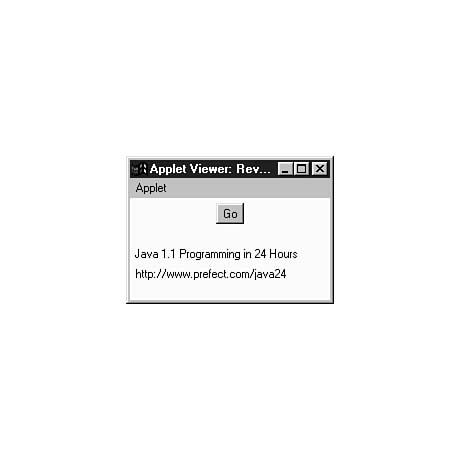
of a Web browser that is equipped to handle Java 1.1 programs. Figure 14.1 shows
the output of the Revolve applet in the appletviewer tool.
Figure 14.1. A screen capture of the Revolve applet using appletviewer.
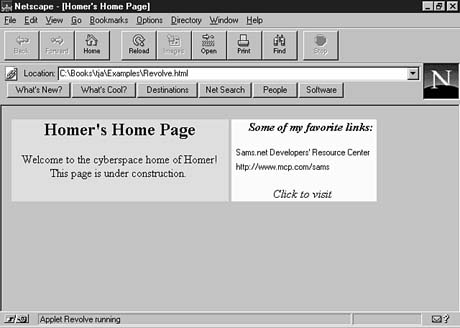
So that you can see how this applet would look on a Web browser, Figure 14.2 shows a modified version of Revolve using Netscape Navigator. This version uses no new features of Java 1.1, so it can be run on browsers that can handle Java 1.0.2 programs.
Figure 14.2. A screen capture of a modified Revolve applet using Netscape Navigator.
If you'd like to run this modified version using a Web browser, you can find it on this guide's CD-ROM in the Win95nt4/guide/Source/Hour14 directory. Load the Web page OldRevolve.asp into a Java-enabled browser.
Summary
Now that you have programmed applets and threads during the past two hours, you should be getting a better idea of the behind-the-scenes work that takes place in an applet. Many of the methods in these programs often are called automatically, such as paint().
With or without threads, writing applets requires an understanding of the methods that might be included in an applet and how they function. In the next several hours, you'll get more chances to see which methods are called automatically and how to use them in your own programs.
Even if you learned nothing else from this hour, you now have a new '90s term to describe your frenzied lifestyle. Use it in a few sentences to see if it grabs you:
- "Boy, I was really multithreading yesterday after Mom was indicted for mail
fraud."
- "I multithreaded all through lunch, and it gave me gas."
- "Not tonight, dear, I'm multithreading."
Q&A
- Q Why isn't java.applet.Applet needed in the class statement of the Revolve
applet?
A It isn't needed because of the import statement that makes all of the java.applet classes available to the program. The only purpose of import is to make it easier to refer to classes in a program. If you don't use it, you have to use full class references such as java.applet.Applet instead of simply Applet. You could write all of your Java programs without using import, though it would make the source files more difficult to understand.
Q If the Revolve applet only has one thread, what's the point of using threads at all?
A Multithreading has benefits even it's really just single-threading. The reason is that you can start, stop, and pause a thread from within a program; you don't have the same kind of control without threads. Also, by making an applet a thread, even for a single-thread project, you make it easier to implement additional threads as needed later on.
Q Are there any reasons not to leave a pair of empty brackets after a catch statement, which causes errors to be disregarded?
A It depends on the type of error or exception that is being caught. In the Revolve applet, you know with both catch statements what the cause of an exception would be. Because of this knowledge, you can handle the error. In the getURL() method, the MalformedURLException would only be caused if the URL sent to the method is invalid.
Quiz
Set aside your threads (in the Java sense, not the nudity sense), and answer the following questions about multithreading in Java.
Questions
- 1. What class must be implemented for an applet to use threads?
(a) Runnable
(b) Thread
Applet
2. When a class has been set up as a thread, what method will be handled when the thread begins running?
(a) start()
(b) run()
init()
3. You're admiring the work of another programmer who has created an applet that handles four simultaneous tasks. What should you tell him?
(a) "That's not half as exciting as the Eleanor Mondale screen saver I downloaded off the Web."
(b) "You're the wind beneath my wings."
"Nice threads!"
Answers
- 1. a. Runnable must be used with the implements statement.
Thread is used inside a multithreaded program, but it is not needed in the
class statement that begins a program.
2. b. The run() statement is handled when the thread begins.
3. c. This compliment could be confusing if the programmer is well-dressed, but let's be honest--what are the chances of that?
Activities
If this long workshop hasn't left you feeling threadbare, expand your skills with the following activities:
- If you are comfortable with HTML, create your own home page that includes the
Revolve applet and six of your own favorite Web sites. Use the applet along
with other graphics and text on the page.
- Rewrite the Ouch applet from the previous hour to use threads and actually
pause one second for each second that the national debt is increasing.


Popular Tutorials
-
 MS Access
1109
MS Access
1109
-
 C++
1222
C++
1222
-
 HTML
584
HTML
584
-
 JavaScript
616
JavaScript
616
-
 Vbscript
873
Vbscript
873
-
 Oracle
473
Oracle
473
-
 VC++
875
VC++
875
-
 SQL
2959
SQL
2959
-
 XML
514
XML
514
-
 Java
814
Java
814
-
 Perl
455
Perl
455
-
 Linux
451
Linux
451