Web based School


- Internet Protocol
- The Internet Protocol Datagram Header
- Version Number
- Header Length
- Type of Service
- Datagram Length (or Packet Length)
- Identification
- Flags
- Fragment Offset
- Time to Live (TTL)
- Transport Protocol
- Header Checksum
- Sending Address and Destination Address
- Options
- Padding
- A Datagram's Life
- Internet Control Message Protocol (ICMP)
- IPng: IP Version 6
- Internet Protocol Support in Different Environments
- Summary
- Q&A
- Quiz
— 3 —
The Internet Protocol (IP)
The Internet Protocol (IP)
Yesterday I looked at the history of TCP/IP and the Internet in some detail. Today I move on to the first of the two important protocol elements of TCP/IP: the Internet Protocol, the "IP" part of TCP/IP. A good understanding of IP is necessary to continue on to TCP and UDP, because the IP is the component that handles the movement of datagrams across a network. Knowing how a datagram must be assembled and how it is moved through the networks helps you understand how the higher-level layers work with IP. For almost all protocols in the TCP/IP family, IP is the essential element that packages data and ensures that it is sent to its destination.
This chapter contains, unfortunately, even more detail on headers, protocols, and messaging than you saw in the last couple of days. This level of information is necessary in order for you to deal with understanding the applications and their interaction with IP, as well as troubleshooting the system. Although I don't go into exhaustive detail, there is enough here that you can refer back to this chapter whenever needed.
As with many of the subjects I look at in this guide, don't assume that this chapter covers everything there is to know about IP. There are many guides written on IP alone, going into each facet of the protocol and its functionality. Luckily, most of the details are transparent to you, and there is little advantage gained in knowing it. For that reason, I simplify the subject a little, still providing enough detail for you to see how IP works and what it does.
Internet Protocol
The Internet Protocol (IP) is a primary protocol of the OSI model, as well as an integral part of TCP/IP (as the name suggests). Although the word "Internet" appears in the protocol's name, it is not restricted to use with the Internet. It is true that all machines on the Internet can use or understand IP, but IP can also be used on dedicated networks that have no relation to the Internet at all. IP defines a protocol, not a connection. Indeed, IP is a very good choice for any network that needs an efficient protocol for machine-to-machine communications, although it faces some competition from protocols like Novell NetWare's IPX on small to medium local area networks that use NetWare as a PC server operating system.
What does IP do? Its main tasks are addressing of datagrams of information between computers and managing the fragmentation process of these datagrams. The protocol has a formal definition of the layout of a datagram of information and the formation of a header composed of information about the datagram. IP is responsible for the routing of a datagram, determining where it will be sent, and devising alternate routes in case of problems.
Another important aspect of IP's purpose has to do with unreliable delivery of a datagram. Unreliable in the IP sense means that the delivery of the datagram is not guaranteed, because it can get delayed, misrouted, or mangled in the breakdown and reassembly of message fragments. IP has nothing to do with flow control or reliability: there is no inherent capability to verify that a sent message is correctly received. IP does not have a checksum for the data contents of a datagram, only for the header information. The verification and flow control tasks are left to other components in the layer model. (For that matter, IP doesn't even properly handle the forwarding of datagrams. IP can make a guess as to the best routing to move a datagram to the next node along a path, but it does not inherently verify that the chosen path is the fastest or most efficient route.) Part of the IP system defines how gateways manage datagrams, how and when they should produce error messages, and how to recover from problems that might arise.
In the first chapter, you saw how data can be broken into smaller sections for transmission and then reassembled at another location, a process called fragmentation and reassembly. IP provides for a maximum packet size of 65,535 bytes, which is much larger than most networks can handle, hence the need for fragmentation. IP has the capability to automatically divide a datagram of information into smaller datagrams if necessary, using the principles you saw in Day 1.
When the first datagram of a larger message that has been divided into fragments arrives at the destination, a reassembly timer is started by the receiving machine's IP layer. If all the pieces of the entire datagram are not received when the timer reaches a predetermined value, all the datagrams that have been received are discarded. The receiving machine knows the order in which the pieces are to be reassembled because of a field in the IP header. One consequence of this process is that a fragmented message has a lower chance of arrival than an unfragmented message, which is why most applications try to avoid fragmentation whenever possible.
IP is connectionless, meaning that it doesn't worry about which nodes a datagram passes through along the path, or even at which machines the datagram starts and ends. This information is in the header, but the process of analyzing and passing on a datagram has nothing to do with IP analyzing the sending and receiving IP addresses. IP handles the addressing of a datagram with the full 32-bit Internet address, even though the transport protocol addresses use 8 bits. A new version of IP, called version 6 or IPng (IP Next Generation) can handle much larger headers, as you will see toward the end of today's material in the section titled "IPng: IP Version 6."
The Internet Protocol Datagram Header
It is tempting to compare IP to a hardware network such as Ethernet because of the basic similarities in packaging information. Yesterday you saw how Ethernet assembles a frame by combining the application data with a header block containing address information. IP does the same, except the contents of the header are specific to IP. When Ethernet receives an IP-assembled datagram (which includes the IP header), it adds its header to the front to create a frame—a process called encapsulation. One of the primary differences between the IP and Ethernet headers is that Ethernet's header contains the physical address of the destination machine, whereas the IP header contains the IP address. You might recall from yesterday's discussion that the translation between the two addresses is performed by the Address Resolution Protocol.
Encapsulation is the process of adding something to the start (and sometimes the end) of data, just as a pill capsule holds the medicinal contents. The added header and tail give details about the enclosed data.
The datagram is the transfer unit used by IP, sometimes more specifically called an Internet datagram, or IP datagram. The specifications that define IP (as well as most of the other protocols and services in the TCP/IP family of protocols) define headers and tails in terms of words, where a word is 32 bits. Some operating systems use a different word length, although 32 bits per word is the more-often encountered value (some minicomputers and larger systems use 64 bits per word, for example). There are eight bits to a byte, so a 32-bit word is the same as four bytes on most systems.
The IP header is six 32-bit words in length (24 bytes total) when all the optional fields are included in the header. The shortest header allowed by IP uses five words (20 bytes total). To understand all the fields in the header, it is useful to remember that IP has no hardware dependence but must account for all versions of IP software it can encounter (providing full backward-compatibility with previous versions of IP). The IP header layout is shown schematically in Figure 3.1. The different fields in the IP header are examined in more detail in the following subsections.
Figure 3.1. The IP header layout.
Version Number
This is a 4-bit field that contains the IP version number the protocol software is using. The version number is required so that receiving IP software knows how to decode the rest of the header, which changes with each new release of the IP standards. The most widely used version is 4, although several systems are now testing version 6 (called IPng). The Internet and most LANs do not support IP version 6 at present.
Part of the protocol definition stipulates that the receiving software must first check the version number of incoming datagrams before proceeding to analyze the rest of the header and encapsulated data. If the software cannot handle the version used to build the datagram, the receiving machine's IP layer rejects the datagram and ignores the contents completely.
Header Length
This 4-bit field reflects the total length of the IP header built by the sending machine; it is specified in 32-bit words. The shortest header is five words (20 bytes), but the use of optional fields can increase the header size to its maximum of six words (24 bytes). To properly decode the header, IP must know when the header ends and the data begins, which is why this field is included. (There is no start-of-data marker to show where the data in the datagram begins. Instead, the header length is used to compute an offset from the start of the IP header to give the start of the data block.)
Type of Service
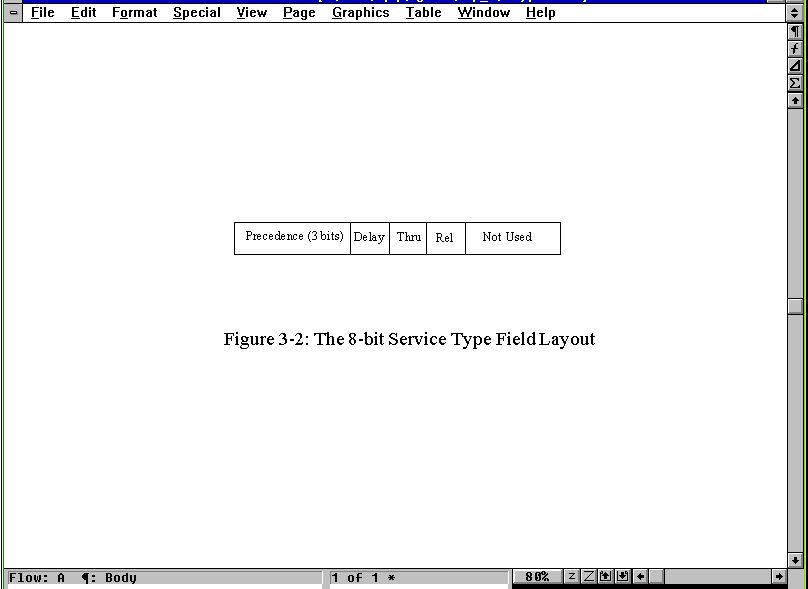
The 8-bit (1 byte) Service Type field instructs IP how to process the datagram properly. The field's 8 bits are read and assigned as shown in Figure 3.2, which shows the layout of the Service Type field inside the larger IP header shown in Figure 3.1. The first 3 bits indicate the datagram's precedence, with a value from 0 (normal) through 7 (network control). The higher the number, the more important the datagram and, in theory at least, the faster the datagram should be routed to its destination. In practice, though, most implementations of TCP/IP and practically all hardware that uses TCP/IP ignores this field, treating all datagrams with the same priority.
Figure 3.2. The 8-bit Service Type field layout.
The next three bits are 1-bit flags that control the delay, throughput, and reliability of the datagram. If the bit is set to 0, the setting is normal. A bit set to 1 implies low delay, high throughput, and high reliability for the respective flags. The last two bits of the field are not used. Most of these bits are ignored by current IP implementations, and all datagrams are treated with the same delay, throughput, and reliability settings.
For most purposes, the values of all the bits in the Service Type field are set to 0 because differences in precedence, delay, throughput, and reliability between machines are virtually nonexistent unless a special network has been established. Although these flags would be useful in establishing the best routing method for a datagram, no currently available UNIX-based IP system bothers to evaluate the bits in these fields. (Although it is conceivable that the code could be modified for high security or high reliability networks.)
Datagram Length (or Packet Length)
This field gives the total length of the datagram, including the header, in bytes. The length of the data area itself can be computed by subtracting the header length from this value. The size of the total datagram length field is 16 bits, hence the 65,535 bytes maximum length of a datagram (including the header). This field is used to determine the length value to be passed to the transport protocol to set the total frame length.
Identification
This field holds a number that is a unique identifier created by the sending node. This number is required when reassembling fragmented messages, ensuring that the fragments of one message are not intermixed with others. Each chunk of data received by the IP layer from a higher protocol layer is assigned one of these identification numbers when the data arrives. If a datagram is fragmented, each fragment has the same identification number.
Flags
The Flags field is a 3-bit field, the first bit of which is left unused (it is ignored by the protocol and usually has no value written to it). The remaining two bits are dedicated to flags called DF (Don't Fragment) and MF (More Fragments), which control the handling of the datagrams when fragmentation is desirable.
If the DF flag is set to 1, the datagram cannot be fragmented under any circumstances. If the current IP layer software cannot send the datagram on to another machine without fragmenting it, and this bit is set to 1, the datagram is discarded and an error message is sent back to the sending device.
If the MF flag is set to 1, the current datagram is followed by more packets (sometimes called subpackets), which must be reassembled to re-create the full message. The last fragment that is sent as part of a larger message has its MF flag set to 0 (off) so that the receiving device knows when to stop waiting for datagrams. Because the order of the fragments' arrival might not correspond to the order in which they were sent, the MF flag is used in conjunction with the Fragment Offset field (the next field in the IP header) to indicate to the receiving machine the full extent of the message.
Fragment Offset
If the MF (More Fragments) flag bit is set to 1 (indicating fragmentation of a larger datagram), the fragment offset contains the position in the complete message of the submessage contained within the current datagram. This enables IP to reassemble fragmented packets in the proper order.
Offsets are always given relative to the beginning of the message. This is a 13-bit field, so offsets are calculated in units of 8 bytes, corresponding to the maximum packet length of 65,535 bytes. Using the identification number to indicate which message a receiving datagram belongs to, the IP layer on a receiving machine can then use the fragment offset to reassemble the entire message.
Time to Live (TTL)
This field gives the amount of time in seconds that a datagram can remain on the network before it is discarded. This is set by the sending node when the datagram is assembled. Usually the TTL field is set to 15 or 30 seconds.
The TCP/IP standards stipulate that the TTL field must be decreased by at least one second for each node that processes the packet, even if the processing time is less than one second. Also, when a datagram is received by a gateway, the arrival time is tagged so that if the datagram must wait to be processed, that time counts against its TTL. Hence, if a gateway is particularly overloaded and can't get to the datagram in short order, the TTL timer can expire while awaiting processing, and the datagram is abandoned.
If the TTL field reaches 0, the datagram must be discarded by the current node, but a message is sent back to the sending machine when the packet is dropped. The sending machine can then resend the datagram. The rules governing the TTL field are designed to prevent IP packets from endlessly circulating through networks.
Transport Protocol
This field holds the identification number of the transport protocol to which the packet has been handed. The numbers are defined by the Network Information Center (NIC), which governs the Internet. There are currently about 50 protocols defined and assigned a transport protocol number. The two most important protocols are ICMP (detailed in the section titled "Internet Control Message Protocol (ICMP)" later today), which is number 1, and TCP, which is number 6. The full list of numbers is not necessary here because most of the protocols are never encountered by users. (If you really want this information, it’s in several RFCs mentioned in the apendixes.)
Header Checksum
The number in this field of the IP header is a checksum for the protocol header field (but not the data fields) to enable faster processing. Because the Time to Live (TTL) field is decremented at each node, the checksum also changes with every machine the datagram passes through. The checksum algorithm takes the ones-complement of the 16-bit sum of all 16-bit words.
This is a fast, efficient algorithm, but it misses some unusual corruption circumstances such as the loss of an entire 16-bit word that contains only 0s. However, because the data checksums used by both TCP and UDP cover the entire packet, these types of errors usually can be caught as the frame is assembled for the network transport.
Sending Address and Destination Address
These fields contain the 32-bit IP addresses of the sending and destination devices. These fields are established when the datagram is created and are not altered during the routing.
Options
The Options field is optional, composed of several codes of variable length. If more than one option is used in the datagram, the options appear consecutively in the IP header. All the options are controlled by a byte that is usually divided into three fields: a 1-bit copy flag, a 2-bit option class, and a 5-bit option number. The copy flag is used to stipulate how the option is handled when fragmentation is necessary in a gateway. When the bit is set to 0, the option should be copied to the first datagram but not subsequent ones. If the bit is set to 1, the option is copied to all the datagrams.
The option class and option number indicate the type of option and its particular value. At present, there are only two option classes set. (With only 2 bits to work with in the field, a maximum of four options could be set.) When the value is 0, the option applies to datagram or network control. A value of 2 means the option is for debugging or administration purposes. Values of 1 and 3 are unused. Currently supported values for the option class and number are given in Table 3.1.
|
Option Class |
Option Number |
Description
| 0
| 0
| Marks the end of the options list
| 0
| 1
| No option (used for padding)
| 0
| 2
| Security options (military purposes only)
| 0
| 3
| Loose source routing
| 0
| 7
| Activates routing record (adds fields)
| 0
| 9
| Strict source routing
| 2
| 4
| Timestamping active (adds fields) |
Of most interest to you are options that enable the routing and timestamps to be recorded. These are used to provide a record of a datagram's passage across the internetwork, which can be useful for diagnostic purposes. Both these options add information to a list contained within the datagram. (The timestamp has an interesting format: it is expressed in milliseconds since midnight, Universal Time. Unfortunately, because most systems have widely differing time settings—even when corrected to Universal Time—the timestamps should be treated with more than a little suspicion.)
There are two kinds of routing indicated within the Options field: loose and strict. Loose routing provides a series of IP addresses that the machine must pass through, but it enables any route to be used to get to each of these addresses (usually gateways). Strict routing enables no deviations from the specified route. If the route can't be followed, the datagram is abandoned. Strict routing is frequently used for testing routes but rarely for transmission of user datagrams because of the higher chances of the datagram being lost or abandoned.
Padding
The content of the padding area depends on the options selected. The padding is usually used to ensure that the datagram header is a round number of bytes.
A Datagram's Life
To understand how IP and other TCP/IP layers work to package and send a datagram from one machine to another, I take a simplified look at a typical datagram's passage. When an application must send a datagram out on the network, it performs a few simple steps. First, it constructs the IP datagram within the legal lengths stipulated by the local IP implementation. The checksum is calculated for the data, and then the IP header is constructed. Next, the first hop (machine) of the route to the destination must be determined to route the datagram to the destination machine directly over the local network, or to a gateway if the internetwork is used. If routing is important, this information is added to the header using an option. Finally, the datagram is passed to the network for its manipulation of the datagram.
As a datagram passes along the internetwork, each gateway performs a series of tests. After the network layer has stripped off its own header, the gateway IP layer calculates the checksum and verifies the integrity of the datagram. If the checksums don't match, the datagram is discarded and an error message is returned to the sending device. Next, the TTL field is decremented and checked. If the datagram has expired, it is discarded and an error message is sent back to the sending machine. After determining the next hop of the route, either by analysis of the target address or from a specified routing instruction within the Options field of the IP header, the datagram is rebuilt with the new TTL value and new checksum.
If fragmentation is necessary because of an increase in the datagram's length or a limitation in the software, the datagram is divided, and new datagrams with the correct header information are assembled. If a routing or timestamp is required, it is added as well. Finally, the datagram is passed back to the network layer.
When the datagram is finally received at the destination device, the system performs a checksum calculation and—assuming the two sums match—checks to see if there are other fragments. If more datagrams are required to reassemble the entire message, the system waits, meanwhile running a timer to ensure that the datagrams arrive within a reasonable time. If all the parts of the larger message have arrived but the device can't reassemble them before the timer reaches 0, the datagram is discarded and an error message is returned to the sender. Finally, the IP header is stripped off, the original message is reconstructed if it was fragmented, and the message is passed up the layers to the upper layer application. If a reply was required, it is then generated and sent back to the sending device.
When extra information is added to the datagram for routing or timestamp recording, the length of the datagram can increase. Handling all these conditions is part of IP's forte, for which practically every problem has a resolution system.
Internet Control Message Protocol (ICMP)
As you have seen today and over the last two days, many problems can occur in routing a message from sender to receiver. The TTL timer might expire; fragmented datagrams might not arrive with all segments intact; a gateway might misroute a datagram, and so on. Letting the sending device know of a problem with a datagram is important, as is correctly handling error conditions within the network routing itself. The Internet Control Message Protocol (ICMP) was developed for this task.
ICMP is an error-reporting system. It is an integral part of IP and must be included in every IP implementation. This provides for consistent, understandable error messages and signals across the different versions of IP and different operating systems. It is useful to think of ICMP as one IP package designed specifically to talk to another IP package across the network: in other words, ICMP is the IP layer's communications system. Messages generated by ICMP are treated by the rest of the network as any other datagram, but they are interpreted differently by the IP layer software. ICMP messages have a header built in the same manner as any IP datagram, and ICMP datagrams are not differentiated at any point from normal data-carrying datagrams until a receiving machine's IP layer processes the datagram properly.
In almost all cases, error messages sent by ICMP are routed back to the original datagram's sending machine. This is because only the sender's and destination device's IP addresses are included in the header. Because the error doesn't mean anything to the destination device, the sender is the logical recipient of the error message. The sender can then determine from the ICMP message the type of error that occurred and establish how to best resend the failed datagram.
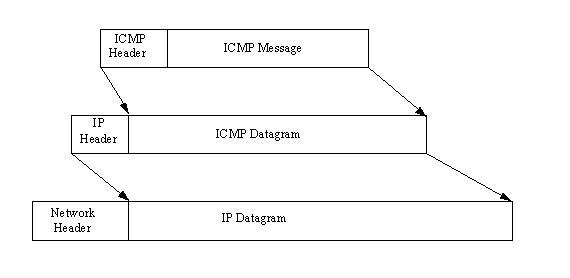
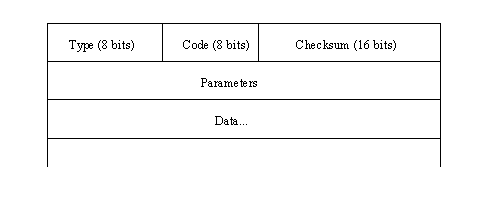
ICMP messages go through two encapsulations, as do all IP messages: incorporation into a regular IP datagram and then into the network frame. This is shown in Figure 3.3. ICMP headers have a different format than IP headers, though, and the format differs slightly depending on the type of message. However, all ICMP headers start with the same three fields: a message type, a code field, and a checksum for the ICMP message. Figure 3.4 shows the layout of the ICMP message.
Figure 3.3. Two-step encapsulation of an ICMP message.
Figure 3.4. The layout of an ICMP message.
Usually, any ICMP message that is reporting a problem with delivery also includes the header and first 64 bits of the data field from the datagram for which the problem occurred. Including the 64 bits of the original datagram accomplishes two things. First, it enables the sending device to match the datagram fragment to the original datagram by comparison. Also, because most of the protocols involved are defined at the start of the datagram, the inclusion of the original datagram fragment allows for some diagnostics to be performed by the machine receiving the ICMP message.
The 8-bit Message Type field in the ICMP header (shown in Figure 3.4) can have one of the values shown in Table 3.2.
|
Value |
Description
| 0
| Echo Reply
| 3
| Destination Not Reachable
| 4
| Source Quench
| 5
| Redirection Required
| 8
| Echo Request
| 11
| Time to Live Exceeded
| 12
| Parameter Problem
| 13
| Timestamp Request
| 14
| Timestamp Reply
| 15
| Information Request (now obsolete)
| 16
| Information Reply (now obsolete)
| 17
| Address Mask Request
| 18
| Address Mask Reply |
The Code field expands on the message type, providing a little more information for the receiving machine. The checksum in the ICMP header is calculated in the same manner as the normal IP header checksum.
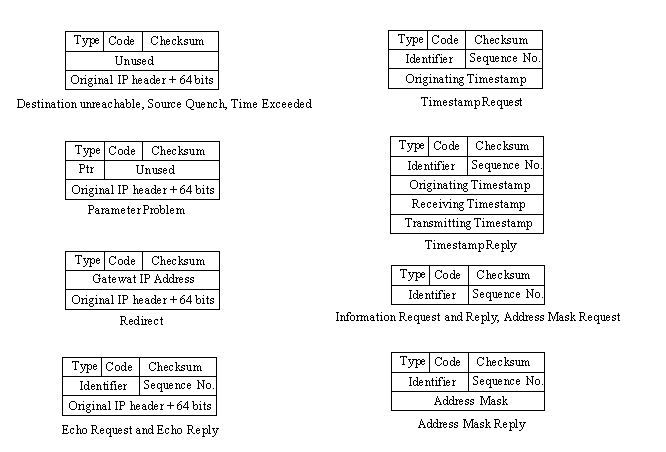
The layout of the ICMP message is slightly different for each type of message. Figure 3.5 shows the layouts of each type of ICMP message header. The Destination Unreachable and Time Exceeded messages are self-explanatory, although they are used in other circumstances, too, such as when a datagram must be fragmented but the Don't Fragment flag is set. This results in a Destination Unreachable message being returned to the sending machine.
Figure 3.5. ICMP message header layouts.
The Source Quench ICMP message is used to control the rate at which datagrams are transmitted, although this is a very rudimentary form of flow control. When a device receives a Source Quench message, it should reduce the transmittal rate over the network until the Source Quench messages cease. The messages are typically generated by a gateway or host that either has a full receiving buffer or has slowed processing of incoming datagrams because of other factors. If the buffer is full, the device is supposed to issue a Source Quench message for each datagram that is discarded. Some implementations issue Source Quench messages when the buffer exceeds a certain percentage to slow down reception of new datagrams and enable the device to clear the buffer.
Redirection messages are sent to a gateway in the path when a better route is available. For example, if a gateway has just received a datagram from another gateway but on checking its datafiles finds a better route, it sends the Redirection message back to that gateway with the IP address of the better route. When a Redirection message is sent, an integer is placed in the code field of the header to indicate the conditions for which the rerouting applies. A value of 0 means that datagrams for any device on the destination network should be redirected. A value of 1 indicates that only datagrams for the specific device should be rerouted. A value of 2 implies that only datagrams for the network with the same type of service (read from one of the IP header fields) should be rerouted. Finally, a value of 3 reroutes only for the same host with the same type of service.
The Parameter Problem message is used whenever a semantic or syntactic error has been encountered in the IP header. This can happen when options are used with incorrect arguments. When a Parameter Problem message is sent back to the sending device, the Parameter field in the ICMP error message contains a pointer to the byte in the IP header that caused the problem. (See Figure 3.5.)
Echo request or reply messages are commonly used for debugging purposes. When a request is sent, a device or gateway down the path sends a reply back to the specified device. These request/reply pairs are useful for identifying routing problems, failed gateways, or network cabling problems. The simple act of processing an ICMP message also acts as a check of the network, because each gateway or device along the path must correctly decode the headers and then pass the datagram along. Any failure along the way could be with the implementation of the IP software. A commonly used request/reply system is the ping command. The ping command sends a series of requests and waits for replies.
Timestamp requests and replies enable the timing of message passing along the network to be monitored. When combined with strict routing, this can be useful in identifying bottlenecks. Address mask requests and replies are used for testing within a specific network or subnetwork.
IPng: IP Version 6
When IP version 4 (the current release) was developed, the use of a 32-bit IP address seemed more than enough to handle the projected use of the Internet. With the incredible growth rate of the Internet over the last few years, however, the 32-bit IP address might become a problem. To counter this limit, IP Next Generation, usually called IP version 6 (IPv6), is under development.
Several proposals for IPng implementation are currently being studied, the most popular of which are TUBA (TCP and UDP with Bigger Addresses), CATNIP (Common Architecture for the Internet), and SIPP (Simple Internet Protocol Plus). None of the three meet all the proposed changes for version 6, but a compromise or modification based on one of these proposals is likely.
What does IPng have to offer? The list of changes tells you the main features of IPng in a nutshell:
- 128-bit network address instead of 32-bit
- More efficient IP header with extensions for applications and options
- No header checksum
- A flow label for quality-of-service requirements
- Prevention of intermediate fragmentation of datagrams
- Built-in security for authentication and encryption
Next I look at IPng in a little more detail to show the changes that affect most users, as well as network programmers and network administrators. I start with a look at the IPng header. Remember that at present IPng is still under development and is not widely deployed except on test networks.
IPng Datagram
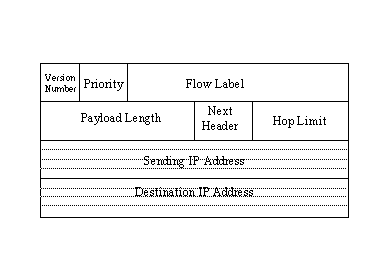
As mentioned earlier, the header for IPng datagrams has been modified over the earlier version 4 header. The changes are mostly to provide support for the new, longer 128-bit IP addresses and to remove obsolete and unneeded fields. The basic layout of the IPng header is shown in Figure 3.6. As you can see, there are quite a few changes from the IP header used in IP version 4 (see Figure 3.1).
Figure 3.6. The IPng header layout.
The version number in the IP datagram header is four bits long and holds the release number (which is 6 with IPng). The Priority field is four bits long and holds a value indicating the datagram's priority. The priority is used to define the transmission order. The priority is set first with a broad classification, then a narrower identifier within each class. I look at the priority classification in a little more detail in a moment.
The Flow Label field is 24 bits long and is still in the development stage. It is likely to be used in combination with the source machine IP address to provide flow identification for the network. For example, if you are using a UNIX workstation on the network, the flow is different from another machine such as a Windows 95 PC. This field can be used to identify flow characteristics and provide some adjustment capabilities. The field can also be used to help identify target machines for large transfers, in which case a cache system becomes more efficient at routing between source and destination. Flow labels are discussed in more detail in the section titled "Flow Labels" later today.
The Payload Length field is a 16-bit field used to specify the total length of the IP datagram, given in bytes. The total length is exclusive of the IP header itself. The use of a 16-bit field limits the maximum value in this field to 65,535, but there is a provision to send large datagrams using an extension header (see the section titled "IP Extension Headers" later today).
The Next Header field is used to indicate which header follows the IP header when other applications want to piggy-back on the IP header. Several values have been defined for the Next Header field, as shown in Table 3.3.
|
Value |
Description
| 0
| Hop-by-hop options
| 4
| IP
| 6
| TCP
| 17
| UDP
| 43
| Routing
| 44
| Fragment
| 45
| Interdomain Routine
| 46
| Resource Reservation
| 50
| Encapsulating Security
| 51
| Authentication
| 58
| ICMP
| 59
| No Next Header
| 60
| Destination Options |
The Hop Limit field determines the number of hops the datagram can travel. With each forwarding, the number is decremented by 1. When the Hop Limit field reaches 0, the datagram is discarded, just as with IP version 4.
Finally, the Sending and Destination IP Addresses in 128-bit format are placed in the header. I look at the new IP address format in more detail in the section titled "128-Bit IP Addresses" later in this chapter.
Priority Classification
The Priority Classification field in the IPng header first divides the datagram into one of two categories: congestion controlled or noncongestion controlled. Noncongestion controlled datagrams are always routed as a priority over congestion controlled datagrams. There are subclassifications of noncongestion controlled datagram priorities available for use, but none of the categories have been accepted as standard yet.
If the datagram is congestion controlled, it is sensitive to congestion problems on the network. If congestion occurs, the datagram can be slowed down and held temporarily in caches until the problem is alleviated. Beneath the broad congestion controlled category are several subclasses that further refine the priority of the datagram. The subcategories of congestion controlled priorities are given in Table 3.4.
|
Value |
Meaning
| 0
| No priority specified
| 1
| Background traffic
| 2
| Unattended data transfer
| 3
| Unassigned
| 4
| Attended bulk transfer
| 5
| Unassigned
| 6
| Interactive traffic
| 7
| Control traffic |
Noncongestion controlled traffic has priorities 8 through 15 available, but as I mentioned earlier, they are not defined.
Examples of each of the primary subcategories might help you see how the datagrams are prioritized. Routing and network management traffic that is considered highest priority is assigned category 7. Interactive applications such as Telnet and remote X sessions are assigned as interactive traffic (category 6). Transfers that are not time-critical (such as Telnet sessions) but are still controlled by an interactive application such as FTP are assigned as category 4. E-mail is usually assigned as category 2, whereas low-priority material such as news is set to category 1.
Flow Labels
As mentioned earlier, the Flow Label field new to the IPng header can be used to help identify the sender and destination of many IP datagrams. By employing caches to handle flows, the datagrams can be routed more efficiently. Not all applications can handle flow labels, in which case the field is set to a value of 0.
A simple example might help show the usefulness of the flow label field. Suppose a PC running Windows 95 is connected to a UNIX server on another network and is sending a large number of datagrams. By setting a specific value of the flow label for all the datagrams in the transmission, the routers along the way to the server can assemble entries in their routing caches that indicate which way to route each datagram with the same flow label. When subsequent datagrams with the same flow label arrive, the router doesn't have to recalculate the route; it can simply check the cache and extract the saved information from that. This speeds up the passage of the datagrams through each router.
To prevent caches from growing too large or holding stale information, IPng stipulates that the cache maintained in a routing device cannot be kept for more than six seconds. If a new datagram with the same flow label is not received within six seconds, the cache entry is removed. To prevent repeated values from the sending machine, the sender must wait six seconds before using the same flow label value for another destination.
IPng allows flow labels to be used to reserve a route for time-critical applications. For example, a real-time application that has to send several datagrams along the same route and needs as rapid a transmission as possible (such as is needed for video or audio, for example) can establish the route by sending datagrams ahead of time, being careful not to exceed the six second time-out on the interim routers.
128-Bit IP Addresses
Probably the most important aspect of IPng is its capability to provide for longer IP addresses. IPng increases the IP address from 32 bits to 128 bits. This enables an incredible number of addresses to be assembled, probably more than can ever be used.
The new IP addresses support three kinds of addresses: unicast, multicast, and anycast.
- Unicast addresses are meant to identify a particular machine's interface. This lets a PC, for example, have several different protocols in use, each with its own address. Thus, you could send messages specifically to a machine's IP interface address and not the NetBEUI interface address.
- A multicast address identifies a group of interfaces, enabling all machines in a group to receive the same packet. This is much like broadcasts in IP version 4, although with more flexibility for defining groups. Your machine's interfaces could belong to several multicast groups.
- An anycast address identifies a group of interfaces on a single multicast address. In other words, more than one interface can receive the datagram on the same machine.
The handling of fragmentation and reassembly is also changed with IPng to provide more capabilities for IP. Also proposed for IPng is an authentication scheme that can ensure that the data has not been corrupted between sender and receiver, as well as ensuring that the sending and receiving machines are who they claim they are.
IP Extension Headers
IPng has the provision to enable additional headers to be tacked onto the IP header. This might be necessary when a simple routing to the destination is not possible, or when special services such as authentication are required for the datagram. The additional information required is packaged into an extension header and appended to the IP header.
IPng defines several types of extension headers identified by a number placed in the Next Header field of the IP header. The currently accepted values and their meanings were shown in Table 3.3. Several extensions can be appended onto one IP header, with each extension's Next Header field indicating the next extension. Normally, the extension headers are appended in ascending numerical order. This makes it easier for routers to analyze the extensions, stopping the examination when it gets past router-specific extensions.
Hop-by-Hop Headers
Extension type 0 is hop-by-hop, which is used to provide IP options to every machine the datagram passes through. The options included in the hop-by-hop extension have a standard format of a Type value, a Length, and a Value (except for the Pad1 option, which has a single value set to 0 and no length or value field). Both the Type and Length fields are a single byte in length, whereas the Value field's length is variable and indicated by the length byte.
There are three types of hop-by-hop extensions defined so far, called Pad1, PadN, and Jumbo Payload. The Pad1 option is a single byte with a value of 0, no length, and no value. It is used to alter the order and position of other options in the header when necessary, dictated usually by an application. The PadN option is similar except it has N zeros placed in the Value field and a calculated value for the length.
The Jumbo Payload extension option is used to handle datagram sizes in excess of 65,535 bytes. The Length field in the IP header is limited to 16 bits, hence the limit of 65,535 for the datagram size. To handle larger datagram lengths, the IP header's Length field is set to 0, which redirects the routers to the extension to pick up a correct length value. The Length field can be defined in the extension header using 32 bits, which is in excess of 4 terabytes.
Routing Headers
A routing extension can be tacked onto the IP header when the sending machine wants to control the routing of the datagram instead of leaving it to the routers along the path. The routing extension can be used to give routes to the destination. The routing extension includes fields for each IP address along the desired route.
Fragment Headers
The fragment header can be appended to an IP datagram to enable a machine to fragment a large datagram into smaller parts. Part of the design of IPng was to prevent subsequent fragmentation, but in some cases fragmentation must be enabled in order to pass the datagram along the network.
Authentication Headers
The authentication header is used to ensure that no alteration was made to the contents of the datagram and that the datagram originated at the machine shown in the IP header. By default, IPng uses an authentication scheme called Message Digest 5 (MD5). Other authentication schemes can be used as long as both ends of the connection agree on the same scheme.
The authentication header consists of a security parameters index (SPI) that, when combined with the destination IP address, defines the authentication scheme. The SPI is followed by authentication data, which with MD5 is 16 bytes long. MD5 starts with a key (padded to 128 bits if it is shorter), then appends the entire datagram. The key is then tagged at the end, and the MD5 algorithm is run on the whole. To prevent problems with hop counters and the authentication header itself altering the values, they are zeroed for the purposes of calculating the authentication value. The MD5 algorithm generates a 128-bit value that is placed in the authentication header. The steps are repeated in reverse at the receiving end. Both ends must have the same key value, of course, for the scheme to work.
The datagram contents can be encrypted prior to generating authentication values using the default IPng encryption scheme, called Cipher Block Chaining (CBC), part of the Data Encryption Standard (DES).
Internet Protocol Support in Different Environments
The University of California at Berkeley was given a grant in the early 1980s to modify their UNIX operating system to included support for IP. The BSD4.2 UNIX release already offered support for TCP and IP, as well as the Simple Mail Transfer Protocol (SMTP) and Address Resolution Protocol (ARP), but with DARPA's funds, BSD4.3 was developed to provide more complete support.
The BSD4.2 support for IP was quite good prior to this grant, but it was limited to use in small local area networks only. To increase the capabilities of BSD UNIX's IP support, BSD added retransmission capabilities, Time to Live information, and redirection messages. Other features were added, too, enabling BSD4.3 to work with larger networks, internetworks (connections between different networks), and wide area networks connected by leased lines. This process brought the BSD UNIX system (and its licensees, such as Sun's SunOS) in line with the IP standards used on AT&T UNIX and other UNIX-based platforms.
With the strong support for IP among the UNIX community, it was inevitable that manufacturers of other software operating systems would start to produce software that allowed their machines to interconnect to the UNIX IP system. Most of the drive to produce IP versions for non-UNIX operating systems was not because of the Internet (which hadn't started its phenomenal growth at the time) but the desire to integrate the other operating systems into local area networks that used UNIX servers.
This section of today's material examines several hardware and software systems, focusing on the most widely used platforms, and shows the availability of IP (and entire TCP/IP suites) for those machines. Much of this is of interest only if you have the particular platform discussed (DEC VAX users tend not to care about interconnectivity to IBM SNA platforms, for example), so you can be selective about the sections you read. In some cases, I use one IP package from some of these platforms as an example and for screen captures later in this guide.
MS-DOS
PCs came onto the scene when TCP/IP was already in common use, so it was not surprising to find interconnection software rapidly introduced. In many ways, the PC was a perfect platform as a stand-alone machine with access through a communications package to other larger systems. The PC was perfect for a client/server environment.
There are many PC-based versions of TCP/IP. The most widely used packages come from FTP Software, The Wollongong Group, and Beame and Whiteside Software Inc. All the packages feature interconnection capabilities to other machines using TCP/IP, and most add other useful features such as FTP and mail routing.
FTP Software's PC/TCP is one of the most widely used. PC/TCP supports the major network interfaces: Packet Driver, IBM's Adapter Support Interface (ASI), Novell's Open Data Link Interface (ODI), and Microsoft/3Com's Network Driver Interface Specification (NDIS). All four LAN interfaces are discussed in more detail in the section titled "Local Area Networks" later today.
The design of PC/TCP covers all seven layers of the OSI model, developed in such a manner that components can be configured as required to support different transport mechanisms and applications. Typically, the Packet Driver, ASI, ODI, or NDIS module has a generic PC/TCP kernel on top of it, with the PC/TCP application on top of that.
PC/TCP enables the software to run both TCP/IP and another protocol, such as DECnet, Novell NetWare, or LAN Manager, simultaneously. This can be useful for enabling a PC to work within a small LAN workgroup, as well as within a larger network, without switching software.
Microsoft Windows
There are several TCP/IP products appearing for Microsoft's Windows 3.x, Windows for Workgroups, and Windows 95. Most of the early packages for Windows 3.x were ports of DOS products. Although these tend to work well, a totally Windows-designed product tends to have a slight edge in terms of integration with the Windows environment. Windows for Workgroups 3.11 has no inherent TCP/IP drives, but several products are available to add TCP/IP suites for this GUI, as well as Windows 3.1 and Windows 3.11.
One Windows 3.x-designed product is NetManage's Chameleon TCP/IP for Windows. Chameleon offers a complete port of TCP/IP and additional software utilities to enable a PC running Windows 3.x to integrate into a TCP/IP network. Chameleon offers terminal emulation, Telnet, FTP, electronic mail, DNS directory services, and NFS capabilities. There are several versions of Chameleon, depending on whether NFS is required.
Windows 95 has TCP/IP drivers included with the distribution software, but they are not loaded by default (NetWare's IPX/SPX is the default protocol for Windows 95). You must install and configure the TCP/IP product as a separate step after installing Windows 95 if you want to use IP on your network. You can see how this is done on Day 10, "Setting Up a Sample TCP/IP Network: DOS and Windows Clients."
Windows NT
Windows NT is ideally suited for TCP/IP because it is designed to act as a server and gateway. Although Windows NT is not inherently multiuser, it does work well as a TCP/IP access device. Windows NT includes support for the TCP/IP protocols as a network transport, although the implementation does not include all the utilities usually associated with TCP/IP. TCP/IP can be chosen as the default protocol on a Windows NT machine when the operating system is installed.
Among the add-on products available for Windows NT, NetManage's Chameleon32 is a popular package. Similar to the Microsoft Windows version, Chameleon32 offers versions for NFS.
OS/2
IBM's OS/2 platform has a strong presence in corporations because of the IBM reputation and OS/2's solid performance. Not surprisingly, TCP/IP products are popular in these installations, as well. Although OS/2 differs from DOS in many ways, it is possible to run DOS-based ports of TCP/IP software under OS/2. A better solution is to run a native OS/2 application. Several TCP/IP OS/2-native implementations are available, including a TCP/IP product from IBM itself.
Macintosh
Except for versions of UNIX that run on the Macintosh, the Macintosh and UNIX worlds have depended on several different versions of TCP/IP to keep them connected. With many corporations now wanting their investment in Macintosh computers to serve double duty as X terminals onto UNIX workstation, TCP/IP for the Mac has become even more important.
Macintosh TCP products are available in several forms, usually as an add-on application or device driver for the Macintosh operating system. An alternative is Tenon Intersystems' MachTen product line, which enables a UNIX kernel and the Macintosh operating system to coexist on the same machine, providing compatibility between UNIX and the Macintosh file system and Apple events. TCP/IP is part of the MachTen product.
The AppleTalk networking system enables Macs and UNIX machines to interconnect to a limited extent, although this requires installation of AppleTalk software on the UNIX host—something many system administrators are reluctant to do. Also, because AppleTalk is not as fast and versatile as Ethernet and other network transports, this solution is seldom favored.
A better solution is simply to install TCP/IP on the Macintosh using one of several commercial packages available. Apple's own MacTCP software product can perform the basic services but must be coupled with software from other vendors for the higher layer applications. MacTCP also requires a Datagram Delivery Protocol to Internet Protocol (DDP-to-IP) router to handle the sending and receiving of DDP and IP datagrams.
Apple's MacTCP functions by providing the physical through transport layers of the architecture. MacTCP allows for both LocalTalk and Ethernet hardware and supports both IP and TCP, as well as several other protocols. Running on top of MacTCP is the third-party application, which uses MacTCP's function calls to provide the final application for the user. Functions such as Telnet and FTP protocols are supported with add-on software, too.
DEC
Digital Equipment Corporation's minicomputers were for many years a mainstay in scientific and educational research, so an obvious development for DEC and third-party software companies was to introduce IP software. Most DEC machines run either VMS or Ultrix (DEC's licensed version of UNIX). Providing IP capabilities to Ultrix was a matter of duplicating the code developed at Berkeley, but VMS was not designed for IP-type communications, relying instead on DEC's proprietary network software.
DEC's networking software is the Digital Network Architecture (DECnet). The first widely used version was DECnet Phase IV (introduced in 1982), which used industry-standard protocols for the lower layers but was proprietary in the upper layers. The 1987 release of DECnet Phase V provided a combined DECnet IV and OSI system that allowed new OSI protocols to be used within the DECnet environment.
DEC announced the ADVANTAGE-NETWORKS in 1991 as an enhancement of DECnet Phase V, adding support for the Internet Protocols. With the ADVANTAGE-NETWORKS, users could choose between the older, DEC-specific DECnet, OSI, or IP schemes. ADVANTAGE-NETWORKS is DEC's attempt to provide interoperability, providing the DEC-exclusive DECnet system for LAN use, and the TCP/IP and OSI systems for WANs and system interconnection between different hardware types.
Users of VMS systems can connect to the UNIX environment in several ways. The easiest is to use a software gateway between the VMS machine and a UNIX machine. DEC's TCP/IP Services for VMS performs this function, as do several third-party software solutions, such as the Kermit protocol from Columbia University, Wollongong Group's WIN/TCP, and TGV's MultiNet. The advantage of the third-party communications protocol products such as Kermit is that they don't have to be connected to a UNIX machine, because any operating system that supports the communications protocol will work.
ADVANTAGE-NETWORKS users have more options available, many from DEC. Because the protocol is already embedded in the network software, it makes the most sense simply to use it as it comes, if it fits into the existing system architecture. Because of internal conversion software, ADVANTAGE-NETWORKS can connect from a DECnet machine using either the DECnet or the OSI protocols.
IBM's SNA
IBM's Systems Network Architecture (SNA) is in widespread use for both mainframes and minicomputers. Essentially all IBM equipment provides full support for IP and TCP, as well as many other popular protocols. Native IBM software is available for each machine, and several third-party products have appeared (usually at a lower cost than those offered by IBM).
The IBM UNIX version, AIX (which few people know stands for Advanced Interactive Executive), has the TCP/IP software built in, enabling any machine that can run AIX (from workstations to large minicomputers) to interconnect through IP with no additional software. The different versions of AIX have slightly different support, so users should check before blindly trying to connect AIX machines.
For large systems such as mainframes, IBM has the 3172 Interconnect Controller, which sits between the mainframe and a network. The 3172 is a hefty box that handles high-speed traffic between a mainframe channel and the network, off-loading the processing for the communications aspect from the mainframe processor. It can connect to Ethernet or token ring networks and through additional software to DEC's DECnet.
IBM mainframes running either MVS or VM can run software appropriately called TCP/IP for MVS and TCP/IP for VM. These products provide access from other machines running TCP/IP to access the mainframe operating system remotely, usually over a LAN. The software enables the calling machine (the client in a client/server scheme) to act as a 3270-series terminal to MVS or VM. FTP is provided for file transfers with automatic conversion from EBCDIC to ASCII. An interface to PROFS is available. Both TCP/IP software products support SMTP for electronic mail.
Local Area Networks
LANs are an obvious target for TCP/IP, because TCP/IP helps solve many interconnection problems between different hardware and software platforms. To run TCP/IP over a network, the existing network and transport layer software must be replaced with TCP/IP, or the two must be merged together in some manner so that the LAN protocol can carry TCP/IP information within its existing protocol (encapsulation).
Whichever solution is taken for the lower layer, a higher layer interface also must be developed, which resides in the equivalent of the data link layer, communicating between the higher layer applications and the hardware. This interface enables the higher layers to be independent of the hardware when using TCP/IP, which many popular LAN operating systems are not currently able to claim.
Three interfaces (which have been mentioned earlier today) are currently in common use. The Packet Driver interface was the first interface developed to meet these needs. 3Com Corporation and Microsoft developed the Network Driver Interface Specification (NDIS) for OS/2 and 3Com's networking software. NDIS provides a driver to communicate with the networking hardware and a protocol driver that acts as the interface to the higher layers. Novell's Open Data Link Interface (ODI) is similar to NDIS.
For single-vendor, PC-based networks, several dedicated TCP/IP packages are available, such as Novell's LAN WorkPlace, designed to enable any NetWare system to connect to a LAN using an interface hardware card and a software driver.
Summary
Today I started an in-depth look at the TCP/IP protocol family with the Internet Protocol. I covered what IP is and how it does its task of passing datagrams between machines. The construction of the IP datagram and the format of the IP header are shown in detail. The construction of the IP header is important to many TCP/IP family protocol members, so you can use this knowledge in later chapters. I also looked at the Internet Control Message Protocol (ICMP), an important aspect of the TCP/IP system.
The next chapter moves to the next-higher layer in the TCP/IP layered architecture and looks at the Transmission Control Protocol (TCP). I also look at the related User Datagram Protocol (UDP). TCP and UDP form the basis for all TCP/IP protocols.
Q&A
Why does the IP header have a Time to Live field?
The easiest way to answer this is to consider what would happen without the field. A datagram with faulty information in the IP header could circulate around a network forever, forwarding from one gateway to another in search of a destination. With a Time to Live field, the number of bounces the datagram makes is limited. This has been proven to have an important effect on network traffic.
Give a one-sentence description of ICMP.
ICMP is an error-reporting system that communicates between different IP-based devices, providing information about status changes and failed devices.
What is a neighbor in the IP sense?
Neighbors are connected through a gateway. There is no physical restriction on the distance between neighbors. However, all neighbors share gateways.
How is an ICMP message datagram constructed?
The ICMP message, which can include part of the datagram that causes an ICMP message to be generated, has an ICMP header attached to the front of it. This is then passed to IP, which encapsulates it within an IP header. Finally, a network header is added when the datagram is sent over the network.
Quiz
- Explain why IP is important to the proper transmission of data.
- Show the construction of the IP header and the meaning of each element within the header structure.
- ICMP headers are quite small. Show the structure of a typical message header and the meaning of the bits within it.

Popular Tutorials
-
 MS Access
1109
MS Access
1109
-
 C++
1222
C++
1222
-
 HTML
584
HTML
584
-
 JavaScript
616
JavaScript
616
-
 Vbscript
873
Vbscript
873
-
 Oracle
473
Oracle
473
-
 VC++
875
VC++
875
-
 SQL
2959
SQL
2959
-
 XML
514
XML
514
-
 Java
814
Java
814
-
 Perl
455
Perl
455
-
 Linux
451
Linux
451