Web based School


- What Is TCP?
- Following a Message
- Ports and Sockets
- TCP Communications with the Upper Layers
- Passive and Active Ports
- TCP Timers
- The Retransmission Timer
- The Quiet Timer
- The Persistence Timer
- The Keep-Alive Timer and the Idle Timer
- Transmission Control Blocks and Flow Control
- TCP Protocol Data Units
- TCP and Connections
- User Datagram Protocol (UDP)
- Summary
- Q&A
- Workshop
— 4 —
TCP and UDP
TCP and UDP
Yesterday's text examined the Internet Protocol (IP) in considerable detail. As you might remember, the Internet Protocol handles the lower-layer functionality. Today I look at the transport layer, where the Transmission Control Protocol (TCP) and User Datagram Protocol (UDP) come into play.
TCP is one of the most widely used transport layer protocols, expanding from its original implementation on the ARPANET to connecting commercial sites all over the world. On Day 1, "Open Systems, Standards, and Protocols," you looked at the OSI seven-layer model, which bears a striking resemblance to TCP/IP's layered model, so it is not surprising that many of the features of the OSI transport layer were based on TCP.
In theory, a transport layer protocol could be a very simple software routine, but TCP cannot be called simple. Why use a transport layer that is as complex as TCP? The most important reason depends on IP's unreliability. As you saw yesterday, IP does not guarantee delivery of a datagram; it is a connectionless system with no reliability. IP simply handles the routing of datagrams, and if problems occur, IP discards the packet without a second thought (generating an ICMP error message back to the sender in the process). The task of ascertaining the status of the datagrams sent over a network and handling the resending of information if parts have been discarded falls to TCP, which can be thought of as riding shotgun over IP.
Most users think of TCP and IP as a tightly knit pair, but TCP can be (and frequently is) used with other protocols without IP. For example, TCP or parts of it are used in the File Transfer Protocol (FTP) and the Simple Mail Transfer Protocol (SMTP), both of which do not use IP.
What Is TCP?
The Transmission Control Protocol provides a considerable number of services to the IP layer and the upper layers. Most importantly, it provides a connection-oriented protocol to the upper layers that enable an application to be sure that a datagram sent out over the network was received in its entirety. In this role, TCP acts as a message-validation protocol providing reliable communications. If a datagram is corrupted or lost, TCP usually handles the retransmission, rather than the applications in the higher layers.
TCP is not a piece of software. It is a communications protocol. When you install a TCP stack on your machine, you are installing the TCP layer, and usually a lot more software to provide the rest of the TCP/IP services. TCP is used as a catch-all phrase for TCP/IP in many cases.
TCP manages the flow of datagrams from the higher layers to the IP layer, as well as incoming datagrams from the IP layer up to the higher level protocols. TCP has to ensure that priorities and security are properly respected. TCP must be capable of handling the termination of an application above it that was expecting incoming datagrams, as well as failures in the lower layers. TCP also must maintain a state table of all data streams in and out of the TCP layer. The isolation of all these services in a separate layer enables applications to be designed without regard to flow control or message reliability. Without the TCP layer, each application would have to implement the services themselves, which is a waste of resources.
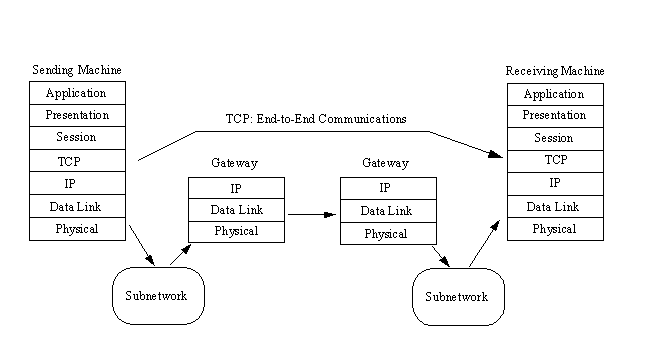
TCP resides in the transport layer, positioned above IP but below the upper layers and their applications, as shown in Figure 4.1. TCP resides only on devices that actually process datagrams, ensuring that the datagram has gone from the source to the target machine. It does not reside on a device that simply routes datagrams, so there is usually no TCP layer in a gateway. This makes sense, because on a gateway the datagram has no need to go higher in the layered model than the IP layer.
Figure 4.1. TCP provides end-to-end communications.
Because TCP is a connection-oriented protocol responsible for ensuring the transfer of a datagram from the source to destination machine (end-to-end communications), TCP must receive communications messages from the destination machine to acknowledge receipt of the datagram. The term virtual circuit is usually used to refer to the communications between the two end machines, most of which are simple acknowledgment messages (either confirmation of receipt or a failure code) and datagram sequence numbers.
Following a Message
To illustrate the role of TCP, it is instructive to follow a sample message between two machines. The processes are simplified at this stage, to be expanded on later today. The message originates from an application in an upper layer and is passed to TCP from the next higher layer in the architecture through some protocol (often referred to as an upper-layer protocol, or ULP, to indicate that it resides above TCP). The message is passed as a stream—a sequence of individual characters sent asynchronously. This is in contrast to most protocols, which use fixed blocks of data. This can pose some conversion problems with applications that handle only formally constructed blocks of data or insist on fixed-size messages.
TCP receives the stream of bytes and assembles them into TCP segments, or packets. In the process of assembling the segment, header information is attached at the front of the data. Each segment has a checksum calculated and embedded within the header, as well as a sequence number if there is more than one segment in the entire message. The length of the segment is usually determined by TCP or by a system value set by the system administrator. (The length of TCP segments has nothing to do with the IP datagram length, although there is sometimes a relationship between the two.)
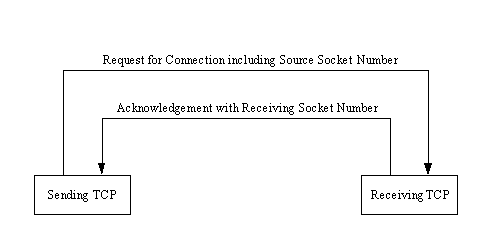
If two-way communications are required (such as with Telnet or FTP), a connection (virtual circuit) between the sending and receiving machines is established prior to passing the segment to IP for routing. This process starts with the sending TCP software issuing a request for a TCP connection with the receiving machine. In the message is a unique number (called a socket number) that identifies the sending machine's connection. The receiving TCP software assigns its own unique socket number and sends it back to the original machine. The two unique numbers then define the connection between the two machines until the virtual circuit is terminated. (I look at sockets in a little more detail in a moment.)
After the virtual circuit is established, TCP sends the segment to the IP software, which then issues the message over the network as a datagram. IP can perform any of the changes to the segment that you saw in yesterday's material, such as fragmenting it and reassembling it at the destination machine. These steps are completely transparent to the TCP layers, however. After winding its way over the network, the receiving machine's IP passes the received segment up to the recipient machine's TCP layer, where it is processed and passed up to the applications above it using an upper-layer protocol.
If the message was more than one TCP segment long (not IP datagrams), the receiving TCP software reassembles the message using the sequence numbers contained in each segment's header. If a segment is missing or corrupt (which can be determined from the checksum), TCP returns a message with the faulty sequence number in the body. The originating TCP software can then resend the bad segment.
If only one segment is used for the entire message, after comparing the segment's checksum with a newly calculated value, the receiving TCP software can generate either a positive acknowledgment (ACK) or a request to resend the segment and route the request back to the sending layer.
The receiving machine's TCP implementation can perform a simple flow control to prevent buffer overload. It does this by sending a buffer size called a window value to the sending machine, following which the sender can send only enough bytes to fill the window. After that, the sender must wait for another window value to be received. This provides a handshaking protocol between the two machines, although it slows down the transmission time and slightly increases network traffic.
As with most connection-based protocols, timers are an important aspect of TCP. The use of a timer ensures that an undue wait is not involved while waiting for an ACK or an error message. If the timers expire, an incomplete transmission is assumed. Usually an expiring timer before the sending of an acknowledgment message causes a retransmission of the datagram from the originating machine.
Timers can cause some problems with TCP. The specifications for TCP provide for the acknowledgment of only the highest datagram number that has been received without error, but this cannot properly handle fragmentary reception. If a message is composed of several datagrams that arrive out of order, the specification states that TCP cannot acknowledge the reception of the message until all the datagrams have been received. So even if all but one datagram in the middle of the sequence have been successfully received, a timer might expire and cause all the datagrams to be resent. With large messages, this can cause an increase in network traffic.
If the receiving TCP software receives duplicate datagrams (as can occur with a retransmission after a timeout or due to a duplicate transmission from IP), the receiving version of TCP discards any duplicate datagrams, without bothering with an error message. After all, the sending system cares only that the message was received—not how many copies were received.
TCP does not have a negative acknowledgment (NAK) function; it relies on a timer to indicate lack of acknowledgment. If the timer has expired after sending the datagram without receiving an acknowledgment of receipt, the datagram is assumed to have been lost and is retransmitted. The sending TCP software keeps copies of all unacknowledged datagrams in a buffer until they have been properly acknowledged. When this happens, the retransmission timer is stopped, and the datagram is removed from the buffer.
TCP supports a push function from the upper-layer protocols. A push is used when an application wants to send data immediately and confirm that a message passed to TCP has been successfully transmitted. To do this, a push flag is set in the ULP connection, instructing TCP to forward any buffered information from the application to the destination as soon as possible (as opposed to holding it in the buffer until it is ready to transmit it).
Ports and Sockets
All upper-layer applications that use TCP (or UDP) have a port number that identifies the application. In theory, port numbers can be assigned on individual machines, or however the administrator desires, but some conventions have been adopted to enable better communications between TCP implementations. This enables the port number to identify the type of service that one TCP system is requesting from another. Port numbers can be changed, although this can cause difficulties. Most systems maintain a file of port numbers and their corresponding service.
Typically, port numbers above 255 are reserved for private use of the local machine, but numbers below 255 are used for frequently used processes. A list of frequently used port numbers is published by the Internet Assigned Numbers Authority and is available through an RFC or from many sites that offer Internet summary files for downloading. The commonly used port numbers on this list are shown in Table 4.1. The numbers 0 and 255 are reserved.
|
Port Number |
Process Name |
Description
| 1
| TCPMUX
| TCP Port Service Multiplexer
| 5
| RJE
| Remote Job Entry
| 7
| ECHO
| Echo
| 9
| DISCARD
| Discard
| 11
| USERS
| Active Users
| 13
| DAYTIME
| Daytime
| 17
| Quote
| Quotation of the Day
| 19
| CHARGEN
| Character generator
| 20
| FTP-DATA
| File Transfer Protocol•Data
| 21
| FTP
| File Transfer Protocol•Control
| 23
| TELNET
| Telnet
| 25
| SMTP
| Simple Mail Transfer Protocol
| 27
| NSW-FE
| NSW User System Front End
| 29
| MSG-ICP
| MSG-ICP
| 31
| MSG-AUTH
| MSG Authentication
| 33
| DSP
| Display Support Protocol
| 35
| Private Print Servers
| 37
| TIME
| Time
| 39
| RLP
| Resource Location Protocol
| 41
| GRAPHICS
| Graphics
| 42
| NAMESERV
| Host Name Server
| 43
| NICNAME
| Who Is
| 49
| LOGIN
| Login Host Protocol
| 53
| DOMAIN
| Domain Name Server
| 67
| BOOTPS
| Bootstrap Protocol Server
| 68
| BOOTPC
| Bootstrap Protocol Client
| 69
| TFTP
| Trivial File Transfer Protocol
| 79
| FINGER
| Finger
| 101
| HOSTNAME
| NIC Host Name Server
| 102
| ISO-TSAP
| ISO TSAP
| 103
| X400
| X.400
| 104
| X400SND
| X.400 SND
| 105
| CSNET-NS
| CSNET Mailbox Name Server
| 109
| POP2
| Post Office Protocol v2
| 110
| POP3
| Post Office Protocol v3
| 111
| RPC
| Sun RPC Portmap
| 137
| NETBIOS-NS
| NETBIOS Name Service
| 138
| NETBIOS-DG
| NETBIOS Datagram Service
| 139
| NETBIOS-SS
| NETBIOS Session Service
| 146
| ISO-TP0
| ISO TP0
| 147
| ISO-IP
| ISO IP
| 150
| SQL-NET
| SQL NET
| 153
| SGMP
| SGMP
| 156
| SQLSRV
| SQL Service
| 160
| SGMP-TRAPS
| SGMP TRAPS
| 161
| SNMP
| SNMP
| 162
| SNMPTRAP
| SNMPTRAP
| 163
| CMIP-MANAGE
| CMIP/TCP Manager
| 164
| CMIP-AGENT
| CMIP/TCP Agent
| 165
| XNS-Courier
| Xerox
| 179
| BGP
| Border Gateway Protocol |
Each communication circuit into and out of the TCP layer is uniquely identified by a combination of two numbers, which together are called a socket. The socket is composed of the IP address of the machine and the port number used by the TCP software. Both the sending and receiving machines have sockets. Because the IP address is unique across the internetwork, and the port numbers are unique to the individual machine, the socket numbers are also unique across the entire internetwork. This enables a process to talk to another process across the network, based entirely on the socket number.
The last section examined the process of establishing a message. During the process, the sending TCP requests a connection with the receiving TCP, using the unique socket numbers. This process is shown in Figure 4.2. If the sending TCP wants to establish a Telnet session from its port number 350, the socket number would be composed of the source machine's IP address and the port number (350), and the message would have a destination port number of 23 (Telnet's port number). The receiving TCP has a source port of 23 (Telnet) and a destination port of 350 (the sending machine's port).
Figure 4.2. Setting up a virtual circuit with socket numbers.
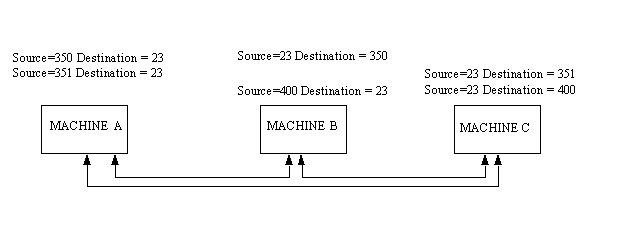
The sending and receiving machines maintain a port table, which lists all active port numbers. The two machines involved have reversed entries for each session between the two. This is called binding and is shown in Figure 4.3. The source and destination numbers are simply reversed for each connection in the port table. Of course, the IP addresses, and hence the socket numbers, are different.
Figure 4.3. Binding entries in port tables.
If the sending machine is requesting more than one connection, the source port numbers are different, even though the destination port numbers might be the same. For example, if the sending machine were trying to establish three Telnet sessions simultaneously, the source machine port numbers might be 350, 351, and 352, and the destination port numbers would all be 23.
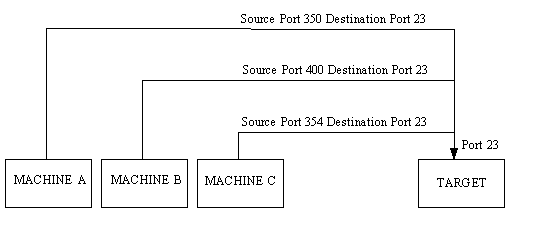
It is possible for more than one machine to share the same destination socket—a process called multiplexing. In Figure 4.4, three machines are establishing Telnet sessions with a destination. They all use destination port 23, which is port multiplexing. Because the datagrams emerging from the port have the full socket information (with unique IP addresses), there is no confusion as to which machine a datagram is destined for.
Figure 4.4. Multiplexing one destination port.
When multiple sockets are established, it is conceivable that more than one machine might send a connection request with the same source and destination ports. However, the IP addresses for the two machines are different, so the sockets are still uniquely identified despite identical source and destination port numbers.
TCP Communications with the Upper Layers
TCP must communicate with applications in the upper layer and a network system in the layer below. Several messages are defined for the upper-layer protocol to TCP communications, but there is no defined method for TCP to talk to lower layers (usually, but not necessarily, IP). TCP expects the layer beneath it to define the communication method. It is usually assumed that TCP and the transport layer communicate asynchronously.
The TCP to upper-layer protocol (ULP) communication method is well-defined, consisting of a set of service request primitives. The primitives involved in ULP to TCP communications are shown in Table 4.2.
|
Command |
Parameters Expected
|
| ABORT
| Local connection name
| ACTIVE-OPEN
| Local port, remote socket
| Optional: ULP timeout, timeout action, precedence, security, options
| ACTIVE-OPEN-WITH-DATA
| Source port, destination socket, data, data length, push flag, urgent flag
| Optional: ULP timeout, timeout action, precedence, security
| ALLOCATE
| Local connection name, data length
| CLOSE
| Local connection name
| FULL-PASSIVE-OPEN
| Local port, destination socket
| Optional: ULP timeout, timeout action, precedence, security, options
| RECEIVE
| Local connection name, buffer address, byte count, push flag, urgent flag
| SEND
| Local connection name, buffer address, data length, push flag, urgent flag
| Optional: ULP timeout, timeout action
| STATUS
| Local connection name
| UNSPECIFIED-PASSIVE-OPEN
| Local port
| Optional: ULP timeout, timeout action, precedence, security, options
|
| CLOSING
| Local connection name
| DELIVER
| Local connection name, buffer address, data length, urgent flag
| ERROR
| Local connection name, error description
| OPEN-FAILURE
| Local connection name
| OPEN-ID
| Local connection name, remote socket, destination address
| OPEN-SUCCESS
| Local connection name
| STATUS RESPONSE
| Local connection name, source port, source address, remote socket, connection state, receive window, send window, amount waiting ACK, amount waiting receipt, urgent mode, precedence, security, timeout, timeout action
| TERMINATE
| Local connection name, description | |||||||
Passive and Active Ports
TCP enables two methods to establish a connection: active and passive. An active connection establishment happens when TCP issues a request for the connection, based on an instruction from an upper-level protocol that provides the socket number. A passive approach takes place when the upper-level protocol instructs TCP to wait for the arrival of connection requests from a remote system (usually from an active open instruction). When TCP receives the request, it assigns a port number. This enables a connection to proceed rapidly, without waiting for the active process.
There are two passive open primitives. A specified passive open creates a connection when the precedence level and security level are acceptable. An unspecified passive open opens the port to any request. The latter is used by servers that are waiting for clients of an unknown type to connect to them.
TCP has strict rules about the use of passive and active connection processes. Usually a passive open is performed on one machine, while an active open is performed on the other, with specific information about the socket number, precedence (priority), and security levels.
Although most TCP connections are established by an active request to a passive port, it is possible to open a connection without a passive port waiting. In this case, the TCP that sends a request for a connection includes both the local socket number and the remote socket number. If the receiving TCP is configured to enable the request (based on the precedence and security settings, as well as application-based criteria), the connection can be opened. This process is looked at again in the section titled "TCP and Connections."
TCP Timers
TCP uses several timers to ensure that excessive delays are not encountered during communications. Several of these timers are elegant, handling problems that are not immediately obvious at first analysis. The timers used by TCP are examined in the following sections, which reveal their roles in ensuring that data is properly sent from one connection to another.
The Retransmission Timer
The retransmission timer manages retransmission timeouts (RTOs), which occur when a preset interval between the sending of a datagram and the returning acknowledgment is exceeded. The value of the timeout tends to vary, depending on the network type, to compensate for speed differences. If the timer expires, the datagram is retransmitted with an adjusted RTO, which is usually increased exponentially to a maximum preset limit. If the maximum limit is exceeded, connection failure is assumed, and error messages are passed back to the upper-layer application.
Values for the timeout are determined by measuring the average time that data takes to be transmitted to another machine and the acknowledgment received back, which is called the round-trip time, or RTT. From experiments, these RTTs are averaged by a formula that develops an expected value, called the smoothed round-trip time, or SRTT. This value is then increased to account for unforeseen delays.
The Quiet Timer
After a TCP connection is closed, it is possible for datagrams that are still making their way through the network to attempt to access the closed port. The quiet timer is intended to prevent the just-closed port from reopening again quickly and receiving these last datagrams.
The quiet timer is usually set to twice the maximum segment lifetime (the same value as the Time to Live field in an IP header), ensuring that all segments still heading for the port have been discarded. Typically, this can result in a port being unavailable for up to 30 seconds, prompting error messages when other applications attempt to access the port during this interval.
The Persistence Timer
The persistence timer handles a fairly rare occurrence. It is conceivable that a receive window might have a value of 0, causing the sending machine to pause transmission. The message to restart sending might be lost, causing an infinite delay. The persistence timer waits a preset time and then sends a one-byte segment at predetermined intervals to ensure that the receiving machine is still clogged.
The receiving machine resends the zero window-size message after receiving one of these status segments, if it is still backlogged. If the window is open, a message giving the new value is returned, and communications are resumed.
The Keep-Alive Timer and the Idle Timer
Both the keep-alive timer and the idle timer were added to the TCP specifications after their original definition. The keep-alive timer sends an empty packet at regular intervals to ensure that the connection to the other machine is still active. If no response has been received after sending the message by the time the idle timer has expired, the connection is assumed to be broken.
The keep-alive timer value is usually set by an application, with values ranging from 5 to 45 seconds. The idle timer is usually set to 360 seconds.
Transmission Control Blocks and Flow Control
TCP has to keep track of a lot of information about each connection. It does this through a Transmission Control Block (TCB), which contains information about the local and remote socket numbers, the send and receive buffers, security and priority values, and the current segment in the queue. The TCB also manages send and receive sequence numbers.
The TCB uses several variables to keep track of the send and receive status and to control the flow of information. These variables are shown in Table 4.3.
|
Variable Name |
Description
|
| SND.UNA
| Send Unacknowledged
| SND.NXT
| Send Next
| SND.WND
| Send Window
| SND.UP
| Sequence number of last urgent set
| SND.WL1
| Sequence number for last window update
| SND.WL2
| Acknowledgment number for last window update
| SND.PUSH
| Sequence number of last pushed set
| ISS
| Initial send sequence number
|
| RCV.NXT
| Sequence number of next received set
| RCV.WND
| Number of sets that can be received
| RCV.UP
| Sequence number of last urgent data
| RCV.IRS
| Initial receive sequence number | ||
Using these variables, TCP controls the flow of information between two sockets. A sample connection session helps illustrate the use of the variables. It begins with Machine A wanting to send five blocks of data to Machine B. If the window limit is seven blocks, a maximum of seven blocks can be sent without acknowledgment. The SND.UNA variable on Machine A indicates how many blocks have been sent but are unacknowledged (5), and the SND.NXT variable has the value of the next block in the sequence (6). The value of the SND.WND variable is 2 (seven blocks possible, minus five sent), so only two more blocks could be sent without overloading the window. Machine B returns a message with the number of blocks received, and the window limit is adjusted accordingly.
The passage of messages back and forth can become quite complex as the sending machine forwards blocks unacknowledged up to the window limit, waiting for acknowledgment of earlier blocks that have been removed from the incoming cue, and then sending more blocks to fill the window again. The tracking of the blocks becomes a matter of guidekeeping, but with large window limits and traffic across internetworks that sometimes cause blocks to go astray, the process is, in many ways, remarkable.
TCP Protocol Data Units
As mentioned earlier, TCP must communicate with IP in the layer below (using an IP-defined method) and applications in the upper layer (using the TCP-ULP primitives). TCP also must communicate with other TCP implementations across networks. To do this, it uses Protocol Data Units (PDUs), which are called segments in TCP parlance.
The layout of the TCP PDU (commonly called the header) is shown in Figure 4.5.
Figure 4.5. The TCP Protocol Data Unit.
The different fields are as follows:
- Source port: A 16-bit field that identifies the local TCP user (usually an upper-layer application program).
- Destination port: A 16-bit field that identifies the remote machine's TCP user.
- Sequence number: A number indicating the current block's position in the overall message. This number is also used between two TCP implementations to provide the initial send sequence (ISS) number.
- Acknowledgment number: A number that indicates the next sequence number expected. In a backhanded manner, this also shows the sequence number of the last data received; it shows the last sequence number received plus 1.
- Data offset: The number of 32-bit words that are in the TCP header. This field is used to identify the start of the data field.
- Reserved: A 6-bit field reserved for future use. The six bits must be set to 0.
- Urg flag: If on (a value of 1), indicates that the urgent pointer field is significant.
- Ack flag: If on, indicates that the Acknowledgment field is significant.
- Psh flag: If on, indicates that the push function is to be performed.
- Rst flag: If on, indicates that the connection is to be reset.
- Syn flag: If on, indicates that the sequence numbers are to be synchronized. This flag is used when a connection is being established.
- Fin flag: If on, indicates that the sender has no more data to send. This is the equivalent of an end-of-transmission marker.
- Window: A number indicating how many blocks of data the receiving machine can accept.
- Checksum: Calculated by taking the 16-bit one's complement of the one's complement sum of the 16-bit words in the header (including pseudo-header) and text together. (A rather lengthy process required to fit the checksum properly into the header.)
- Urgent pointer: Used if the urg flag was set; it indicates the portion of the data message that is urgent by specifying the offset from the sequence number in the header. No specific action is taken by TCP with respect to urgent data; the action is determined by the application.
- Options: Similar to the IP header option field, this is used for specifying TCP options. Each option consists of an option number (one byte), the number of bytes in the option, and the option values. Only three options are currently defined for TCP:
0 End of option list
1 No operation
2 Maximum segment size - Padding: Filled to ensure that the header is a 32-bit multiple.
Following the PDU or header is the data. The Options field has one useful function: to specify the maximum buffer size a receiving TCP implementation can accommodate. Because TCP uses variable-length data areas, it is possible for a sending machine to create a segment that is longer than the receiving software can handle.
The Checksum field calculates the checksum based on the entire segment size, including a 96-bit pseudoheader that is prefixed to the TCP header during the calculation. The pseudoheader contains the source address, destination address, protocol identifier, and segment length. These are the parameters that are passed to IP when a send instruction is passed, and also the ones read by IP when delivery is attempted.
TCP and Connections
TCP has many rules imposed on how it communicates. These rules and the processes that TCP follows to establish a connection, transfer data, and terminate a connection are usually presented in state diagrams. (Because TCP is a state-driven protocol, its actions depend on the state of a flag or similar construct.) Avoiding overly complex state diagrams is difficult, so flow diagrams can be used as a useful method for understanding TCP.
Establishing a Connection
A connection can be established between two machines only if a connection between the two sockets does not exist, both machines agree to the connection, and both machines have adequate TCP resources to service the connection. If any of these conditions are not met, the connection cannot be made. The acceptance of connections can be triggered by an application or a system administration routine.
When a connection is established, it is given certain properties that are valid until the connection is closed. Typically, these are a precedence value and a security value. These settings are agreed upon by the two applications when the connection is in the process of being established.
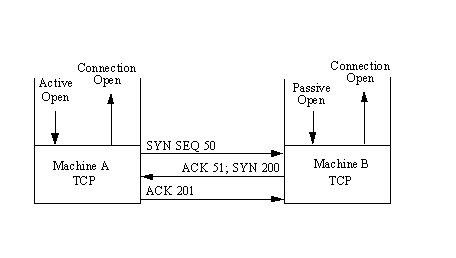
In most cases, a connection is expected by two applications, so they issue either active or passive open requests. Figure 4.6 shows a flow diagram for a TCP open. The process begins with Machine A's TCP receiving a request for a connection from its ULP, to which it sends an active open primitive to Machine B. (Refer back to Table 4.2 for the TCP primitives.) The segment that is constructed has the SYN flag set on (set to 1) and has a sequence number assigned. The diagram shows this with the notation "SYN SEQ 50," indicating that the SYN flag is on and the sequence number (Initial Send Sequence number or ISS) is 50. (Any number could have been chosen.)
Figure 4.6. Establishing a connection.
The application on Machine B has issued a passive open instruction to its TCP. When the SYN SEQ 50 segment is received, Machine B's TCP sends an acknowledgment back to Machine A with the sequence number of 51. Machine B also sets an ISS number of its own. The diagram shows this message as "ACK 51; SYN 200," indicating that the message is an acknowledgment with sequence number 51, it has the SYN flag set, and it has an ISS of 200.
Upon receipt, Machine A sends back its own acknowledgment message with the sequence number set to 201. This is "ACK 201" in the diagram. Then, having opened and acknowledged the connection, Machine A and Machine B both send connection open messages through the ULP to the requesting applications.
It is not necessary for the remote machine to have a passive open instruction, as mentioned earlier. In this case, the sending machine provides both the sending and receiving socket numbers, as well as precedence, security, and timeout values. It is common for two applications to request an active open at the same time. This is resolved quite easily, although it does involve a little more network traffic.
Data Transfer
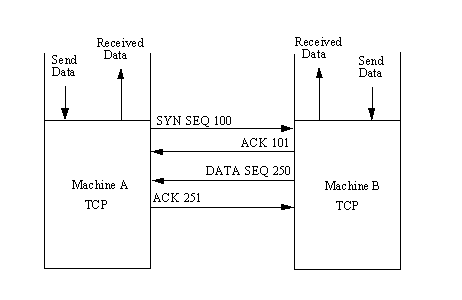
Transferring information is straightforward, as shown in Figure 4.7. For each block of data received by Machine A's TCP from the ULP, TCP encapsulates it and sends it to Machine B with an increasing sequence number. After Machine B receives the message, it acknowledges it with a segment acknowledgment that increments the next sequence number (and hence indicates that it has received everything up to that sequence number). Figure 4.7 shows the transfer of two segments of information—one each way.
The TCP data transport service actually embodies six subservices:
- Full duplex: Enables both ends of a connection to transmit at any time, even simultaneously.
- Timeliness: The use of timers ensures that data is transmitted within a reasonable amount of time.
- Ordered: Data sent from one application is received in the same order at the other end. This occurs despite the fact that the datagrams might be received out of order through IP, because TCP reassembles the message in the correct order before passing it up to the higher layers.
- Labeled: All connections have an agreed-upon precedence and security value.
- Controlled flow: TCP can regulate the flow of information through the use of buffers and window limits.
- Error correction: Checksums ensure that data is free of errors (within the checksum algorithm's limits).
Closing Connections
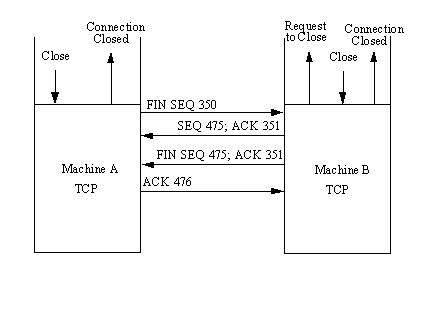
To close a connection, one of the TCPs receives a close primitive from the ULP and issues a message with the FIN flag set on. This is shown in Figure 4.8. In the figure, Machine A's TCP sends the request to close the connection to Machine B with the next sequence number. Machine B then sends back an acknowledgment of the request and its next sequence number. Following this, Machine B sends the close message through its ULP to the application and waits for the application to acknowledge the closure. This step is not strictly necessary; TCP can close the connection without the application's approval, but a well-behaved system would inform the application of the change in state.
Figure 4.8. Closing a connection.
After receiving approval to close the connection from the application (or after the request has timed out), Machine B's TCP sends a segment back to Machine A with the FIN flag set. Finally, Machine A acknowledges the closure, and the connection is terminated.
An abrupt termination of a connection can occur when one side shuts down the socket. This can be done without any notice to the other machine and without regard to any information in transit between the two. Aside from sudden shutdowns caused by malfunctions or power outages, abrupt termination can be initiated by a user, an application, or a system monitoring routine that judges the connection worthy of termination. The other end of the connection might not realize that an abrupt termination has occurred until it attempts to send a message and the timer expires.
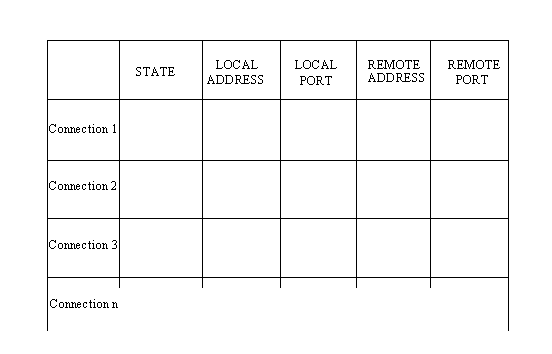
To keep track of all the connections, TCP uses a connection table. Each existing connection has an entry in the table that shows information about the end-to-end connection. The layout of the TCP connection table is shown in Figure 4.9.
Figure 4.9. The TCP connection table.
The meaning of each column is as follows:
- State: The state of the connection (closed, closing, listening, waiting, and so on).
- Local address: The IP address for the connection. When in a listening state, this is set to 0.0.0.0.
- Local port: The local port number.
- Remote address: The remote machine's IP address.
- Remote port: The port number of the remote connection.
User Datagram Protocol (UDP)
TCP is a connection-based protocol. There are times when a connectionless protocol is required, so UDP is used. UDP is used with both the Trivial File Transfer Protocol (TFTP) and the Remote Call Procedure (RCP). Connectionless communications don't provide reliability, meaning there is no indication to the sending device that a message has been received correctly. Connectionless protocols also do not offer error-recovery capabilities—which must be either ignored or provided in the higher or lower layers. UDP is much simpler than TCP. It interfaces with IP (or other protocols) without the bother of flow control or error-recovery mechanisms, acting simply as a sender and receiver of datagrams.
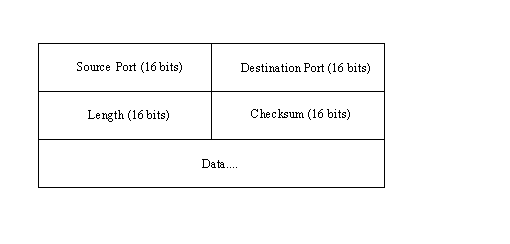
The UDP message header is much simpler than TCP's. It is shown in Figure 4.10. Padding can be added to the datagram to ensure that the message is a multiple of 16 bits.
The fields are as follows:
- Source port: An optional field with the port number. If a port number is not specified, the field is set to 0.
- Destination port: The port on the destination machine.
- Length: The length of the datagram, including header and data.
- Checksum: A 16-bit one's complement of the one's complement sum of the datagram, including a pseudoheader similar to that of TCP.
The UDP checksum field is optional, but if it isn't used, no checksum is applied to the data segment because IP's checksum applies only to the IP header. If the checksum is not used, the field should be set to 0.
Summary
Today, I looked at TCP in reasonable detail. Combined with the information in the last three days, you now have the theory and background necessary to better understand TCP/IP utilities, such as Telnet and FTP, as well as other protocols that use or closely resemble TCP/IP, such as SMTP and TFTP.
The details of TCP/IP are revisited later in this guide, but you can now proceed to actually using TCP/IP and its toolset.
Q&A
Define multiplexing and how it would be used to combine three source machines to one destination machine. Relate to port numbers.
Multiplexing was explained in some detail on Day 1. It refers to combining several connections into one. Three machines could each establish source ports to one machine using only one receiving port. The port numbers for the sending machines would all be different, but all three would use the same destination port number. This was shown in Figure 4.4.
What one word best describes the difference between TCP and UDP?
Connections. TCP is connection-based, whereas UDP is connectionless.
What are port numbers and sockets?
A port number is used to identify the type of service provided. A socket is the address of the port on which a connection is established. There is no inherent physical relationship between the two, although many machines assign certain sockets for particular services (port numbers).
Describe the timers used with TCP.
The retransmission timer is used to control the resending of a datagram. The quiet timer is used to delay the reassignment of a port. The persistence timer is used to test a receive window. Keep-alive timers send empty data to keep a connection alive. The idle timer is the amount of time to wait for a disconnection to be terminated after no datagrams are received.
What are the six data transport subservices offered by TCP?
The subservices are full duplex, timeliness, ordered, labeled, controlled flow, and error correction.
Workshop
The Workshop provides quiz questions to help you solidify your understanding of the material covered. Some Workshop sections of this guide also contain exercises to provide you with experience in using what you have learned. Try to understand the quiz and exercise answers before continuing on to the next chapter. Answers are provided in Appendix F, "Answers to Quizzes."
Quiz
- Draw a diagram showing the binding of port tables when three machines are sending information to each other.
- Draw the TCP protocol data unit (PDU) and explain the meaning of each field.
- Use a diagram to show the signals involved with two machines establishing a TCP connection. Then, show how data is transferred. Finally, show the termination process.
- What is a TCP connection table? How is it used?
- Draw the UDP header and explain the fields it contains.
- What are the advantages of using UDP over TCP? When would you not want to use UDP?

Popular Tutorials
-
 MS Access
1109
MS Access
1109
-
 C++
1222
C++
1222
-
 HTML
584
HTML
584
-
 JavaScript
616
JavaScript
616
-
 Vbscript
873
Vbscript
873
-
 Oracle
473
Oracle
473
-
 VC++
875
VC++
875
-
 SQL
2959
SQL
2959
-
 XML
514
XML
514
-
 Java
814
Java
814
-
 Perl
455
Perl
455
-
 Linux
451
Linux
451